
Turn on suggestions
Auto-suggest helps you quickly narrow down your search results by suggesting possible matches as you type.
Showing results for
EN
Turn on suggestions
Auto-suggest helps you quickly narrow down your search results by suggesting possible matches as you type.
Showing results for
- English
- :
- Forum
- :
- Documentation
- :
- Re: Dimensions
Options
- Subscribe to RSS Feed
- Mark Topic as New
- Mark Topic as Read
- Pin this post for me
- Bookmark
- Subscribe to Topic
- Mute
- Printer Friendly Page

Anonymous
Not applicable
Options
- Mark as New
- Bookmark
- Subscribe
- Mute
- Subscribe to RSS Feed
- Permalink
- Report Inappropriate Content
2016-08-24
01:29 PM
- last edited on
2023-05-22
11:56 PM
by
 Gordana Radonic
Dimensions
2016-08-24
01:29 PM
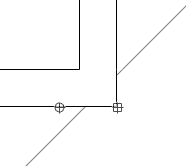
Does anyone know why we get circles but sometimes squares when placing dimensions? Is Archicad trying o tell me something like, it's not well place?
Picture attached.
Read-Only
Labels:
- Labels:
-
Dimension Tools
1 Reply 1

David Maudlin
Rockstar
Options
- Mark as New
- Bookmark
- Subscribe
- Mute
- Subscribe to RSS Feed
- Permalink
- Report Inappropriate Content
2016-08-24 02:12 PM
2016-08-24
02:12 PM
Jonas:
The circle symbol indicates a dynamic dimension point (the dimension string will follow changes to that point on the element), the square symbols indicate a static point (not associated to an element point). For example, a circle would appear at the end of a wall, a square at the wall's midpoint.
You should add a Signature to your Profile (click the Profile button near the top of this page) with your ArchiCAD version and operating system (see mine for an example) for more accurate help in this forum.
David
The circle symbol indicates a dynamic dimension point (the dimension string will follow changes to that point on the element), the square symbols indicate a static point (not associated to an element point). For example, a circle would appear at the end of a wall, a square at the wall's midpoint.
You should add a Signature to your Profile (click the Profile button near the top of this page) with your ArchiCAD version and operating system (see mine for an example) for more accurate help in this forum.
David
David Maudlin / Architect
www.davidmaudlin.com
Digital Architecture
AC29 USA Perpetual • Mac mini M4 Pro OSX15 | 64 gb ram • MacBook Pro M3 Pro OSX14 | 36 gb ram
www.davidmaudlin.com
Digital Architecture
AC29 USA Perpetual • Mac mini M4 Pro OSX15 | 64 gb ram • MacBook Pro M3 Pro OSX14 | 36 gb ram
Still looking?
Suggested topics
- TIP: Visual Check for custom Dimension Texts in Documentation
- elevation dimension in rcp in Modeling
- dimensions acting funny in Documentation
- Doors and Windows Schedule Automatic Dimension Button not Responding in Project data & BIM
- CI Tools Detail Element Tool – How do I increase the overall length of a 2D flashing? in Modeling
