
Turn on suggestions
Auto-suggest helps you quickly narrow down your search results by suggesting possible matches as you type.
Showing results for
EN
Turn on suggestions
Auto-suggest helps you quickly narrow down your search results by suggesting possible matches as you type.
Showing results for
- English
- :
- Forum
- :
- Documentation
- :
- Elevations showing items to be demo'd on New Renov...
Options
- Subscribe to RSS Feed
- Mark Topic as New
- Mark Topic as Read
- Pin this post for me
- Bookmark
- Subscribe to Topic
- Mute
- Printer Friendly Page

Anonymous
Not applicable
Options
- Mark as New
- Bookmark
- Subscribe
- Mute
- Subscribe to RSS Feed
- Permalink
- Report Inappropriate Content
2018-02-23
05:16 PM
- last edited on
2023-05-19
03:22 PM
by
 Gordana Radonic
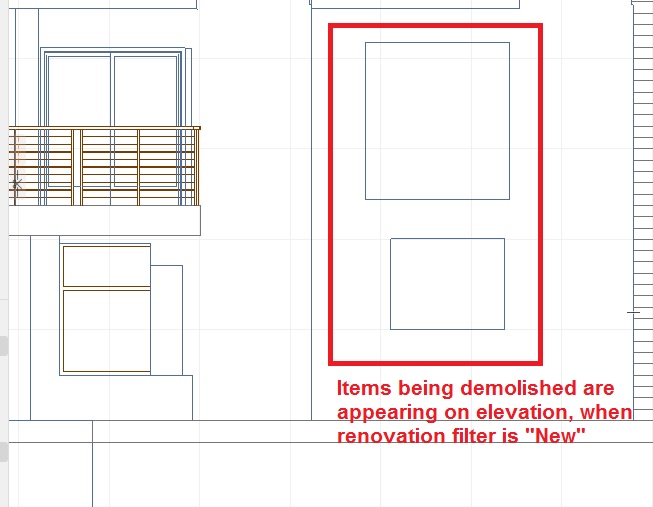
Elevations showing items to be demo'd on New Renovation Filter?
2018-02-23
05:16 PM
How is it then I can get AC to NOT show items to be demolished on the elevation, when the renovation filter is set to New?
Solved! Go to Solution.
1 Solution
Accepted Solutions

Karl Griffith
Booster
Options
- Mark as New
- Bookmark
- Subscribe
- Mute
- Subscribe to RSS Feed
- Permalink
- Report Inappropriate Content
2018-02-23 07:05 PM
2018-02-23
07:05 PM
If your renovation settings for New Construction have an override for existing elements, it will display the existing elements as modified by the demolished elements. Thus, if you demo a door, and have an override on the display of existing elements, the door opening will show. If you turn off any override of existing elements (set to "Show"), then the opening will not show. That is essentially what happens when you change to "Project Completion" status.
ArchiCAD 22
Win 10
Win 10
Solution
3 Replies 3

Richard Morrison
Expert
Options
- Mark as New
- Bookmark
- Subscribe
- Mute
- Subscribe to RSS Feed
- Permalink
- Report Inappropriate Content
2018-02-23 06:47 PM
2018-02-23
06:47 PM
For a quick fix, try the "Planned Status" filter.
Richard
--------------------------
Richard Morrison, Architect-Interior Designer
AC26 (since AC6.0), Win10
--------------------------
Richard Morrison, Architect-Interior Designer
AC26 (since AC6.0), Win10
Karl Griffith
Booster
Options
- Mark as New
- Bookmark
- Subscribe
- Mute
- Subscribe to RSS Feed
- Permalink
- Report Inappropriate Content
2018-02-23 07:05 PM
2018-02-23
07:05 PM
If your renovation settings for New Construction have an override for existing elements, it will display the existing elements as modified by the demolished elements. Thus, if you demo a door, and have an override on the display of existing elements, the door opening will show. If you turn off any override of existing elements (set to "Show"), then the opening will not show. That is essentially what happens when you change to "Project Completion" status.
ArchiCAD 22
Win 10
Win 10
Solution
Anonymous
Not applicable
Options
- Mark as New
- Bookmark
- Subscribe
- Mute
- Subscribe to RSS Feed
- Permalink
- Report Inappropriate Content
2018-02-23 11:08 PM
2018-02-23
11:08 PM
Resolved
The Existing conditions with "Override" was the cause. Set it to "Show" and that removed the Existing Items that are to be demolished.
Thank you
The Existing conditions with "Override" was the cause. Set it to "Show" and that removed the Existing Items that are to be demolished.
Thank you
Still looking?
