
Turn on suggestions
Auto-suggest helps you quickly narrow down your search results by suggesting possible matches as you type.
Showing results for
EN
Turn on suggestions
Auto-suggest helps you quickly narrow down your search results by suggesting possible matches as you type.
Showing results for
- English
- :
- Forum
- :
- Documentation
- :
- Re: Hide section and elevation markers
Options
- Subscribe to RSS Feed
- Mark Topic as New
- Mark Topic as Read
- Pin this post for me
- Bookmark
- Subscribe to Topic
- Mute
- Printer Friendly Page

csubasic
Participant
Options
- Mark as New
- Bookmark
- Subscribe
- Mute
- Subscribe to RSS Feed
- Permalink
- Report Inappropriate Content
2023-08-02 05:45 AM - edited 2023-08-02 05:46 AM
Hide section and elevation markers
2023-08-02
05:45 AM
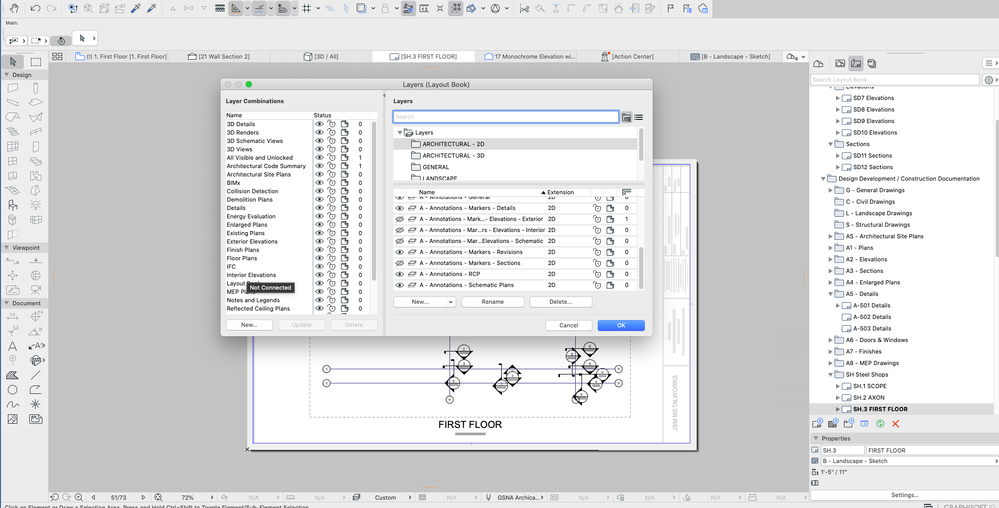
I am making some steel shop drawings and had to create lots of section and elevation views for the different connections. I do not want these to show on the plan view since there are so many. I have the layer for the markers turned off but they are still showing. Any suggestions?
Solved! Go to Solution.
1 Solution
Accepted Solutions

Barry Kelly
Moderator
Options
- Mark as New
- Bookmark
- Subscribe
- Mute
- Subscribe to RSS Feed
- Permalink
- Report Inappropriate Content
2023-08-02 05:50 AM
2023-08-02
05:50 AM
You need to turn the marker layer off in your layer combination.
Then make sure the view (in the view map) that you are placing on the layout, is using that layer combination.
Barry.
One of the forum moderators.
Versions 6.5 to 27
i7-10700 @ 2.9Ghz, 32GB ram, GeForce RTX 2060 (6GB), Windows 10
Lenovo Thinkpad - i7-1270P 2.20 GHz, 32GB RAM, Nvidia T550, Windows 11
Versions 6.5 to 27
i7-10700 @ 2.9Ghz, 32GB ram, GeForce RTX 2060 (6GB), Windows 10
Lenovo Thinkpad - i7-1270P 2.20 GHz, 32GB RAM, Nvidia T550, Windows 11
Solution
3 Replies 3
Barry Kelly
Moderator
Options
- Mark as New
- Bookmark
- Subscribe
- Mute
- Subscribe to RSS Feed
- Permalink
- Report Inappropriate Content
2023-08-02 05:50 AM
2023-08-02
05:50 AM
You need to turn the marker layer off in your layer combination.
Then make sure the view (in the view map) that you are placing on the layout, is using that layer combination.
Barry.
One of the forum moderators.
Versions 6.5 to 27
i7-10700 @ 2.9Ghz, 32GB ram, GeForce RTX 2060 (6GB), Windows 10
Lenovo Thinkpad - i7-1270P 2.20 GHz, 32GB RAM, Nvidia T550, Windows 11
Versions 6.5 to 27
i7-10700 @ 2.9Ghz, 32GB ram, GeForce RTX 2060 (6GB), Windows 10
Lenovo Thinkpad - i7-1270P 2.20 GHz, 32GB RAM, Nvidia T550, Windows 11
Solution
csubasic
Participant
Options
- Mark as New
- Bookmark
- Subscribe
- Mute
- Subscribe to RSS Feed
- Permalink
- Report Inappropriate Content
2023-08-02 06:12 AM
2023-08-02
06:12 AM
Thank you Barry!

karsten_bausche
Expert
Options
- Mark as New
- Bookmark
- Subscribe
- Mute
- Subscribe to RSS Feed
- Permalink
- Report Inappropriate Content
2023-08-02 12:08 PM
2023-08-02
12:08 PM
we have 2 layers:
one for important markers we want to show on plans and
one "for work" where all auxiliary section (markers) are placed on.
AC 6,5 - 28 (-30) | GER WIN | i7-9700K | RTX 3070 | 64GB

Still looking?

Suggested topics
- Number of Section Elevation and Detail Markers (Total Number of Viewpoints) in Documentation
- Spanish Tile Roof Eave Modeling Help in Modeling
- Walls visible in cross sections are disappearing in interior elevations in Modeling
- Window with adjustable frame extensions (jamb) and automatic insulation return – AC29 / GDL in Modeling
- Unlinked section marker unavailable in Teamwork in Documentation
