
Turn on suggestions
Auto-suggest helps you quickly narrow down your search results by suggesting possible matches as you type.
Showing results for
EN
Turn on suggestions
Auto-suggest helps you quickly narrow down your search results by suggesting possible matches as you type.
Showing results for
- English
- :
- Forum
- :
- Documentation
- :
- Re: Is it possible to change a block to a GDL-gene...
Options
- Subscribe to RSS Feed
- Mark Topic as New
- Mark Topic as Read
- Pin this post for me
- Bookmark
- Subscribe to Topic
- Mute
- Printer Friendly Page

LeeJaeYoung
Virtuoso
Options
- Mark as New
- Bookmark
- Subscribe
- Mute
- Subscribe to RSS Feed
- Permalink
- Report Inappropriate Content
2023-01-26 05:21 PM
Is it possible to change a block to a GDL-generated one when importing cad?
2023-01-26
05:21 PM
When importing dwg, if GDL is created with the name of a block or dynamic block in the dwg file, can it be imported as a GDL object at the time of import?
Should I make it an API?
This is a question because there are many things that can be done in archicad. ^^
AC27 on window 11
Solved! Go to Solution.
1 Solution
Accepted Solutions

Barry Kelly
Moderator
Options
- Mark as New
- Bookmark
- Subscribe
- Mute
- Subscribe to RSS Feed
- Permalink
- Report Inappropriate Content
2023-01-27 01:38 AM
2023-01-27
01:38 AM
Have a look at the translator settings.
This is from 22 (all I have open at the moment), but it will be similar in other versions.
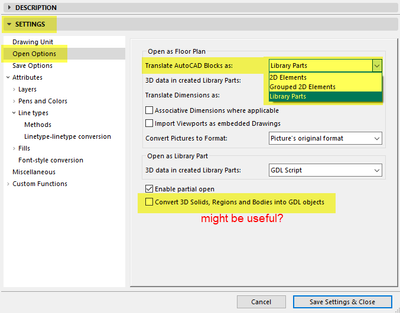
Barry.
One of the forum moderators.
Versions 6.5 to 27
i7-10700 @ 2.9Ghz, 32GB ram, GeForce RTX 2060 (6GB), Windows 10
Lenovo Thinkpad - i7-1270P 2.20 GHz, 32GB RAM, Nvidia T550, Windows 11
Versions 6.5 to 27
i7-10700 @ 2.9Ghz, 32GB ram, GeForce RTX 2060 (6GB), Windows 10
Lenovo Thinkpad - i7-1270P 2.20 GHz, 32GB RAM, Nvidia T550, Windows 11
9 Replies 9
Barry Kelly
Moderator
Options
- Mark as New
- Bookmark
- Subscribe
- Mute
- Subscribe to RSS Feed
- Permalink
- Report Inappropriate Content
2023-01-27 01:38 AM
2023-01-27
01:38 AM
Have a look at the translator settings.
This is from 22 (all I have open at the moment), but it will be similar in other versions.
Barry.
One of the forum moderators.
Versions 6.5 to 27
i7-10700 @ 2.9Ghz, 32GB ram, GeForce RTX 2060 (6GB), Windows 10
Lenovo Thinkpad - i7-1270P 2.20 GHz, 32GB RAM, Nvidia T550, Windows 11
Versions 6.5 to 27
i7-10700 @ 2.9Ghz, 32GB ram, GeForce RTX 2060 (6GB), Windows 10
Lenovo Thinkpad - i7-1270P 2.20 GHz, 32GB RAM, Nvidia T550, Windows 11
LeeJaeYoung
Virtuoso
Options
- Mark as New
- Bookmark
- Subscribe
- Mute
- Subscribe to RSS Feed
- Permalink
- Report Inappropriate Content
2023-01-27 01:59 AM
2023-01-27
01:59 AM
THANK YOU SO MUCH ^^
AC27 on window 11
LeeJaeYoung
Virtuoso
Options
- Mark as New
- Bookmark
- Subscribe
- Mute
- Subscribe to RSS Feed
- Permalink
- Report Inappropriate Content
2023-02-01 02:11 PM
2023-02-01
02:11 PM
How can I link the value of GDL parameter and the value of dwg?
Can I do it with dynamic block?
I don't think it will work, but just in case... ^^
You know archicad is beyond my imagination... ^^
AC27 on window 11
Barry Kelly
Moderator
Options
- Mark as New
- Bookmark
- Subscribe
- Mute
- Subscribe to RSS Feed
- Permalink
- Report Inappropriate Content
2023-02-02 02:31 AM
2023-02-02
02:31 AM
@LeeJaeYoung wrote:
How can I link the value of GDL parameter and the value of dwg?
Can I do it with dynamic block?
Sorry, I don't understand what you are asking.
I don't deal with importing a lot of DWG files, except for site surveys, so I never really deal with converting Autocad blocks to GDL objects.
Barry.
One of the forum moderators.
Versions 6.5 to 27
i7-10700 @ 2.9Ghz, 32GB ram, GeForce RTX 2060 (6GB), Windows 10
Lenovo Thinkpad - i7-1270P 2.20 GHz, 32GB RAM, Nvidia T550, Windows 11
Versions 6.5 to 27
i7-10700 @ 2.9Ghz, 32GB ram, GeForce RTX 2060 (6GB), Windows 10
Lenovo Thinkpad - i7-1270P 2.20 GHz, 32GB RAM, Nvidia T550, Windows 11
LeeJaeYoung
Virtuoso
Options
- Mark as New
- Bookmark
- Subscribe
- Mute
- Subscribe to RSS Feed
- Permalink
- Report Inappropriate Content
2023-02-02 02:42 AM
2023-02-02
02:42 AM
Since the most important thing in GDL is to set parameter values to create various shapes, the question was whether there was a way to set these values in dwg.
In the case of a dynamic block, many aspects are the same as GDL.
(No, it must be close to how to create a family in Revit)
I was curious if it was possible, so I asked.
By the way
https://community.graphisoft.com/t5/Document-Visualize-forum/The-dimension-input-becomes-strange-I-m...
Can you give me an answer on this?
I wonder if it's just me.
AC27 on window 11
Barry Kelly
Moderator
Options
- Mark as New
- Bookmark
- Subscribe
- Mute
- Subscribe to RSS Feed
- Permalink
- Report Inappropriate Content
2023-02-02 02:50 AM
2023-02-02
02:50 AM
As I said, I am not familiar with converting blocks to GDL objects, so I have no idea how the block settings translate to GDL parameters.
I did see you other post (I read all posts), but I don't have an answer for you.
If I think of anything, I will answer that post.
Barry.
One of the forum moderators.
Versions 6.5 to 27
i7-10700 @ 2.9Ghz, 32GB ram, GeForce RTX 2060 (6GB), Windows 10
Lenovo Thinkpad - i7-1270P 2.20 GHz, 32GB RAM, Nvidia T550, Windows 11
Versions 6.5 to 27
i7-10700 @ 2.9Ghz, 32GB ram, GeForce RTX 2060 (6GB), Windows 10
Lenovo Thinkpad - i7-1270P 2.20 GHz, 32GB RAM, Nvidia T550, Windows 11
LeeJaeYoung
Virtuoso
Options
- Mark as New
- Bookmark
- Subscribe
- Mute
- Subscribe to RSS Feed
- Permalink
- Report Inappropriate Content
2023-02-02 03:50 AM - last edited on 2023-02-02 07:10 AM by Barry Kelly
2023-02-02
03:50 AM
예! 감사합니다.
yes! thank you
AC27 on window 11
Barry Kelly
Moderator
Options
- Mark as New
- Bookmark
- Subscribe
- Mute
- Subscribe to RSS Feed
- Permalink
- Report Inappropriate Content
2023-02-02 04:28 AM
2023-02-02
04:28 AM
Don't forget to translate your posts please.
Barry.
One of the forum moderators.
Versions 6.5 to 27
i7-10700 @ 2.9Ghz, 32GB ram, GeForce RTX 2060 (6GB), Windows 10
Lenovo Thinkpad - i7-1270P 2.20 GHz, 32GB RAM, Nvidia T550, Windows 11
Versions 6.5 to 27
i7-10700 @ 2.9Ghz, 32GB ram, GeForce RTX 2060 (6GB), Windows 10
Lenovo Thinkpad - i7-1270P 2.20 GHz, 32GB RAM, Nvidia T550, Windows 11
LeeJaeYoung
Virtuoso
Options
- Mark as New
- Bookmark
- Subscribe
- Mute
- Subscribe to RSS Feed
- Permalink
- Report Inappropriate Content
2023-02-02 07:02 AM
2023-02-02
07:02 AM
This seems like I did ctrl+c ctrl+v for Korean.
Looking forward to your understanding... ^^
(It's a Korean expression, but I don't know if it's the right translation.)
AC27 on window 11

Still looking?
Suggested topics
- Keynotes ghost conflicts in Documentation
- Bug - Curved window wall cutout in Modeling
- Free tool — compare & fix Archicad attribute indexes (XML) in Project data & BIM
- ArchiXML - Attribute editor in Project data & BIM
- Archicad to Revit for MEP: the workaround Graphisoft's own method couldn't give me in Collaboration with other software
