Turn on suggestions
Auto-suggest helps you quickly narrow down your search results by suggesting possible matches as you type.
Showing results for
EN
Turn on suggestions
Auto-suggest helps you quickly narrow down your search results by suggesting possible matches as you type.
Showing results for
- English
- :
- Forum
- :
- Documentation
- :
- Re: Key Plan - Bubble Marker? how to fill "bubble"
Options
- Subscribe to RSS Feed
- Mark Topic as New
- Mark Topic as Read
- Pin this post for me
- Bookmark
- Subscribe to Topic
- Mute
- Printer Friendly Page
rob2218
Enthusiast
Options
- Mark as New
- Bookmark
- Subscribe
- Mute
- Subscribe to RSS Feed
- Permalink
- Report Inappropriate Content
2014-01-20
04:54 PM
- last edited on
2025-02-07
01:49 PM
by
 Aruzhan Ilaikova
Key Plan - Bubble Marker? how to fill "bubble"
2014-01-20
04:54 PM
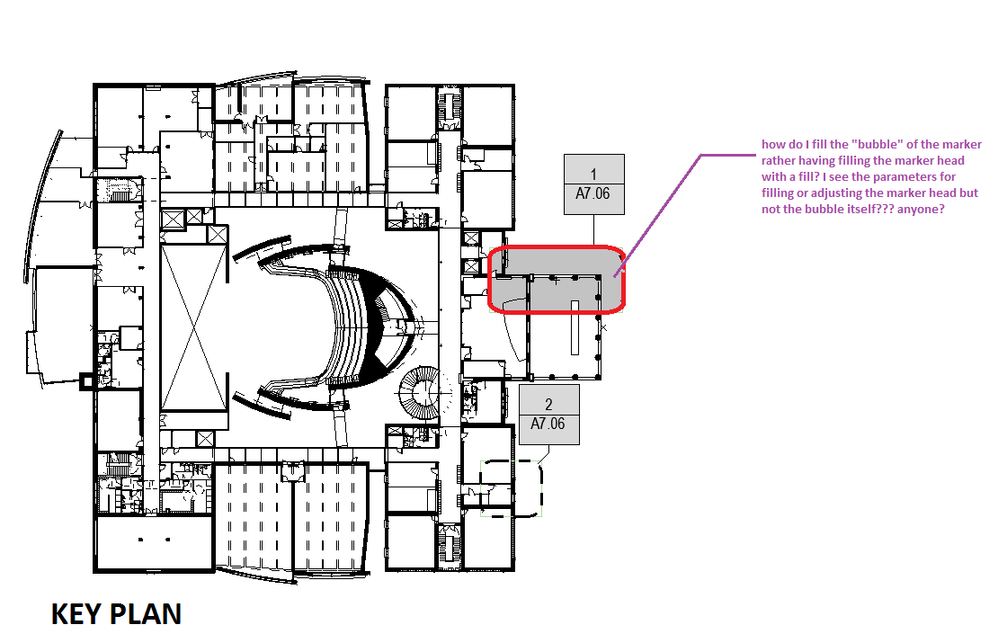
see attached.
I need to use a background fill for the "bubble" not the "marker head".
Where do I change the bubble itself to show a background fill.
Using this graphics for a key plan type diagram.
I need to use a background fill for the "bubble" not the "marker head".
Where do I change the bubble itself to show a background fill.
Using this graphics for a key plan type diagram.
...Bobby Hollywood live from...
i>u
Edgewater, FL!
SOFTWARE VERSION:
Archicad 22, Archicad 23
Windows7 -OS, MAC Maverick OS
i>u
Edgewater, FL!
SOFTWARE VERSION:
Archicad 22, Archicad 23
Windows7 -OS, MAC Maverick OS
1 Reply 1

Stress Co_
Advisor
Options
- Mark as New
- Bookmark
- Subscribe
- Mute
- Subscribe to RSS Feed
- Permalink
- Report Inappropriate Content
2014-01-21 07:02 AM
2014-01-21
07:02 AM
I don't think it can be done without editing the GDL script.
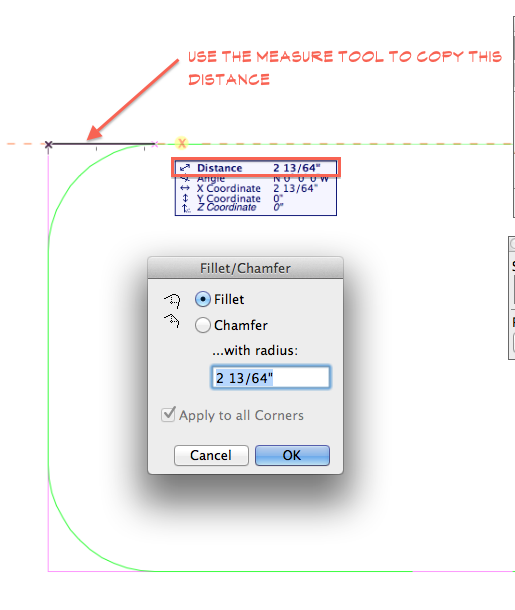
Your workaround is to use the fill tool
(like you did in your screen shot?).
Measure the radius of the detail box's corner and
copy/paste the distance into the "Fillet/Chamfer" command.
It's a quick/easy way to get a rectangular fill to match the detail bubble.
Your workaround is to use the fill tool
(like you did in your screen shot?).
Measure the radius of the detail box's corner and
copy/paste the distance into the "Fillet/Chamfer" command.
It's a quick/easy way to get a rectangular fill to match the detail bubble.
Marc Corney, Architect
Red Canoe Architecture, P. A.
Mac OS 10.15.7 (Catalina) //// Mac OS 14.5 (Sonoma)
Processor: 3.6 GHz 8-Core Intel Core i9 //// Apple M2 Max
Memory: 48 GB 2667 MHz DDR4 //// 32 GB
Graphics: Radeon Pro 580X 8GB //// 12C CPU, 30C GPU
ArchiCAD 25 (5010 USA Full) //// ArchiCAD 27 (4030 USA Full)
Red Canoe Architecture, P. A.
Mac OS 10.15.7 (Catalina) //// Mac OS 14.5 (Sonoma)
Processor: 3.6 GHz 8-Core Intel Core i9 //// Apple M2 Max
Memory: 48 GB 2667 MHz DDR4 //// 32 GB
Graphics: Radeon Pro 580X 8GB //// 12C CPU, 30C GPU
ArchiCAD 25 (5010 USA Full) //// ArchiCAD 27 (4030 USA Full)

Still looking?