
Turn on suggestions
Auto-suggest helps you quickly narrow down your search results by suggesting possible matches as you type.
Showing results for
EN
Turn on suggestions
Auto-suggest helps you quickly narrow down your search results by suggesting possible matches as you type.
Showing results for
- English
- :
- Forum
- :
- Documentation
- :
- Schedule single side of morph
Options
- Subscribe to RSS Feed
- Mark Topic as New
- Mark Topic as Read
- Pin this post for me
- Bookmark
- Subscribe to Topic
- Mute
- Printer Friendly Page

RespondJoe
Participant
Options
- Mark as New
- Bookmark
- Subscribe
- Mute
- Subscribe to RSS Feed
- Permalink
- Report Inappropriate Content
2021-11-03 09:33 PM
Schedule single side of morph
2021-11-03
09:33 PM
A colleague has modelled a panel cladding system using morph faces, as it was proving too complicated for the CI cladding tool. The cladding panels are 4 different finishes and they're trying to schedule them, however with both a surfaces schedule and an elements schedule the area comes out as double, so it's scheduling both sides of the morph face opposed to one.
Is it possible to just schedule one? Would we need to create a new parameter and column to divide the area by half?
TIA!
Read-Only
3 Replies 3

Andre_Steynberg
Enthusiast
Options
- Mark as New
- Bookmark
- Subscribe
- Mute
- Subscribe to RSS Feed
- Permalink
- Report Inappropriate Content
2021-11-09 12:10 PM
2021-11-09
12:10 PM
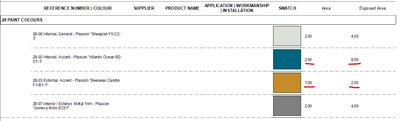
@RespondJoe What fields are you using to schedule the morphs though?
As that can have an effect on your results, see attached.

Andre Steynberg
Win 10 64-bit
AC27
Win 10 64-bit
AC27
RespondJoe
Participant
Options
- Mark as New
- Bookmark
- Subscribe
- Mute
- Subscribe to RSS Feed
- Permalink
- Report Inappropriate Content
2021-11-09 09:50 PM
2021-11-09
09:50 PM
Thanks for the reply! I did a quick test file and it comes out as yours with Area showing one face, Exposed Area showing both. In the live file that they're working in, using surface area or exposed area didn't make any difference, however on further investigation it turns out they'd exploded cladding panels into morphs, so every panel actually had a 3mm thickness and so Area was picking up the sides & back too...!!
Lesson for today, always check the number of morphs..! Thanks for your time 🙂
Cheers
Andre_Steynberg
Enthusiast
Options
- Mark as New
- Bookmark
- Subscribe
- Mute
- Subscribe to RSS Feed
- Permalink
- Report Inappropriate Content
2021-11-10 06:20 AM
2021-11-10
06:20 AM
Awesome glad to have helped!
Andre Steynberg
Win 10 64-bit
AC27
Win 10 64-bit
AC27

Still looking?

Suggested topics
- Ci Tools Keynotes | Archicad Keynotes | Properties | Attributes in Project data & BIM
- Archicad Interactive Schedule shows a single multi-plane hip roof as four separate elements in Documentation
- Component Schedule Expression Limitation (Need Help plz) in Project data & BIM
- Equivalent Single Dwelling calculation in schedule? in Project data & BIM
- CW Door: Discrepancy in Scheduled Width (because of sub-frame) in Project data & BIM
