
Turn on suggestions
Auto-suggest helps you quickly narrow down your search results by suggesting possible matches as you type.
Showing results for
EN
Turn on suggestions
Auto-suggest helps you quickly narrow down your search results by suggesting possible matches as you type.
Showing results for
- English
- :
- Forum
- :
- Documentation
- :
- Unable to increase the resolution of a drawing.
Options
- Subscribe to RSS Feed
- Mark Topic as New
- Mark Topic as Read
- Pin this post for me
- Bookmark
- Subscribe to Topic
- Mute
- Printer Friendly Page

archigreen
Enthusiast
Options
- Mark as New
- Bookmark
- Subscribe
- Mute
- Subscribe to RSS Feed
- Permalink
- Report Inappropriate Content
2022-08-30 10:35 PM
Unable to increase the resolution of a drawing.
2022-08-30
10:35 PM
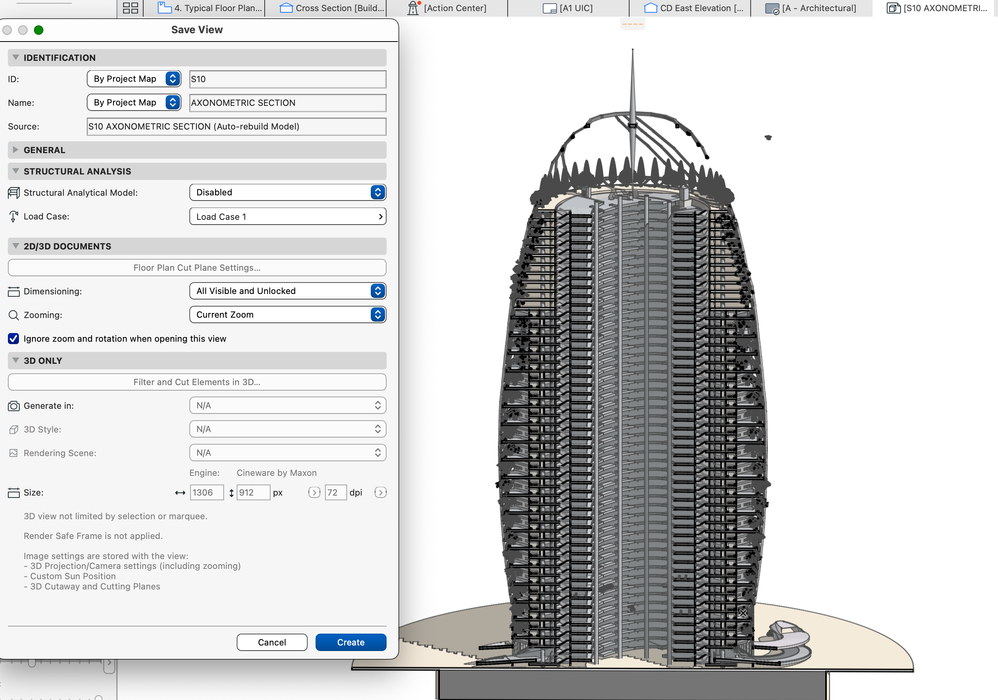
On 3D Document, unable to increase the size of DPI other than 72. WHY?
Any comments?
ArchiCAD 26
MacOS Monterey
MacBook Pro Apple M1 Max
64 GB
MacOS Monterey
MacBook Pro Apple M1 Max
64 GB
Read-Only
2 Replies 2

Lingwisyer
Guru
Options
- Mark as New
- Bookmark
- Subscribe
- Mute
- Subscribe to RSS Feed
- Permalink
- Report Inappropriate Content
2022-08-31 03:28 AM - edited 2022-08-31 03:32 AM
2022-08-31
03:28 AM
For 3D views, the resolution is that of your 3D window. You can undock and set a custom resolution to achieve a higher quality image and there are other threads around here regarding that. The settings at the bottom of the dialogue shown are for render views only. Anyway, 3D documents are suppose to be vectorial are they not, so they should match what ever your printer / publisher resolution is set to.
Ling.
| AC22-29 AUS 3200 | Help Those Help You - Add a Signature |
| Self-taught, bend it till it breaks | Creating a Thread |
| Win11 | i9 10850K | 64GB | RX6600 | Win11 | 7800X3D | 32GB | RTX5070TI |
archigreen
Enthusiast
Options
- Mark as New
- Bookmark
- Subscribe
- Mute
- Subscribe to RSS Feed
- Permalink
- Report Inappropriate Content
2022-08-31 04:08 AM
2022-08-31
04:08 AM
"You can undock and set a custom resolution to achieve a higher quality image" Please explain. Once undocked the drawing, where can I change the resolution settings?
Thanks.
ArchiCAD 26
MacOS Monterey
MacBook Pro Apple M1 Max
64 GB
MacOS Monterey
MacBook Pro Apple M1 Max
64 GB

Still looking?

