
Turn on suggestions
Auto-suggest helps you quickly narrow down your search results by suggesting possible matches as you type.
Showing results for
EN
Turn on suggestions
Auto-suggest helps you quickly narrow down your search results by suggesting possible matches as you type.
Showing results for
- English
- :
- Forum
- :
- Documentation
- :
- Walls - Demolition Wall showing both solid and das...
Options
- Subscribe to RSS Feed
- Mark Topic as New
- Mark Topic as Read
- Pin this post for me
- Bookmark
- Subscribe to Topic
- Mute
- Printer Friendly Page

Anonymous
Not applicable
Options
- Mark as New
- Bookmark
- Subscribe
- Mute
- Subscribe to RSS Feed
- Permalink
- Report Inappropriate Content
2016-08-01
06:39 PM
- last edited on
2023-05-19
03:32 PM
by
 Gordana Radonic
Walls - Demolition Wall showing both solid and dashed lines?
2016-08-01
06:39 PM
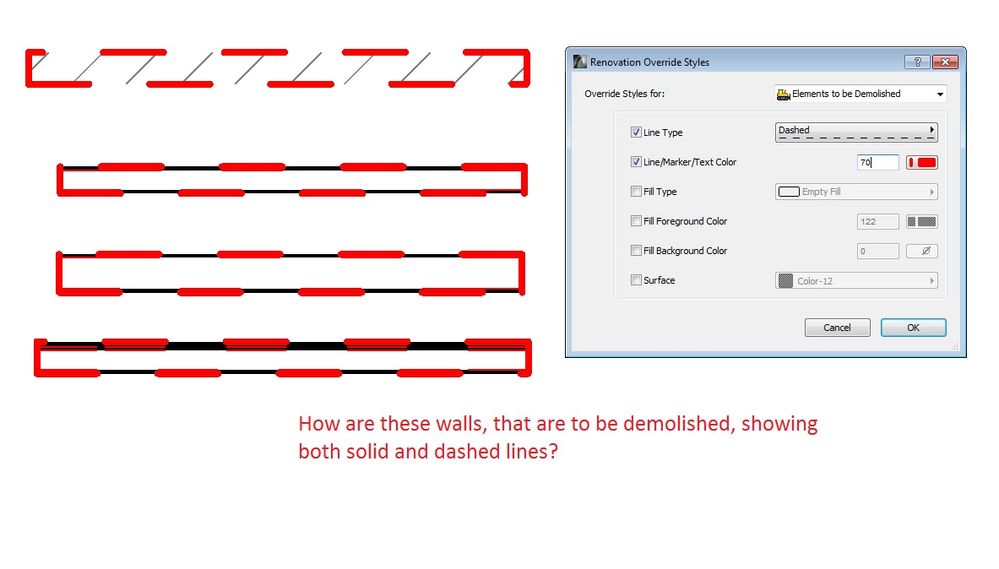
Running into an issue where demolition walls are showing the Renovation Filter option, but the result is having the correct dashed wall, but includes the solid line also. I only want the dashed to show.
Things checked:
- Renovation filters
- Model view options
- Settings
I also checked another wall type, and it appeared like it should - no dashed/solid line - only the dashed outline.
Read-Only
Labels:
2 Replies 2
Anonymous
Not applicable
Options
- Mark as New
- Bookmark
- Subscribe
- Mute
- Subscribe to RSS Feed
- Permalink
- Report Inappropriate Content
2016-08-02 01:42 AM
2016-08-02
01:42 AM
Some times, renovation filters get mixed up (see image attached).
Make sure that "Existing Elements" and "New Elements" are set to "Show" and "Hide" respectively (for demolition filter).
If New Elements, for instance, are set to "show" or "override" they might show together with demolition ones causing your issue... same goes for the existing objects.
Make sure that "Existing Elements" and "New Elements" are set to "Show" and "Hide" respectively (for demolition filter).
If New Elements, for instance, are set to "show" or "override" they might show together with demolition ones causing your issue... same goes for the existing objects.

Anonymous
Not applicable
Options
- Mark as New
- Bookmark
- Subscribe
- Mute
- Subscribe to RSS Feed
- Permalink
- Report Inappropriate Content
2016-08-02 08:12 PM
2016-08-02
08:12 PM
Thanks for the response:
The renovation filters weren't the issue. The issue came down to Renovation Override Styles. Some weird reason the wall composites fill were showing through, even though it was set to demolished. Changing the fill foreground to white overwrote the wall composites fill to show.
The renovation filters weren't the issue. The issue came down to Renovation Override Styles. Some weird reason the wall composites fill were showing through, even though it was set to demolished. Changing the fill foreground to white overwrote the wall composites fill to show.
Still looking?

Suggested topics
- Making shelves in the base cabinet object show as dashed hidden lines in Modeling
- How can I show hidden stair treads as dashed lines in a section? in Modeling
- new windows - existing wall - show dashed in elevations in Documentation
- CI Door & Window Schedule - Cavity Sliding Door in Project data & BIM
- Rennovation Filter - Overriding Demolition Elements to match Existing Elements, on an Existing Renno in Documentation
