
Turn on suggestions
Auto-suggest helps you quickly narrow down your search results by suggesting possible matches as you type.
Showing results for
EN
Turn on suggestions
Auto-suggest helps you quickly narrow down your search results by suggesting possible matches as you type.
Showing results for
- English
- :
- Forum
- :
- Documentation
- :
- Re: walls not joining
Options
- Subscribe to RSS Feed
- Mark Topic as New
- Mark Topic as Read
- Pin this post for me
- Bookmark
- Subscribe to Topic
- Mute
- Printer Friendly Page

onestoreyllc
Booster
Options
- Mark as New
- Bookmark
- Subscribe
- Mute
- Subscribe to RSS Feed
- Permalink
- Report Inappropriate Content
2021-09-15 09:15 PM
walls not joining
2021-09-15
09:15 PM
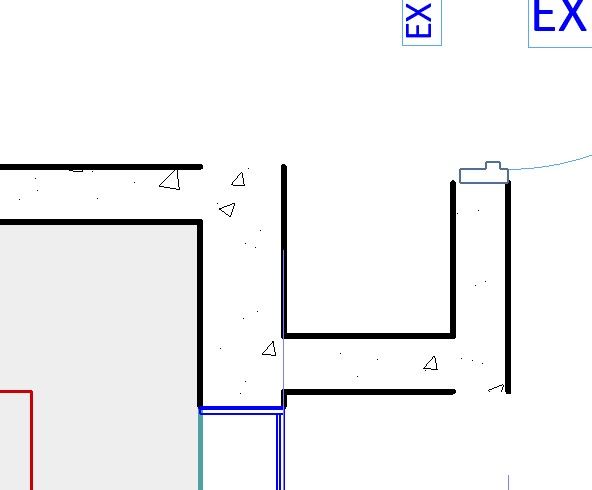
I've reviewed all of the same topics here but none of the remedies worked for me. I can't get two of the same walls to connect with a solid line at the perimeter. It's driving me crazy, help!
Meredith
AC26 USA - Lenovo P17 - Intel(R) Core(TM) i9-10885H CPU @ 2.4GHz - 32.0GB - Windows 11 Pro
AC26 USA - Lenovo P17 - Intel(R) Core(TM) i9-10885H CPU @ 2.4GHz - 32.0GB - Windows 11 Pro
Solved! Go to Solution.
Solved
Read-Only
1 Solution
Accepted Solutions

Barry Kelly
Moderator
Options
- Mark as New
- Bookmark
- Subscribe
- Mute
- Subscribe to RSS Feed
- Permalink
- Report Inappropriate Content
2021-09-16 03:24 AM
2021-09-16
03:24 AM
It has been discussed here a few times, but it is a matter of finding the correct post.
What you need to do is turn on the end lines of the skin in the complex profile settings.
Barry.

One of the forum moderators.
Versions 6.5 to 27
i7-10700 @ 2.9Ghz, 32GB ram, GeForce RTX 2060 (6GB), Windows 10
Lenovo Thinkpad - i7-1270P 2.20 GHz, 32GB RAM, Nvidia T550, Windows 11
Versions 6.5 to 27
i7-10700 @ 2.9Ghz, 32GB ram, GeForce RTX 2060 (6GB), Windows 10
Lenovo Thinkpad - i7-1270P 2.20 GHz, 32GB RAM, Nvidia T550, Windows 11
5 Replies 5
Barry Kelly
Moderator
Options
- Mark as New
- Bookmark
- Subscribe
- Mute
- Subscribe to RSS Feed
- Permalink
- Report Inappropriate Content
2021-09-16 03:24 AM
2021-09-16
03:24 AM
It has been discussed here a few times, but it is a matter of finding the correct post.
What you need to do is turn on the end lines of the skin in the complex profile settings.
Barry.
One of the forum moderators.
Versions 6.5 to 27
i7-10700 @ 2.9Ghz, 32GB ram, GeForce RTX 2060 (6GB), Windows 10
Lenovo Thinkpad - i7-1270P 2.20 GHz, 32GB RAM, Nvidia T550, Windows 11
Versions 6.5 to 27
i7-10700 @ 2.9Ghz, 32GB ram, GeForce RTX 2060 (6GB), Windows 10
Lenovo Thinkpad - i7-1270P 2.20 GHz, 32GB RAM, Nvidia T550, Windows 11

Rajesh Patil
Expert
Options
- Mark as New
- Bookmark
- Subscribe
- Mute
- Subscribe to RSS Feed
- Permalink
- Report Inappropriate Content
2021-09-16 04:43 AM
2021-09-16
04:43 AM
Try this, Select required walls and check if there both ends are displayed in "display wall ends" settings in 2D plan section rollout in "Wall Selection Settings" dialog.
Rajesh Patil
AC 09-27 | INT | WIN11 64
Dell Inspiron 7591, Core i9, 9880H 2.30GHz, 16.0GB, NVidia GeForce GTX1650, 4.0GB, SSD Internal 500GB, Dell SSD External 250GB
AC 09-27 | INT | WIN11 64
Dell Inspiron 7591, Core i9, 9880H 2.30GHz, 16.0GB, NVidia GeForce GTX1650, 4.0GB, SSD Internal 500GB, Dell SSD External 250GB
Barry Kelly
Moderator
Options
- Mark as New
- Bookmark
- Subscribe
- Mute
- Subscribe to RSS Feed
- Permalink
- Report Inappropriate Content
2021-09-16 04:50 AM
2021-09-16
04:50 AM
That setting will only affect the free standing wall end.
It won't affect the corner connections or the door/window opening edges.
Barry.
One of the forum moderators.
Versions 6.5 to 27
i7-10700 @ 2.9Ghz, 32GB ram, GeForce RTX 2060 (6GB), Windows 10
Lenovo Thinkpad - i7-1270P 2.20 GHz, 32GB RAM, Nvidia T550, Windows 11
Versions 6.5 to 27
i7-10700 @ 2.9Ghz, 32GB ram, GeForce RTX 2060 (6GB), Windows 10
Lenovo Thinkpad - i7-1270P 2.20 GHz, 32GB RAM, Nvidia T550, Windows 11
Rajesh Patil
Expert
Options
- Mark as New
- Bookmark
- Subscribe
- Mute
- Subscribe to RSS Feed
- Permalink
- Report Inappropriate Content
2021-09-16 08:06 AM
2021-09-16
08:06 AM
And how about the wall reference lines, are they intersecting in required manner? Also by looking at the screen shot I think you are using Wall Structure as Basic and not Composite, I am right?
Rajesh Patil
AC 09-27 | INT | WIN11 64
Dell Inspiron 7591, Core i9, 9880H 2.30GHz, 16.0GB, NVidia GeForce GTX1650, 4.0GB, SSD Internal 500GB, Dell SSD External 250GB
AC 09-27 | INT | WIN11 64
Dell Inspiron 7591, Core i9, 9880H 2.30GHz, 16.0GB, NVidia GeForce GTX1650, 4.0GB, SSD Internal 500GB, Dell SSD External 250GB
onestoreyllc
Booster
Options
- Mark as New
- Bookmark
- Subscribe
- Mute
- Subscribe to RSS Feed
- Permalink
- Report Inappropriate Content
2021-09-18 07:44 PM - edited 2021-09-18 07:47 PM
2021-09-18
07:44 PM
Thanks for the response, that worked and is much appreciated.
Meredith
AC26 USA - Lenovo P17 - Intel(R) Core(TM) i9-10885H CPU @ 2.4GHz - 32.0GB - Windows 11 Pro
AC26 USA - Lenovo P17 - Intel(R) Core(TM) i9-10885H CPU @ 2.4GHz - 32.0GB - Windows 11 Pro

Still looking?
Suggested topics
