
Turn on suggestions
Auto-suggest helps you quickly narrow down your search results by suggesting possible matches as you type.
Showing results for
EN
Turn on suggestions
Auto-suggest helps you quickly narrow down your search results by suggesting possible matches as you type.
Showing results for
- English
- :
- Forum
- :
- General discussions
- :
- Re: After maintenance on the Community
Options
- Subscribe to RSS Feed
- Mark Topic as New
- Mark Topic as Read
- Pin this post for me
- Bookmark
- Subscribe to Topic
- Mute
- Printer Friendly Page

Andrii Levko
Expert
Options
- Mark as New
- Bookmark
- Subscribe
- Mute
- Subscribe to RSS Feed
- Permalink
- Report Inappropriate Content
2022-07-26 07:57 AM - edited 2022-07-26 08:34 AM
After maintenance on the Community
2022-07-26
07:57 AM
Hello.
After Maintenance on Community the website is not working well.
First of all, I can't log in from any device or OS, not from Mac, Windows, Android. By clicking on the contour of a person as before, it just takes me to the home page. I can only enter to the website from the device which I didn't log out before maintenance.
First of all, I can't log in from any device or OS, not from Mac, Windows, Android. By clicking on the contour of a person as before, it just takes me to the home page. I can only enter to the website from the device which I didn't log out before maintenance.
Is it only mine problem or it is general issue?
Secondly, messages and notifications doesn't always show up in the upper corner of the screen.
And one more thing, it would be nice to have some understanding of what has changed and improved after the maintenance, besides the fact that the globe appeared and the site interface changed a little?
There was only the message "This planned maintenance is to help the preparation to add new languages to the Community" but it's not entirely clear what languages are we talking about here?
Andrii
AC 8.1 - 28 INT/POL 3001
Win11
AC 8.1 - 28 INT/POL 3001
Win11
Solved! Go to Solution.
1 Solution

 Gordana Radonic
Community Manager
Options
- Mark as New
- Bookmark
- Subscribe
- Mute
- Subscribe to RSS Feed
- Permalink
- Report Inappropriate Content
2022-07-26 10:36 AM
2022-07-26
10:36 AM
Hi everyone,
hi @Andrii Levko, thanks for reporting! We became aware of it, and we are fixing the sign-in issue as we speak.
The maintenance work is done to prepare for Graphisoft communities in Portuguese and Japanese languages, which still needs some preparation work from our side, so that's not yet visible and available.
@hevi and @Miha_M main menu and the icon should be fixed soon and menu navigation will be displayed as before. If it takes longer than expected, we'll prepare post to explain it.
You are really helping us with reporting issues, so I want to thank you for your understanding and patience!
Gordana Radonić
Community Manager
15 Replies 15

hevi
Ace
Options
- Mark as New
- Bookmark
- Subscribe
- Mute
- Subscribe to RSS Feed
- Permalink
- Report Inappropriate Content
2022-07-26 08:34 AM - edited 2022-07-26 08:57 AM
2022-07-26
08:34 AM
I still get notifications and messages in the right upper corner on windows and chrome.
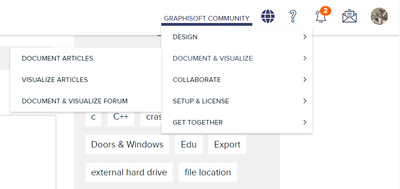
But putting every menu under the Graphisoft Community node is not good, especially as there is a lot of space to spare to spare on the browser version. And that the third-level expands to the left is quite messy. And that it is moues-over. And that there are too many items under Get Together.
And what does the globe do?
Andrii Levko
Expert
Options
- Mark as New
- Bookmark
- Subscribe
- Mute
- Subscribe to RSS Feed
- Permalink
- Report Inappropriate Content
2022-07-26 08:38 AM
2022-07-26
08:38 AM
Actually, now I received a notification where the bell is, yesterday it was not displayed. Maybe everything will get better.
Andrii
AC 8.1 - 28 INT/POL 3001
Win11
AC 8.1 - 28 INT/POL 3001
Win11
Andrii Levko
Expert
Options
- Mark as New
- Bookmark
- Subscribe
- Mute
- Subscribe to RSS Feed
- Permalink
- Report Inappropriate Content
2022-07-26 08:42 AM - edited 2022-07-26 08:47 AM
2022-07-26
08:42 AM
But I still can't log in to the Community website from other devices.
Andrii
AC 8.1 - 28 INT/POL 3001
Win11
AC 8.1 - 28 INT/POL 3001
Win11

Barry Kelly
Moderator
Options
- Mark as New
- Bookmark
- Subscribe
- Mute
- Subscribe to RSS Feed
- Permalink
- Report Inappropriate Content
2022-07-26 08:56 AM
2022-07-26
08:56 AM
I just logged in on my iPad and that all seems OK.
The web page was already open and i had to conform my login details.
But just to check I logged out and tried to log back in.
And you are correct - it just refreshed the home page and there is not login option.
@Gordana Radonic and @Noemi Balogh are you aware of this problem?
Barry.
One of the forum moderators.
Versions 6.5 to 27
i7-10700 @ 2.9Ghz, 32GB ram, GeForce RTX 2060 (6GB), Windows 10
Lenovo Thinkpad - i7-1270P 2.20 GHz, 32GB RAM, Nvidia T550, Windows 11
Versions 6.5 to 27
i7-10700 @ 2.9Ghz, 32GB ram, GeForce RTX 2060 (6GB), Windows 10
Lenovo Thinkpad - i7-1270P 2.20 GHz, 32GB RAM, Nvidia T550, Windows 11
Andrii Levko
Expert
Options
- Mark as New
- Bookmark
- Subscribe
- Mute
- Subscribe to RSS Feed
- Permalink
- Report Inappropriate Content
2022-07-26 09:02 AM
2022-07-26
09:02 AM
I have sent the information about this issue to e-mail [email protected]
Andrii
AC 8.1 - 28 INT/POL 3001
Win11
AC 8.1 - 28 INT/POL 3001
Win11
Barry Kelly
Moderator
Options
- Mark as New
- Bookmark
- Subscribe
- Mute
- Subscribe to RSS Feed
- Permalink
- Report Inappropriate Content
2022-07-26 09:11 AM
2022-07-26
09:11 AM
Thank you.
Barry.
One of the forum moderators.
Versions 6.5 to 27
i7-10700 @ 2.9Ghz, 32GB ram, GeForce RTX 2060 (6GB), Windows 10
Lenovo Thinkpad - i7-1270P 2.20 GHz, 32GB RAM, Nvidia T550, Windows 11
Versions 6.5 to 27
i7-10700 @ 2.9Ghz, 32GB ram, GeForce RTX 2060 (6GB), Windows 10
Lenovo Thinkpad - i7-1270P 2.20 GHz, 32GB RAM, Nvidia T550, Windows 11

Miha_M
Advisor
Options
- Mark as New
- Bookmark
- Subscribe
- Mute
- Subscribe to RSS Feed
- Permalink
- Report Inappropriate Content
2022-07-26 08:57 AM - edited 2022-07-26 09:11 AM
2022-07-26
08:57 AM
I have the exact same problem. I am logged in through one "personal" edge browser window, on the other company edge window I can't log in. I tried logging in through a new "Inprivate" browser window session, but this also doesn't work.
| Archicad 4.5 - 29
| HP Z840 | 2× E5-2643 v4 | 64 GB RAM | Quadro M5000 | Windows 10 Pro x64
| HP Z4 G4 | W-2245 | 64 GB RAM | RTX A4000 | Windows 11
Barry Kelly
Moderator
Options
- Mark as New
- Bookmark
- Subscribe
- Mute
- Subscribe to RSS Feed
- Permalink
- Report Inappropriate Content
2022-07-26 09:10 AM
2022-07-26
09:10 AM
Fortunately I am still logged in here using Firefox on a Windows machine.
But I just tried my laptop with Firefox and MS Edge and I can't log in with either of those.
Barry.
One of the forum moderators.
Versions 6.5 to 27
i7-10700 @ 2.9Ghz, 32GB ram, GeForce RTX 2060 (6GB), Windows 10
Lenovo Thinkpad - i7-1270P 2.20 GHz, 32GB RAM, Nvidia T550, Windows 11
Versions 6.5 to 27
i7-10700 @ 2.9Ghz, 32GB ram, GeForce RTX 2060 (6GB), Windows 10
Lenovo Thinkpad - i7-1270P 2.20 GHz, 32GB RAM, Nvidia T550, Windows 11
Barry Kelly
Moderator
Options
- Mark as New
- Bookmark
- Subscribe
- Mute
- Subscribe to RSS Feed
- Permalink
- Report Inappropriate Content
2022-07-26 09:52 AM
2022-07-26
09:52 AM
Just to let everyone know, it is being looked into.
Those that are looking into it can't log in themselves, so they can't respond here.
If you are logged in at the moment - don't log out. 😧
Barry.
One of the forum moderators.
Versions 6.5 to 27
i7-10700 @ 2.9Ghz, 32GB ram, GeForce RTX 2060 (6GB), Windows 10
Lenovo Thinkpad - i7-1270P 2.20 GHz, 32GB RAM, Nvidia T550, Windows 11
Versions 6.5 to 27
i7-10700 @ 2.9Ghz, 32GB ram, GeForce RTX 2060 (6GB), Windows 10
Lenovo Thinkpad - i7-1270P 2.20 GHz, 32GB RAM, Nvidia T550, Windows 11
 Noemi Balogh
Community Admin
Options
- Mark as New
- Bookmark
- Subscribe
- Mute
- Subscribe to RSS Feed
- Permalink
- Report Inappropriate Content
2022-07-26 10:48 AM
2022-07-26
10:48 AM
Thank you Barry for this short message. It seems that the login issue is fixed (at least I'm here again). The other topics mentioned by you are still under working, as Gordana said.
Noémi Balogh
Staff Community Expert, Admin
Gordana Radonic
Community Manager
Options
- Mark as New
- Bookmark
- Subscribe
- Mute
- Subscribe to RSS Feed
- Permalink
- Report Inappropriate Content
2022-07-26 10:36 AM
2022-07-26
10:36 AM
Hi everyone,
hi @Andrii Levko, thanks for reporting! We became aware of it, and we are fixing the sign-in issue as we speak.
The maintenance work is done to prepare for Graphisoft communities in Portuguese and Japanese languages, which still needs some preparation work from our side, so that's not yet visible and available.
@hevi and @Miha_M main menu and the icon should be fixed soon and menu navigation will be displayed as before. If it takes longer than expected, we'll prepare post to explain it.
You are really helping us with reporting issues, so I want to thank you for your understanding and patience!
Gordana Radonić
Community Manager
Andrii Levko
Expert
Options
- Mark as New
- Bookmark
- Subscribe
- Mute
- Subscribe to RSS Feed
- Permalink
- Report Inappropriate Content
2022-07-26 11:27 AM
2022-07-26
11:27 AM
Hi @Gordana Radonic .
Thanks for your explanation about the languages.
Andrii
AC 8.1 - 28 INT/POL 3001
Win11
AC 8.1 - 28 INT/POL 3001
Win11
Andrii Levko
Expert
Options
- Mark as New
- Bookmark
- Subscribe
- Mute
- Subscribe to RSS Feed
- Permalink
- Report Inappropriate Content
2022-07-26 11:19 AM - edited 2022-07-26 11:30 AM
2022-07-26
11:19 AM
Yeah, "log in" works and notifications seems are already showing up today.
Thank you for fast fixing !
Andrii
AC 8.1 - 28 INT/POL 3001
Win11
AC 8.1 - 28 INT/POL 3001
Win11
Miha_M
Advisor
Options
- Mark as New
- Bookmark
- Subscribe
- Mute
- Subscribe to RSS Feed
- Permalink
- Report Inappropriate Content
2022-07-27 12:47 PM - edited 2022-07-27 12:48 PM
2022-07-27
12:47 PM
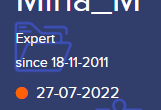
There might one more thing left to fix. I am logged in, but the red dot on my profile page says that the user (me) is offline.
| Archicad 4.5 - 29
| HP Z840 | 2× E5-2643 v4 | 64 GB RAM | Quadro M5000 | Windows 10 Pro x64
| HP Z4 G4 | W-2245 | 64 GB RAM | RTX A4000 | Windows 11
Gordana Radonic
Community Manager
Options
- Mark as New
- Bookmark
- Subscribe
- Mute
- Subscribe to RSS Feed
- Permalink
- Report Inappropriate Content
2022-07-27 01:27 PM
2022-07-27
01:27 PM
Hi @Miha_M,
Hm..wierd 🧐 We are actually right now checking some other irregularity on the profile setting, so we'll check the online status on other profiles as well, and see what might be the issue.
Thanks for the message!
Gordana
Gordana Radonić
Community Manager

Still looking?

Suggested topics
- Archicad 30: What have you done? in General discussions
- Re: BIMcloud Hybrid in Teamwork & BIMcloud
- Welcome to our AI Solutions forum | Guidelines for participating in AI solutions
- Add-on to automatically track/stamp elements with Teamwork user + date/time + create/reserve/edit in Teamwork & BIMcloud
- Parking layouts and solar parks in a site polygon in Libraries & objects
