
Turn on suggestions
Auto-suggest helps you quickly narrow down your search results by suggesting possible matches as you type.
Showing results for
EN
Turn on suggestions
Auto-suggest helps you quickly narrow down your search results by suggesting possible matches as you type.
Showing results for
- English
- :
- Forum
- :
- Installation & update
- :
- library 19 update 4554.8 not installing
Options
- Subscribe to RSS Feed
- Mark Topic as New
- Mark Topic as Read
- Pin this post for me
- Bookmark
- Subscribe to Topic
- Mute
- Printer Friendly Page

Anonymous
Not applicable
Options
- Mark as New
- Bookmark
- Subscribe
- Mute
- Subscribe to RSS Feed
- Permalink
- Report Inappropriate Content
2016-04-25
10:22 PM
- last edited on
2024-03-25
02:50 PM
by
 Aruzhan Ilaikova
library 19 update 4554.8 not installing
2016-04-25
10:22 PM
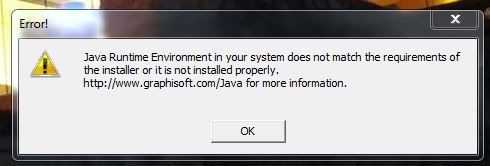
Have been trying to install ARCHICAD 19 USA Library Update 4554.8 dated 2016.01.13 for several months. I am currently running the most current version of Java....Version 8 update 92 build 1.8.0_92-b14. The installation notes note: To run the installer, Java version 7 must be installed on your computer. You can install Java version 8 from your original ARCHICAD install DVD. Do I need to uninstall my current Java and reinstall java 7? I keep updating Java hoping one of these days this will work....that's not working for me.
Thanks in advance Cary
Thanks in advance Cary
2 Replies 2
 Laszlo Nagy
Community Admin
Options
- Mark as New
- Bookmark
- Subscribe
- Mute
- Subscribe to RSS Feed
- Permalink
- Report Inappropriate Content
2016-04-28 05:10 PM
2016-04-28
05:10 PM
Yes, sometimes this is what you have to do:
1. Uninstall Java 8.
2. Install Java 7 from the installation DVD (or whichever version comes on the DVD).
3. Install ARCHICAD.
4. Update to Java 8.
This is nobody's fault really (although Java 8 could be compatible with Java 7 - however sometimes in software development to implement certain improvements compatibility with previous versions must be abandoned).
1. Uninstall Java 8.
2. Install Java 7 from the installation DVD (or whichever version comes on the DVD).
3. Install ARCHICAD.
4. Update to Java 8.
This is nobody's fault really (although Java 8 could be compatible with Java 7 - however sometimes in software development to implement certain improvements compatibility with previous versions must be abandoned).
Loving Archicad since 1995 - Find Archicad Tips at x.com/laszlonagy
AMD Ryzen9 5900X CPU, 64 GB RAM 3600 MHz, Nvidia GTX 1060 6GB, 500 GB NVMe SSD
2x28" (2560x1440), Windows 10 PRO ENG, Ac20-Ac29
AMD Ryzen9 5900X CPU, 64 GB RAM 3600 MHz, Nvidia GTX 1060 6GB, 500 GB NVMe SSD
2x28" (2560x1440), Windows 10 PRO ENG, Ac20-Ac29
Anonymous
Not applicable
Options
- Mark as New
- Bookmark
- Subscribe
- Mute
- Subscribe to RSS Feed
- Permalink
- Report Inappropriate Content
2016-04-28 06:05 PM
2016-04-28
06:05 PM
thanks for explanation!!!
Still looking?

Suggested topics
- ProKit Coverings Library missing / not loading in Libraries & objects
- Welcome to our AI Solutions forum | Guidelines for participating in AI solutions
- Linking and Managing Office Custom Libraries in Libraries & objects
- Problem with Library Folder Name - Library Update 2 - FRA in Libraries & objects
- FAIL: New Libpack Concept in Libraries & objects
