
Turn on suggestions
Auto-suggest helps you quickly narrow down your search results by suggesting possible matches as you type.
Showing results for
EN
Turn on suggestions
Auto-suggest helps you quickly narrow down your search results by suggesting possible matches as you type.
Showing results for
- English
- :
- Forum
- :
- Installation & update
- :
- toolbox help needed
Options
- Subscribe to RSS Feed
- Mark Topic as New
- Mark Topic as Read
- Pin this post for me
- Bookmark
- Subscribe to Topic
- Mute
- Printer Friendly Page

Anonymous
Not applicable
Options
- Mark as New
- Bookmark
- Subscribe
- Mute
- Subscribe to RSS Feed
- Permalink
- Report Inappropriate Content
2012-06-18 04:56 AM
toolbox help needed
2012-06-18
04:56 AM
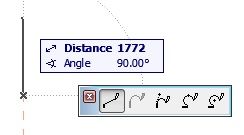
The small toolbox which appears whilst you are drawing an element is not appearing as it should. It only appears whilst i'm holding down the mouse button and disappears immediately when i let go. i have been working around it the last couple of days by dragging the mouse over to it before i release the button, however part of my problem is that it doesn't always appear.
i have added a picture of the toolbox i am talking about as i am not sure of its proper name. (the one with the line tools, not the tooltip).
Read-Only
Labels:
- Labels:
-
Performance
1 Reply 1

 Laszlo Nagy
Community Admin
Options
- Mark as New
- Bookmark
- Subscribe
- Mute
- Subscribe to RSS Feed
- Permalink
- Report Inappropriate Content
2012-06-18 10:46 AM
2012-06-18
10:46 AM
This may be a graphics card driver problem.
Try to upgrade to the latest version of the driver or if that doesn't work, downgrade to an earlier version of the driver where it worked.
Try to upgrade to the latest version of the driver or if that doesn't work, downgrade to an earlier version of the driver where it worked.
Loving Archicad since 1995 - Find Archicad Tips at x.com/laszlonagy
AMD Ryzen9 5900X CPU, 64 GB RAM 3600 MHz, Nvidia GTX 1060 6GB, 500 GB NVMe SSD
2x28" (2560x1440), Windows 10 PRO ENG, Ac20-Ac29
AMD Ryzen9 5900X CPU, 64 GB RAM 3600 MHz, Nvidia GTX 1060 6GB, 500 GB NVMe SSD
2x28" (2560x1440), Windows 10 PRO ENG, Ac20-Ac29
Still looking?

Suggested topics
- Some free useful objects: Road signs, parametric pathway, roof crickets, crowds in Libraries & objects
- Ci Tools Keynotes | Archicad Keynotes | Properties | Attributes in Project data & BIM
- Archicad 29 AI Visualizer – Licence Issue in Installation & update
- Need data from relatively new projects in General discussions
- Need help modelling a Wall Reveal in Modeling
