
Turn on suggestions
Auto-suggest helps you quickly narrow down your search results by suggesting possible matches as you type.
Showing results for
EN
Turn on suggestions
Auto-suggest helps you quickly narrow down your search results by suggesting possible matches as you type.
Showing results for
- English
- :
- Forum
- :
- Libraries & objects
- :
- Re: Missing windows components
Options
- Subscribe to RSS Feed
- Mark Topic as New
- Mark Topic as Read
- Pin this post for me
- Bookmark
- Subscribe to Topic
- Mute
- Printer Friendly Page

Anonymous
Not applicable
Options
- Mark as New
- Bookmark
- Subscribe
- Mute
- Subscribe to RSS Feed
- Permalink
- Report Inappropriate Content
2019-05-17
08:46 AM
- last edited on
2023-05-24
12:26 PM
by
 Rubia Torres
15 Replies 15
Anonymous
Not applicable
Options
- Mark as New
- Bookmark
- Subscribe
- Mute
- Subscribe to RSS Feed
- Permalink
- Report Inappropriate Content
2019-05-23 08:24 AM
2019-05-23
08:24 AM
Lingwisyer wrote:
Do not think this will be the case since the 3D preview is generated from the same script as the actual object itself, but, if you go toOpen Object by Subtype, do you have the following object?
General GDL Element => Model Element => Macro => Sash
If not, you will want to reinstall your default AC library.
Ling.
Thank you Ling, I checked and version 36 of the sash is there, I will uninstall AC and reinstall over the weekend and see if that works. I will report back if that works.
Anonymous
Not applicable
Options
- Mark as New
- Bookmark
- Subscribe
- Mute
- Subscribe to RSS Feed
- Permalink
- Report Inappropriate Content
2019-06-24 10:48 AM
2019-06-24
10:48 AM
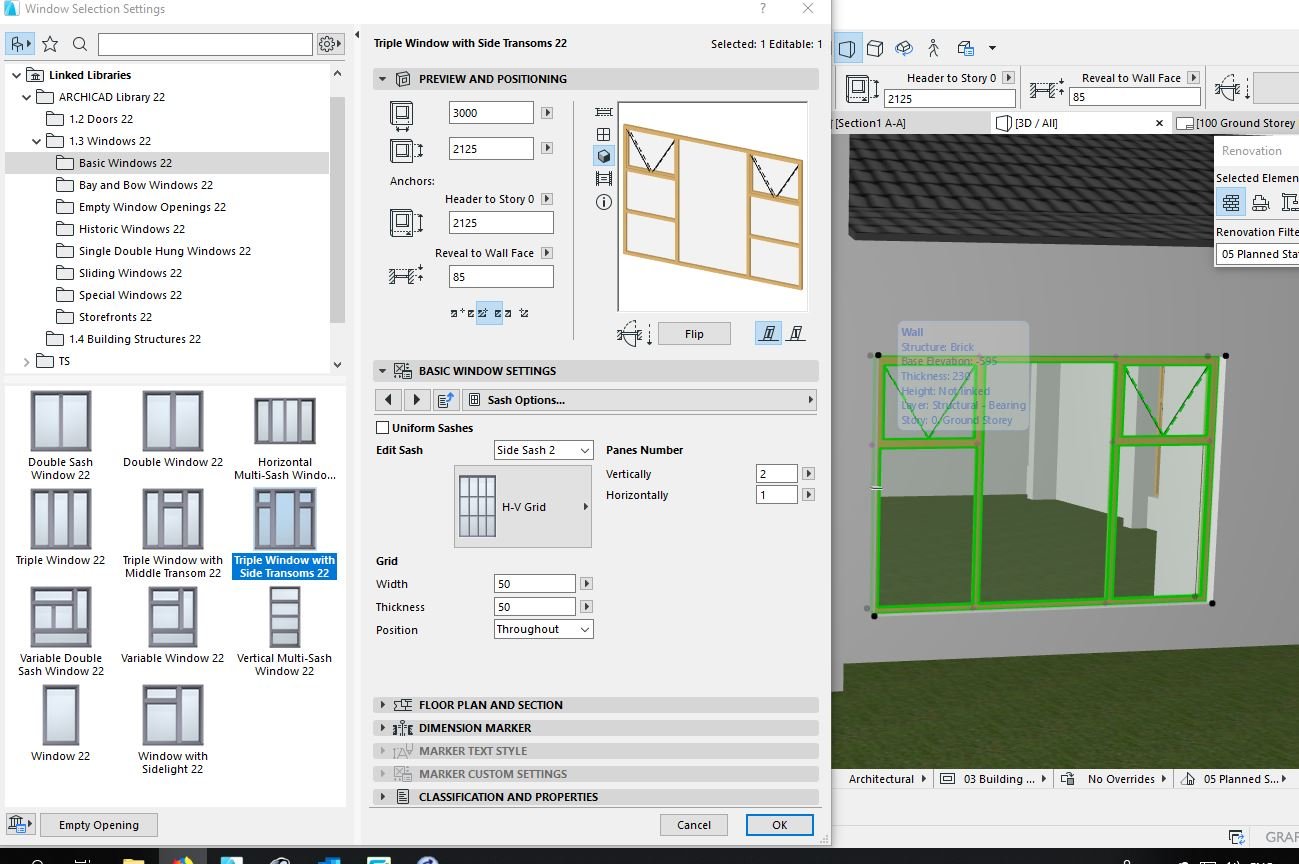
So I found what was causing my windows to have missing components. It's a bit embarrassing really, but I hope this may help someone else. The MVO settings under Document, Model view, Model view options, was set to simplified instead of full. I have no idea how this got changed! Instantly showed everything correctly.
Thanks again for all the suggestions. Luckily I never got around to reinstalling.
Thanks again for all the suggestions. Luckily I never got around to reinstalling.

Barry Kelly
Moderator
Options
- Mark as New
- Bookmark
- Subscribe
- Mute
- Subscribe to RSS Feed
- Permalink
- Report Inappropriate Content
2019-06-24 11:07 AM
2019-06-24
11:07 AM
Thanks for posting back.
So it seems that the 3D preview in the object settings does not follow the MVO settings.
This could be a little dangerous in my opinion.
I do not use the default Graphisoft Library so I do not have this 'simplified' option.
I just tested this and it is indeed the case.
Very confusing if you ask me.
Barry.
So it seems that the 3D preview in the object settings does not follow the MVO settings.
This could be a little dangerous in my opinion.
I do not use the default Graphisoft Library so I do not have this 'simplified' option.
I just tested this and it is indeed the case.
Very confusing if you ask me.
Barry.
One of the forum moderators.
Versions 6.5 to 27
i7-10700 @ 2.9Ghz, 32GB ram, GeForce RTX 2060 (6GB), Windows 10
Lenovo Thinkpad - i7-1270P 2.20 GHz, 32GB RAM, Nvidia T550, Windows 11
Versions 6.5 to 27
i7-10700 @ 2.9Ghz, 32GB ram, GeForce RTX 2060 (6GB), Windows 10
Lenovo Thinkpad - i7-1270P 2.20 GHz, 32GB RAM, Nvidia T550, Windows 11

Palawat
Expert
Options
- Mark as New
- Bookmark
- Subscribe
- Mute
- Subscribe to RSS Feed
- Permalink
- Report Inappropriate Content
2019-06-24 12:50 PM
2019-06-24
12:50 PM
Maybe it's MVO.
Please check your "Model View Options" and make sure that the "3D and Section/Elevation" for window under "DETAIL LEVEL OF DOOR WINDOW..." is set to "Full".
Please check your "Model View Options" and make sure that the "3D and Section/Elevation" for window under "DETAIL LEVEL OF DOOR WINDOW..." is set to "Full".
Archicad 29, Windows 10, Corei7 3.4 GHz, 32 GB Ram.
https://www.indigofigs.com
https://www.facebook.com/indigofigs
https://www.indigofigs.com
https://www.facebook.com/indigofigs
Barry Kelly
Moderator
Options
- Mark as New
- Bookmark
- Subscribe
- Mute
- Subscribe to RSS Feed
- Permalink
- Report Inappropriate Content
2019-06-24 01:58 PM
2019-06-24
01:58 PM
Palawat wrote:Yes, that is what Tiny discovered.
Maybe it's MVO.
Please check your "Model View Options" and make sure that the "3D and Section/Elevation" for window under "DETAIL LEVEL OF DOOR WINDOW..." is set to "Full".
Barry.
One of the forum moderators.
Versions 6.5 to 27
i7-10700 @ 2.9Ghz, 32GB ram, GeForce RTX 2060 (6GB), Windows 10
Lenovo Thinkpad - i7-1270P 2.20 GHz, 32GB RAM, Nvidia T550, Windows 11
Versions 6.5 to 27
i7-10700 @ 2.9Ghz, 32GB ram, GeForce RTX 2060 (6GB), Windows 10
Lenovo Thinkpad - i7-1270P 2.20 GHz, 32GB RAM, Nvidia T550, Windows 11
Palawat
Expert
Options
- Mark as New
- Bookmark
- Subscribe
- Mute
- Subscribe to RSS Feed
- Permalink
- Report Inappropriate Content
2019-06-24 02:06 PM
2019-06-24
02:06 PM
Ouch! Tiny's latest post didn't show up when I replied. 
Archicad 29, Windows 10, Corei7 3.4 GHz, 32 GB Ram.
https://www.indigofigs.com
https://www.facebook.com/indigofigs
https://www.indigofigs.com
https://www.facebook.com/indigofigs
- « Previous
-
- 1
- 2
- Next »
- « Previous
-
- 1
- 2
- Next »
Didn't find the answer?
Check other topics in this Forum
Back to ForumRead the latest accepted solutions!
Accepted SolutionsStart a new conversation!

Suggested topics
- Missing Attributes in Library Elements – Teamwork File / Educational Version in Libraries & objects
- doors and window missing in reference when publishing layout in Documentation
- Creating elements on a rotate grid in 3d in Modeling
- Status and Revision on Revision History in Documentation
- Trying to calculate ACTUAL Wall Areas in Project data & BIM
