
Turn on suggestions
Auto-suggest helps you quickly narrow down your search results by suggesting possible matches as you type.
Showing results for
EN
Turn on suggestions
Auto-suggest helps you quickly narrow down your search results by suggesting possible matches as you type.
Showing results for
- English
- :
- Forum
- :
- Libraries & objects
- :
- Re: Round Opening, Centre Point
Options
- Subscribe to RSS Feed
- Mark Topic as New
- Mark Topic as Read
- Pin this post for me
- Bookmark
- Subscribe to Topic
- Mute
- Printer Friendly Page

Anonymous
Not applicable
Options
- Mark as New
- Bookmark
- Subscribe
- Mute
- Subscribe to RSS Feed
- Permalink
- Report Inappropriate Content
2012-07-04
08:51 AM
- last edited on
2023-05-24
11:48 AM
by
 Rubia Torres
Round Opening, Centre Point
2012-07-04
08:51 AM
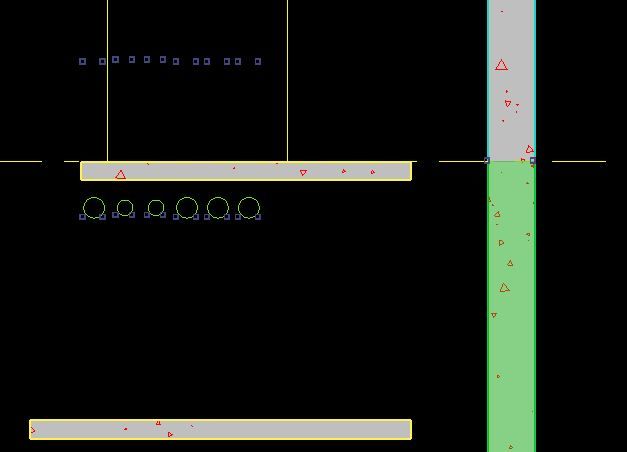
I am using the 'W Round Opening 15' object for penetrations to my core walls. This appears fine. However when I open my concrete core elevations, I cannot dimension to the centre of the opening.
I think this is because the model view options is set to 'show opening only'.
My question is, is there anyway I can add
2 Replies 2

Karl Ottenstein
Moderator Emeritus
Options
- Mark as New
- Bookmark
- Subscribe
- Mute
- Subscribe to RSS Feed
- Permalink
- Report Inappropriate Content
2012-07-04 06:25 PM
2012-07-04
06:25 PM
Tom wrote:I do not believe so: 'show opening only' specifically says to ignore the entire object (which is where you would add [symbol] or program [script] your hotspot(s)] and only show the wall hole.
My question is, is there anyway I can addhotspotsto a window object, that will appear when the 'show opening only' model view option is checked?
Vote for Wish: Copy/Paste in 3D
AC 29 USA and earlier • hardware key • macOS Tahoe 26.7 MacBook Pro M2 Max 12CPU/30GPU cores, 32GB
AC 29 USA and earlier • hardware key • macOS Tahoe 26.7 MacBook Pro M2 Max 12CPU/30GPU cores, 32GB
Anonymous
Not applicable
Options
- Mark as New
- Bookmark
- Subscribe
- Mute
- Subscribe to RSS Feed
- Permalink
- Report Inappropriate Content
2012-07-05 02:08 AM

Didn't find the answer?
Check other topics in this Forum
Back to ForumRead the latest accepted solutions!
Accepted SolutionsStart a new conversation!

Suggested topics
- Window with adjustable frame extensions (jamb) and automatic insulation return – AC29 / GDL in Modeling
- AC freezes half way through opening .pln in Installation & update
- AC27 Point Cloud great in plan, bounding nodes only in 3D in Project data & BIM
- Low Archicad Performance (Teamwork/Local) on High-End Hardware in General discussions
- LAND4 add-on // Current issues and possible ideas for alternatives in Modeling
