
Turn on suggestions
Auto-suggest helps you quickly narrow down your search results by suggesting possible matches as you type.
Showing results for
EN
Turn on suggestions
Auto-suggest helps you quickly narrow down your search results by suggesting possible matches as you type.
Showing results for
- English
- :
- Forum
- :
- Libraries & objects
- :
- Re: Show doors on multiple floors
Options
- Subscribe to RSS Feed
- Mark Topic as New
- Mark Topic as Read
- Pin this post for me
- Bookmark
- Subscribe to Topic
- Mute
- Printer Friendly Page

AK3463
Contributor
Options
- Mark as New
- Bookmark
- Subscribe
- Mute
- Subscribe to RSS Feed
- Permalink
- Report Inappropriate Content
2023-01-13
11:46 PM
- last edited on
2023-05-24
09:41 AM
by
 Rubia Torres
Show doors on multiple floors
2023-01-13
11:46 PM
Hi - can anyone help me out with this? The door is on the lower level, and I need it to show on the 1st floor level floorplan as well. Thanks!
3 Replies 3

Mahmoud Qenawi
Ace
Options
- Mark as New
- Bookmark
- Subscribe
- Mute
- Subscribe to RSS Feed
- Permalink
- Report Inappropriate Content
2023-01-14 12:51 AM
2023-01-14
12:51 AM
You can make the door appear if you make the wall consisting of the door appear above via show on stories option in floor plan and section panel.
AC 29 INT 4006/WIN 11
AMD Ryzen 7 5800H with Radeon Graphics 3.20 GHz 16.0 GB
AMD Ryzen 7 5800H with Radeon Graphics 3.20 GHz 16.0 GB
AK3463
Contributor
Options
- Mark as New
- Bookmark
- Subscribe
- Mute
- Subscribe to RSS Feed
- Permalink
- Report Inappropriate Content
2023-01-16 11:10 PM
2023-01-16
11:10 PM
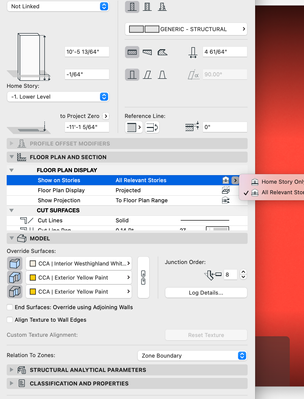
Appreciate this. Now how do you get the wall to show? The door and wall are on the -1. lower level, but I need them to show on the next level up. It doesn't seem to be giving the option to change this?
Mahmoud Qenawi
Ace
Options
- Mark as New
- Bookmark
- Subscribe
- Mute
- Subscribe to RSS Feed
- Permalink
- Report Inappropriate Content
2023-01-17 01:44 AM - edited 2023-01-17 01:46 AM
2023-01-17
01:44 AM
Adjust wall height to exceed to the next story & go to the upper view & from view settings - set floor plan cut plane to show down to 1 story below,
Please Note that FPCP settings will affect all view elements.
AC 29 INT 4006/WIN 11
AMD Ryzen 7 5800H with Radeon Graphics 3.20 GHz 16.0 GB
AMD Ryzen 7 5800H with Radeon Graphics 3.20 GHz 16.0 GB

Didn't find the answer?
Check other topics in this Forum
Back to ForumRead the latest accepted solutions!
Accepted SolutionsStart a new conversation!

Suggested topics
- After 3 years with Archicad, I'm honestly disappointed in General discussions
- Ci Doors + Windows : Wall Hole Glitch in Libraries & objects
- Best workflow for multiple wall finish combinations without Composite Bloat in Documentation
- 3D Document not showing extended floor finish into window niche (doors work fine) in Modeling
- Threshold / Sill - Why is this option not available on all Door Objects? in Libraries & objects
