
Turn on suggestions
Auto-suggest helps you quickly narrow down your search results by suggesting possible matches as you type.
Showing results for
EN
Turn on suggestions
Auto-suggest helps you quickly narrow down your search results by suggesting possible matches as you type.
Showing results for
- English
- :
- Forum
- :
- Libraries & objects
- :
- Re: Window/door and opening tool conjunction
Options
- Subscribe to RSS Feed
- Mark Topic as New
- Mark Topic as Read
- Pin this post for me
- Bookmark
- Subscribe to Topic
- Mute
- Printer Friendly Page

ArchiMind
Advocate
Options
- Mark as New
- Bookmark
- Subscribe
- Mute
- Subscribe to RSS Feed
- Permalink
- Report Inappropriate Content
2023-01-19
03:46 PM
- last edited on
2025-01-02
03:34 PM
by
 Molinda Prey
Window/door and opening tool conjunction
2023-01-19
03:46 PM
Hello everyone,
I have a quick question. Have anyone tried to use the opening tool in conjunction with the window/door tool and was able to remove the thin part of the wall that the opening tool is creating?
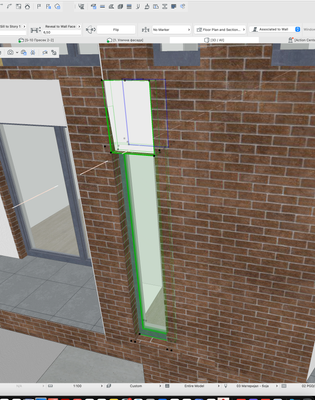
Cheers,
Stefan Veselinovic
Currently while asking the question I am working on
ArchiCAD 25, macOS Monterey.
Versions 13 to 25
CPU: AMD Ryzen 9 5900X 12-Core
RAM:32GB
GPU: RTX 2080Ti
Windows 11
CPU: AMD Ryzen 9 5900X 12-Core
RAM:32GB
GPU: RTX 2080Ti
Windows 11
Solved! Go to Solution.
1 Solution
Accepted Solutions

Barry Kelly
Moderator
Options
- Mark as New
- Bookmark
- Subscribe
- Mute
- Subscribe to RSS Feed
- Permalink
- Report Inappropriate Content
2023-01-20 02:32 AM
2023-01-20
02:32 AM
That is the side surface of the opening.
I don't think you can do anything with it in 25.
I think you can change the surface material in 26, but am not sure if you can hide it.
Just stretch the opening to include the window - it won't cut the window out.
Barry.
One of the forum moderators.
Versions 6.5 to 27
i7-10700 @ 2.9Ghz, 32GB ram, GeForce RTX 2060 (6GB), Windows 10
Lenovo Thinkpad - i7-1270P 2.20 GHz, 32GB RAM, Nvidia T550, Windows 11
Versions 6.5 to 27
i7-10700 @ 2.9Ghz, 32GB ram, GeForce RTX 2060 (6GB), Windows 10
Lenovo Thinkpad - i7-1270P 2.20 GHz, 32GB RAM, Nvidia T550, Windows 11
7 Replies 7
Barry Kelly
Moderator
Options
- Mark as New
- Bookmark
- Subscribe
- Mute
- Subscribe to RSS Feed
- Permalink
- Report Inappropriate Content
2023-01-20 02:32 AM
2023-01-20
02:32 AM
That is the side surface of the opening.
I don't think you can do anything with it in 25.
I think you can change the surface material in 26, but am not sure if you can hide it.
Just stretch the opening to include the window - it won't cut the window out.
Barry.
One of the forum moderators.
Versions 6.5 to 27
i7-10700 @ 2.9Ghz, 32GB ram, GeForce RTX 2060 (6GB), Windows 10
Lenovo Thinkpad - i7-1270P 2.20 GHz, 32GB RAM, Nvidia T550, Windows 11
Versions 6.5 to 27
i7-10700 @ 2.9Ghz, 32GB ram, GeForce RTX 2060 (6GB), Windows 10
Lenovo Thinkpad - i7-1270P 2.20 GHz, 32GB RAM, Nvidia T550, Windows 11
ArchiMind
Advocate
Options
- Mark as New
- Bookmark
- Subscribe
- Mute
- Subscribe to RSS Feed
- Permalink
- Report Inappropriate Content
2023-01-20 08:40 AM
2023-01-20
08:40 AM
Thank you for your reply, Barry.
In the end, before replying to me I did just that but seems a little bit off how sometimes tools are not communicating between themselves. Hope they will resolve this kind of behavior.
Cheers,
Versions 13 to 25
CPU: AMD Ryzen 9 5900X 12-Core
RAM:32GB
GPU: RTX 2080Ti
Windows 11
CPU: AMD Ryzen 9 5900X 12-Core
RAM:32GB
GPU: RTX 2080Ti
Windows 11

Lingwisyer
Guru
Options
- Mark as New
- Bookmark
- Subscribe
- Mute
- Subscribe to RSS Feed
- Permalink
- Report Inappropriate Content
2023-01-23 02:21 AM
2023-01-23
02:21 AM
You know, have you tried using the Opening Oversize settings within doors and windows?
| AC22-29 AUS 3200 | Help Those Help You - Add a Signature |
| Self-taught, bend it till it breaks | Creating a Thread |
| Win11 | i9 10850K | 64GB | RX6600 | Win11 | 7800X3D | 32GB | RTX5070TI |
ArchiMind
Advocate
Options
- Mark as New
- Bookmark
- Subscribe
- Mute
- Subscribe to RSS Feed
- Permalink
- Report Inappropriate Content
2023-01-24 07:52 AM
2023-01-24
07:52 AM
Hey @Lingwisyer,
I know about the option, but it wouldn't give me needed result.
It would cut the whole wall instead insulation part only.
At the end i just made opening bigger, as Barry mentioned.
Cheers,
Stefan
Versions 13 to 25
CPU: AMD Ryzen 9 5900X 12-Core
RAM:32GB
GPU: RTX 2080Ti
Windows 11
CPU: AMD Ryzen 9 5900X 12-Core
RAM:32GB
GPU: RTX 2080Ti
Windows 11

AlexV
Booster
Options
- Mark as New
- Bookmark
- Subscribe
- Mute
- Subscribe to RSS Feed
- Permalink
- Report Inappropriate Content
2026-02-27 10:40 AM
2026-02-27
10:40 AM
A few years later and I must be doing something wrong, because using a limited opening ( for a recess) and stretching the opening over the door will not cut the door , but it also covers it. The only way to get rid of the pesky opening edges is to draw an opening tool (infinte or through the wall) also over the door. As in the third instance. This can't be the way it's meant to work, is it?
Any ideas what I missed? Tested with reference plane on both sides as you can see.
/Alex


Barry Kelly
Moderator
Options
- Mark as New
- Bookmark
- Subscribe
- Mute
- Subscribe to RSS Feed
- Permalink
- Report Inappropriate Content
2026-02-27 01:16 PM
2026-02-27
01:16 PM
@AlexV wrote:
The only way to get rid of the pesky opening edges is to draw an opening tool (infinte or through the wall) also over the door. As in the third instance. This can't be the way it's meant to work, is it?
Yes, it appears that if you want a recess (niche) around the door, you will also have to add a second infinite opening to cut the wall away for the door.
The niche has a base surface, and as the openings do not affect the door. it also seems the door has no affect on the opening.
So, the opening shows the base (wall material) as if the wall is still there with no door.
Requiring that you add a second infinite opening to cut the wall away where the door is.
This does seem a little illogical, but it is the way it must be it seems.
You could always report this to your local Archicad support to see what they say.
Or make a wish that the opening object recognises the wall hole created by the door object.
Barry.
One of the forum moderators.
Versions 6.5 to 27
i7-10700 @ 2.9Ghz, 32GB ram, GeForce RTX 2060 (6GB), Windows 10
Lenovo Thinkpad - i7-1270P 2.20 GHz, 32GB RAM, Nvidia T550, Windows 11
Versions 6.5 to 27
i7-10700 @ 2.9Ghz, 32GB ram, GeForce RTX 2060 (6GB), Windows 10
Lenovo Thinkpad - i7-1270P 2.20 GHz, 32GB RAM, Nvidia T550, Windows 11
AlexV
Booster
Options
- Mark as New
- Bookmark
- Subscribe
- Mute
- Subscribe to RSS Feed
- Permalink
- Report Inappropriate Content
2026-02-27 03:49 PM
2026-02-27
03:49 PM
Hej, tx for the reply.
Maybe I misunderstood the original question and solution in the post. Bassicaly, I am also trying to get rid of the edge surface between a door and an opening, and the solution to draw the opening over the door doesn't work. That's why I reached out. But maybe OP was having issues with an infinte opening and a door and in that case it works.


Didn't find the answer?
Check other topics in this Forum
Back to ForumRead the latest accepted solutions!
Accepted SolutionsStart a new conversation!

