
Turn on suggestions
Auto-suggest helps you quickly narrow down your search results by suggesting possible matches as you type.
Showing results for
EN
Turn on suggestions
Auto-suggest helps you quickly narrow down your search results by suggesting possible matches as you type.
Showing results for
Options
- Subscribe to RSS Feed
- Mark Topic as New
- Mark Topic as Read
- Pin this post for me
- Bookmark
- Subscribe to Topic
- Mute
- Printer Friendly Page

Llian
Advocate
Options
- Mark as New
- Bookmark
- Subscribe
- Mute
- Subscribe to RSS Feed
- Permalink
- Report Inappropriate Content
2018-01-13 10:22 PM
3D views not showing up
2018-01-13
10:22 PM
Lilian Seow LEED AP | cSBA | CAPM | PMP
AC 29 USA FULL | Windows 11 Enterprise i5 3.10GHz | Archicad-user since 1994!
AC 29 USA FULL | Windows 11 Enterprise i5 3.10GHz | Archicad-user since 1994!
3 Replies 3

Anonymous
Not applicable
Options
- Mark as New
- Bookmark
- Subscribe
- Mute
- Subscribe to RSS Feed
- Permalink
- Report Inappropriate Content
2018-01-14 03:23 AM
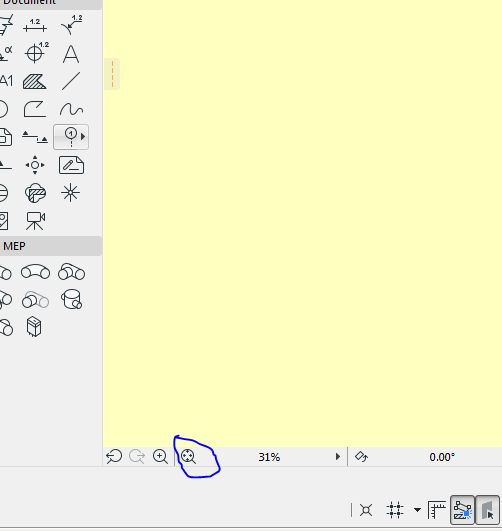
Llian
Advocate
Options
- Mark as New
- Bookmark
- Subscribe
- Mute
- Subscribe to RSS Feed
- Permalink
- Report Inappropriate Content
2018-01-14 03:25 AM
2018-01-14
03:25 AM
Thanks. I did show all layers and view extension. No 3D. Only the X, Y and Z coordinates. I had to copy and paste into a new template.
Lilian Seow LEED AP | cSBA | CAPM | PMP
AC 29 USA FULL | Windows 11 Enterprise i5 3.10GHz | Archicad-user since 1994!
AC 29 USA FULL | Windows 11 Enterprise i5 3.10GHz | Archicad-user since 1994!
Anonymous
Not applicable
Options
- Mark as New
- Bookmark
- Subscribe
- Mute
- Subscribe to RSS Feed
- Permalink
- Report Inappropriate Content
2018-01-14 03:39 AM
2018-01-14
03:39 AM
I solved this problem using the marquee tool. Go to the floor plan, draw the marquee tool and press f4 on Mac or f5 on windows. After you enter the 3D mode, also use the "fit to window" mode, then the model should appear.
Still looking?

Suggested topics
- Issues with 3Dconnexxion CadMouse Pro Wireless in Installation & update
- Expanded Show on Stories for Wall in Documentation
- Detail marker as plan in Documentation
- Section view at 1:20 in Modeling
- Is there a way to hyperlink files in order to place their drawings into a common layout book? in Documentation
