
Turn on suggestions
Auto-suggest helps you quickly narrow down your search results by suggesting possible matches as you type.
Showing results for
EN
Turn on suggestions
Auto-suggest helps you quickly narrow down your search results by suggesting possible matches as you type.
Showing results for
Options
- Subscribe to RSS Feed
- Mark Topic as New
- Mark Topic as Read
- Pin this post for me
- Bookmark
- Subscribe to Topic
- Mute
- Printer Friendly Page

Anonymous
Not applicable
Options
- Mark as New
- Bookmark
- Subscribe
- Mute
- Subscribe to RSS Feed
- Permalink
- Report Inappropriate Content
2006-02-28
09:33 PM
- last edited on
2023-05-23
05:17 PM
by
 Rubia Torres
Cutting or trimming beam
2006-02-28
09:33 PM

13 Replies 13

Erika Epstein
Enthusiast
Options
- Mark as New
- Bookmark
- Subscribe
- Mute
- Subscribe to RSS Feed
- Permalink
- Report Inappropriate Content
2006-03-01 07:57 AM
2006-03-01
07:57 AM
Have you tried creating a vaulted roof to trim with?
Erika
Architect, Consultant
MacBook Pro Retina, 15-inch Yosemite 2.8 GHz Intel Core i7 16 GB 1600 MHz DDR3
Mac OSX 10.11.1
AC5-18
Onuma System
"Implementing Successful Building Information Modeling"
Architect, Consultant
MacBook Pro Retina, 15-inch Yosemite 2.8 GHz Intel Core i7 16 GB 1600 MHz DDR3
Mac OSX 10.11.1
AC5-18
Onuma System
"Implementing Successful Building Information Modeling"

David Maudlin
Rockstar
Options
- Mark as New
- Bookmark
- Subscribe
- Mute
- Subscribe to RSS Feed
- Permalink
- Report Inappropriate Content
2006-03-01 01:58 PM
2006-03-01
01:58 PM
Colyer-Lloyd:
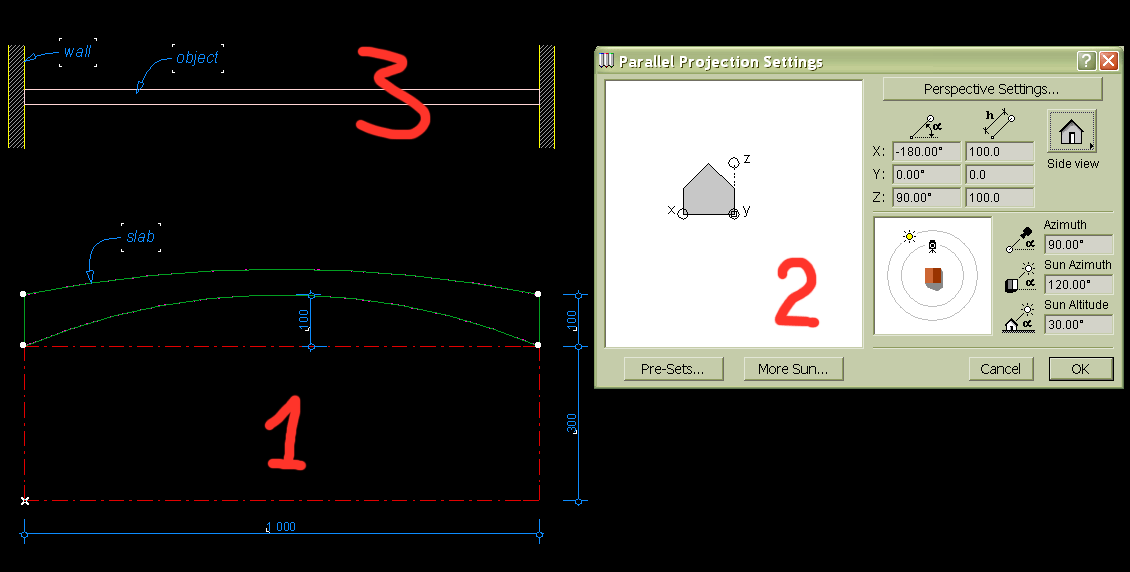
You also might want to create your own library part. Create the beam shape you want with the slab tool, set the 3D view of this slab as an elevation from what will be the top, save as Gdl object (which will rotate the slab 90 degrees so it is standing up), and place your new part. You can search this forum for more information on this technique, and the documentation that came with ArchiCAD.
HTH,
David
You also might want to create your own library part. Create the beam shape you want with the slab tool, set the 3D view of this slab as an elevation from what will be the top, save as Gdl object (which will rotate the slab 90 degrees so it is standing up), and place your new part. You can search this forum for more information on this technique, and the documentation that came with ArchiCAD.
HTH,
David
David Maudlin / Architect
www.davidmaudlin.com
Digital Architecture
AC29 USA Perpetual • Mac mini M4 Pro OSX15 | 64 gb ram • MacBook Pro M3 Pro OSX14 | 36 gb ram
www.davidmaudlin.com
Digital Architecture
AC29 USA Perpetual • Mac mini M4 Pro OSX15 | 64 gb ram • MacBook Pro M3 Pro OSX14 | 36 gb ram
Anonymous
Not applicable
Options
- Mark as New
- Bookmark
- Subscribe
- Mute
- Subscribe to RSS Feed
- Permalink
- Report Inappropriate Content
2006-03-01 04:19 PM
2006-03-01
04:19 PM
SEO?
Anonymous
Not applicable
Options
- Mark as New
- Bookmark
- Subscribe
- Mute
- Subscribe to RSS Feed
- Permalink
- Report Inappropriate Content
2006-03-01 04:56 PM
2006-03-01
04:56 PM
Erika wrote:
Have you tried creating a vaulted roof to trim with?
I tried that, but I can't seem to get the angle I want. All I get are flat sections and not a true curve, frustrating!
David,
I don't understand what your telling me to do.
Here's another pic, looking down to the end of the restaurant


TomWaltz
Participant
Options
- Mark as New
- Bookmark
- Subscribe
- Mute
- Subscribe to RSS Feed
- Permalink
- Report Inappropriate Content
2006-03-01 05:24 PM
2006-03-01
05:24 PM
Archicad is pretty bad at creating curves in the XZ and YZ planes in general.
You may want to consider making the beam a wall, then making a custom "wallhole" window to create the arch.
It's a bit annoying, but allows you to create a truly curved cut in the wall.
You may want to consider making the beam a wall, then making a custom "wallhole" window to create the arch.
It's a bit annoying, but allows you to create a truly curved cut in the wall.
Tom Waltz
Anonymous
Not applicable
Options
- Mark as New
- Bookmark
- Subscribe
- Mute
- Subscribe to RSS Feed
- Permalink
- Report Inappropriate Content
2006-03-01 06:57 PM
2006-03-01
06:57 PM
If I understand the question, this is what you want.
Two ways to do it:
1. Doing what David told you - a little bit difficult the first time, but if you get the idea it's very fast.
2. Using SEO - Solid Element Operation. Make a lying cylinder and subtract it from your beam.

Two ways to do it:
1. Doing what David told you - a little bit difficult the first time, but if you get the idea it's very fast.
2. Using SEO - Solid Element Operation. Make a lying cylinder and subtract it from your beam.
Anonymous
Not applicable
Options
- Mark as New
- Bookmark
- Subscribe
- Mute
- Subscribe to RSS Feed
- Permalink
- Report Inappropriate Content
2006-03-01 07:02 PM
2006-03-01
07:02 PM
Wow, you are amazing, thats what i need.
TomWaltz
Participant
Options
- Mark as New
- Bookmark
- Subscribe
- Mute
- Subscribe to RSS Feed
- Permalink
- Report Inappropriate Content
2006-03-01 07:15 PM
2006-03-01
07:15 PM
whoa, BIG cylinder.
Tom Waltz
Anonymous
Not applicable
Options
- Mark as New
- Bookmark
- Subscribe
- Mute
- Subscribe to RSS Feed
- Permalink
- Report Inappropriate Content
2006-03-01 07:16 PM
Still looking?
