
Turn on suggestions
Auto-suggest helps you quickly narrow down your search results by suggesting possible matches as you type.
Showing results for
EN
Turn on suggestions
Auto-suggest helps you quickly narrow down your search results by suggesting possible matches as you type.
Showing results for
Options
- Subscribe to RSS Feed
- Mark Topic as New
- Mark Topic as Read
- Pin this post for me
- Bookmark
- Subscribe to Topic
- Mute
- Printer Friendly Page

mserrato
Contributor
Options
- Mark as New
- Bookmark
- Subscribe
- Mute
- Subscribe to RSS Feed
- Permalink
- Report Inappropriate Content
2022-08-04 04:23 PM
Graphic Override for New Walls
2022-08-04
04:23 PM
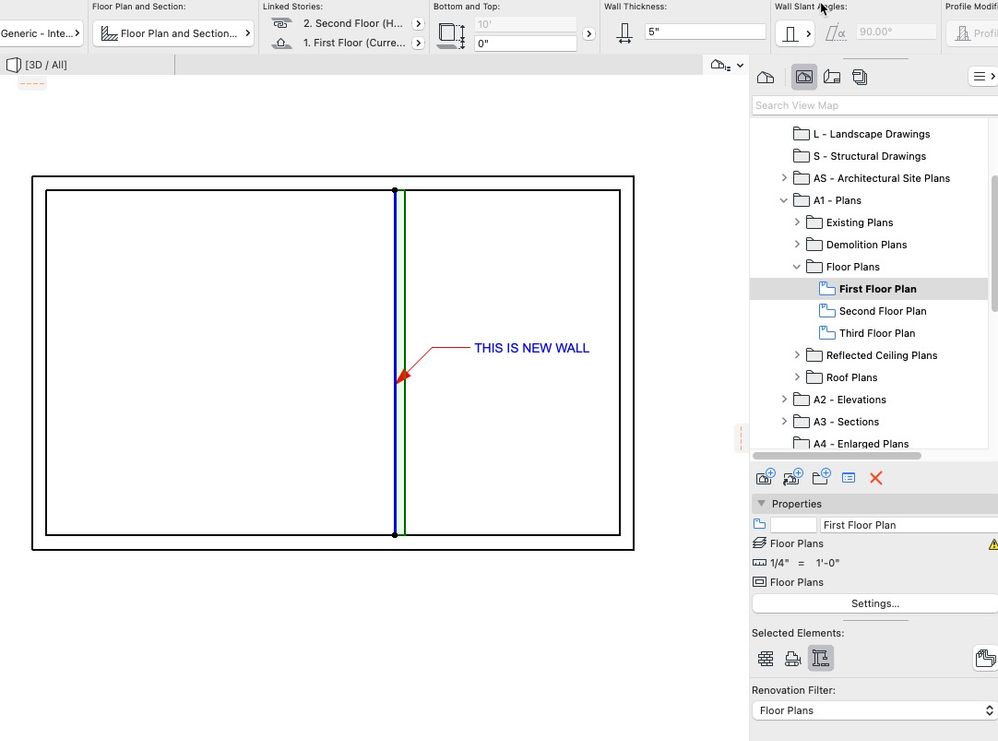
good morning, simple problem. I want to show new walls in plan with a hatch. the Renovation Filter > Floor Plans > Graphic Override Rules is showing a hatch for New Elements, but walls that are designated New are still showing up as white, without the hatch. thanks, margaret
Solved! Go to Solution.
Solved
Read-Only
2 Solutions
Accepted Solutions

Andrii Levko
Expert
Options
- Mark as New
- Bookmark
- Subscribe
- Mute
- Subscribe to RSS Feed
- Permalink
- Report Inappropriate Content
2022-08-04 05:10 PM
2022-08-04
05:10 PM
Solution
Andrii Levko
Expert
Options
- Mark as New
- Bookmark
- Subscribe
- Mute
- Subscribe to RSS Feed
- Permalink
- Report Inappropriate Content
2022-08-04 05:21 PM
2022-08-04
05:21 PM
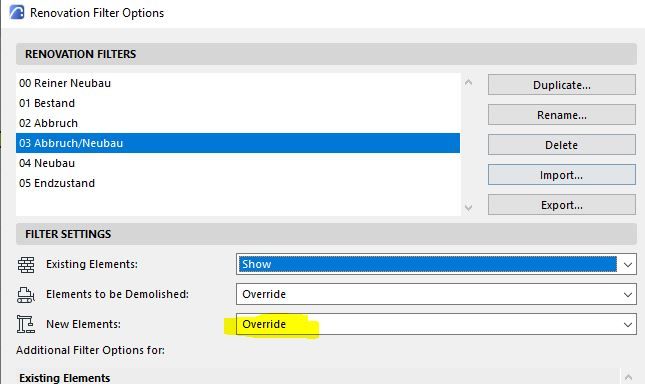
You should check Filter Settings in Renovation Filter Options, if you have selected "Override" for New Elements, as picture above.
Andrii
AC 8.1 - 28 INT/POL 3001
Win11
AC 8.1 - 28 INT/POL 3001
Win11
Solution
10 Replies 10
Andrii Levko
Expert
Options
- Mark as New
- Bookmark
- Subscribe
- Mute
- Subscribe to RSS Feed
- Permalink
- Report Inappropriate Content
2022-08-04 05:00 PM
2022-08-04
05:00 PM
Good evening.
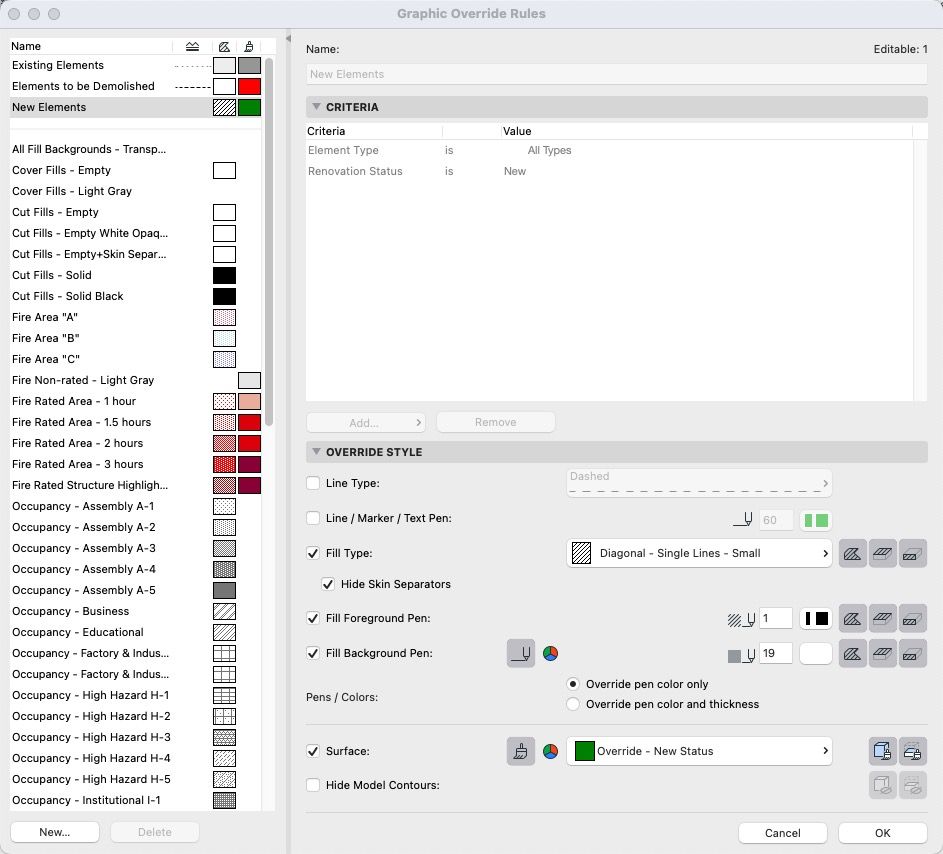
Check if you have Override Cover Fill Background for New Elements in GO settings

Andrii
AC 8.1 - 28 INT/POL 3001
Win11
AC 8.1 - 28 INT/POL 3001
Win11
mserrato
Contributor
Options
- Mark as New
- Bookmark
- Subscribe
- Mute
- Subscribe to RSS Feed
- Permalink
- Report Inappropriate Content
2022-08-04 05:03 PM
2022-08-04
05:03 PM
mserrato
Contributor
Options
- Mark as New
- Bookmark
- Subscribe
- Mute
- Subscribe to RSS Feed
- Permalink
- Report Inappropriate Content
2022-08-04 05:04 PM
2022-08-04
05:04 PM
thanks, I think I do, see picture...still not working?
Andrii Levko
Expert
Options
- Mark as New
- Bookmark
- Subscribe
- Mute
- Subscribe to RSS Feed
- Permalink
- Report Inappropriate Content
2022-08-04 05:10 PM
2022-08-04
05:10 PM
Do you have selected override for New Elements?
Andrii
AC 8.1 - 28 INT/POL 3001
Win11
AC 8.1 - 28 INT/POL 3001
Win11
Solution

Lee Hankins
Virtuoso
Options
- Mark as New
- Bookmark
- Subscribe
- Mute
- Subscribe to RSS Feed
- Permalink
- Report Inappropriate Content
2022-08-04 05:10 PM
2022-08-04
05:10 PM
You don't have any other Graphic Override rules applied do you? Graphic overrides will take precedent over renovation overrides. make sure your graphic Overrides are set to none and see if it works then.
Lee Hankins
ArchiCAD 4.5 - Archicad 29
macOS Tahoe (26.0)
ArchiCAD 4.5 - Archicad 29
macOS Tahoe (26.0)
Lee Hankins
Virtuoso
Options
- Mark as New
- Bookmark
- Subscribe
- Mute
- Subscribe to RSS Feed
- Permalink
- Report Inappropriate Content
2022-08-04 05:11 PM
2022-08-04
05:11 PM
Make sure your Renovation Filter is set to a filter type that is configured to override 'new' elements.
Lee Hankins
ArchiCAD 4.5 - Archicad 29
macOS Tahoe (26.0)
ArchiCAD 4.5 - Archicad 29
macOS Tahoe (26.0)
mserrato
Contributor
Options
- Mark as New
- Bookmark
- Subscribe
- Mute
- Subscribe to RSS Feed
- Permalink
- Report Inappropriate Content
2022-08-04 05:16 PM
2022-08-04
05:16 PM
no, and I'm sure wall in question is "new item" on renovation pallet.
Andrii Levko
Expert
Options
- Mark as New
- Bookmark
- Subscribe
- Mute
- Subscribe to RSS Feed
- Permalink
- Report Inappropriate Content
2022-08-04 05:21 PM
2022-08-04
05:21 PM
You should check Filter Settings in Renovation Filter Options, if you have selected "Override" for New Elements, as picture above.
Andrii
AC 8.1 - 28 INT/POL 3001
Win11
AC 8.1 - 28 INT/POL 3001
Win11
Solution
mserrato
Contributor
Options
- Mark as New
- Bookmark
- Subscribe
- Mute
- Subscribe to RSS Feed
- Permalink
- Report Inappropriate Content
2022-08-04 05:22 PM
2022-08-04
05:22 PM
that's it! thanks Andrii. I'm just coming to Archicad from Revit, and I'm baffled by the number of options.....

Still looking?

