
Turn on suggestions
Auto-suggest helps you quickly narrow down your search results by suggesting possible matches as you type.
Showing results for
EN
Turn on suggestions
Auto-suggest helps you quickly narrow down your search results by suggesting possible matches as you type.
Showing results for
Options
- Subscribe to RSS Feed
- Mark Topic as New
- Mark Topic as Read
- Pin this post for me
- Bookmark
- Subscribe to Topic
- Mute
- Printer Friendly Page

Graeme
Booster
Options
- Mark as New
- Bookmark
- Subscribe
- Mute
- Subscribe to RSS Feed
- Permalink
- Report Inappropriate Content
Monday - last edited Monday
Opening behaving badly..
Monday
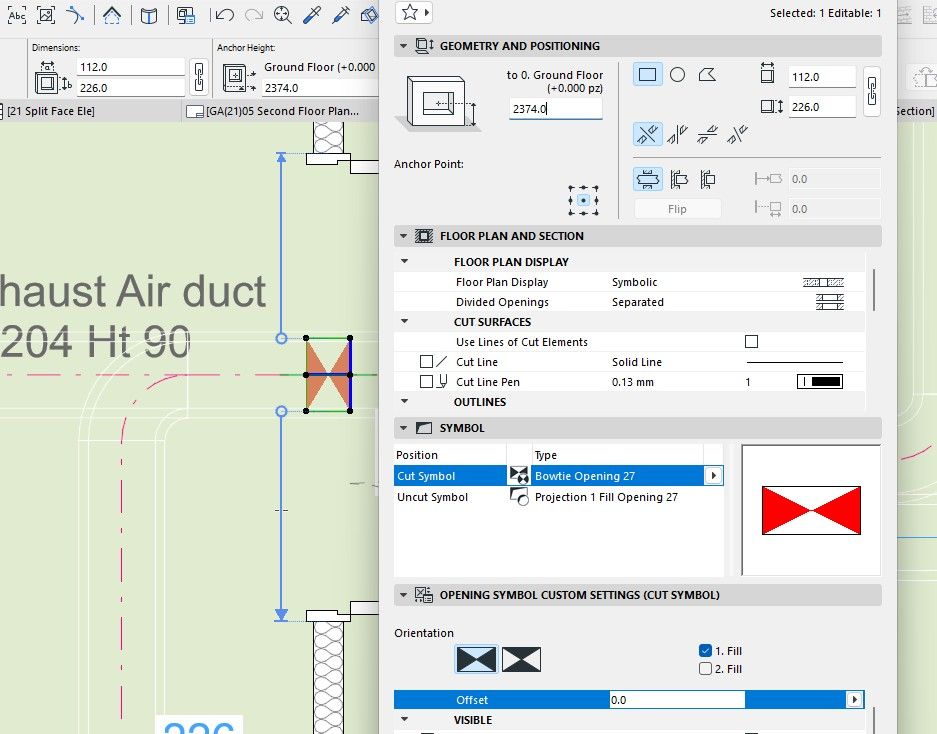
I've used the Opening tool to add holes for ductwork through my partitions. What is weird is that a lot of these Openings are behaving badly or weirdly as their width and height are swapped around and I can't find a reason why.
The screenshots show two openings one behaving correctly and the other with the weird behaviour namely when you enter the width the height changes and same if you enter the height the width changes.

ArchiCAD 3.4 - 28
Windows 11
Windows 11
7 Replies 7
Graeme
Booster
Options
- Mark as New
- Bookmark
- Subscribe
- Mute
- Subscribe to RSS Feed
- Permalink
- Report Inappropriate Content
Monday
Monday
Hmm may have found what is doing it. When I use the "Create Openings" palette the ressulting opening has the flipped width and height. Whereas when I just use the syringe tool and then place an Opening manually it works fine.
Would be nice if anyone else in AC28 gets the same result.
ArchiCAD 3.4 - 28
Windows 11
Windows 11

marcoariveross
Booster
Options
- Mark as New
- Bookmark
- Subscribe
- Mute
- Subscribe to RSS Feed
- Permalink
- Report Inappropriate Content
Monday
Monday
Hi
If you look closely, there's no such error.
Your elements are rotated. If you place an opening in two elements with different orientations in plan and/or 3D, you'll obviously see a different graphical representation. The dimensions are based on the element's plane, not on the view from a higher plane.
BIM Manager Pavimaq
Lima-Perú
Archicad 29-Windows 11-64Gb RAM
Lima-Perú
Archicad 29-Windows 11-64Gb RAM
Graeme
Booster
Options
- Mark as New
- Bookmark
- Subscribe
- Mute
- Subscribe to RSS Feed
- Permalink
- Report Inappropriate Content
yesterday
yesterday
Sorry I disagree, you can see in the screenshots below the objects measure 226mm in Plan whereas the preview of the misbehaving objects says it is 112mm. Also in the schedule I have made it gets it wrong too. It shows the length as the height and visa versa yet in 3d and 2d Plan view they are the correct width and height.


ArchiCAD 3.4 - 28
Windows 11
Windows 11

Turit
Booster
Options
- Mark as New
- Bookmark
- Subscribe
- Mute
- Subscribe to RSS Feed
- Permalink
- Report Inappropriate Content
yesterday
yesterday
The opening can be rotated manually. Once rotated, it will not rotate back even after the properties are transferred.

Graeme
Booster
Options
- Mark as New
- Bookmark
- Subscribe
- Mute
- Subscribe to RSS Feed
- Permalink
- Report Inappropriate Content
yesterday
yesterday
Thanks for the video.
To me that is a problem particularly if using fuse link dampers which need to be installed so gravity helps them operate.
If you create a schedule to which the Buyer purchases the dampers based on ArchiCAD's schedule where the width and height have got messed up as you show then the Damper will be ordered with the wrong orientation.
ArchiCAD 3.4 - 28
Windows 11
Windows 11

Mahmoud Qenawi
Ace
Options
- Mark as New
- Bookmark
- Subscribe
- Mute
- Subscribe to RSS Feed
- Permalink
- Report Inappropriate Content
yesterday - last edited yesterday
yesterday
You're right, even beams have the same attitude when rotating.


Better, we should adjust their size numerically or graphically without using the rotating feature.
Don't know if it's a bug or not but thanks for informing us.

AC 29 INT 4006/WIN 11
AMD Ryzen 7 5800H with Radeon Graphics 3.20 GHz 16.0 GB
AMD Ryzen 7 5800H with Radeon Graphics 3.20 GHz 16.0 GB

Lingwisyer
Guru
Options
- Mark as New
- Bookmark
- Subscribe
- Mute
- Subscribe to RSS Feed
- Permalink
- Report Inappropriate Content
8 hours ago
8 hours ago
Unlike the Opening Tool, the Beam Tool has a rotation angle that you can reference. The Opening Tool on the other hand freely rotates and changes to polygonal without any reflection in the settings.
Ling.
| AC22-29 AUS 3200 | Help Those Help You - Add a Signature |
| Self-taught, bend it till it breaks | Creating a Thread |
| Win11 | i9 10850K | 64GB | RX6600 | Win11 | R5 2600 | 16GB | GTX1660 |

Still looking?
