
Turn on suggestions
Auto-suggest helps you quickly narrow down your search results by suggesting possible matches as you type.
Showing results for
EN
Turn on suggestions
Auto-suggest helps you quickly narrow down your search results by suggesting possible matches as you type.
Showing results for
Options
- Subscribe to RSS Feed
- Mark Topic as New
- Mark Topic as Read
- Pin this post for me
- Bookmark
- Subscribe to Topic
- Mute
- Printer Friendly Page

Polar Bear
Booster
Options
- Mark as New
- Bookmark
- Subscribe
- Mute
- Subscribe to RSS Feed
- Permalink
- Report Inappropriate Content
2021-11-08 09:02 PM
PLACE EXTERNAL DRAWING : BLANK SCREEN
2021-11-08
09:02 PM
Hello,
I have tried to place an external drawing. It is the drawing of a house plan onto a topo site made on dwg.
When it gets onto the independent worksheet, it is blank. Attached image. This happens with few of my sites project.
What am i doing wrong?
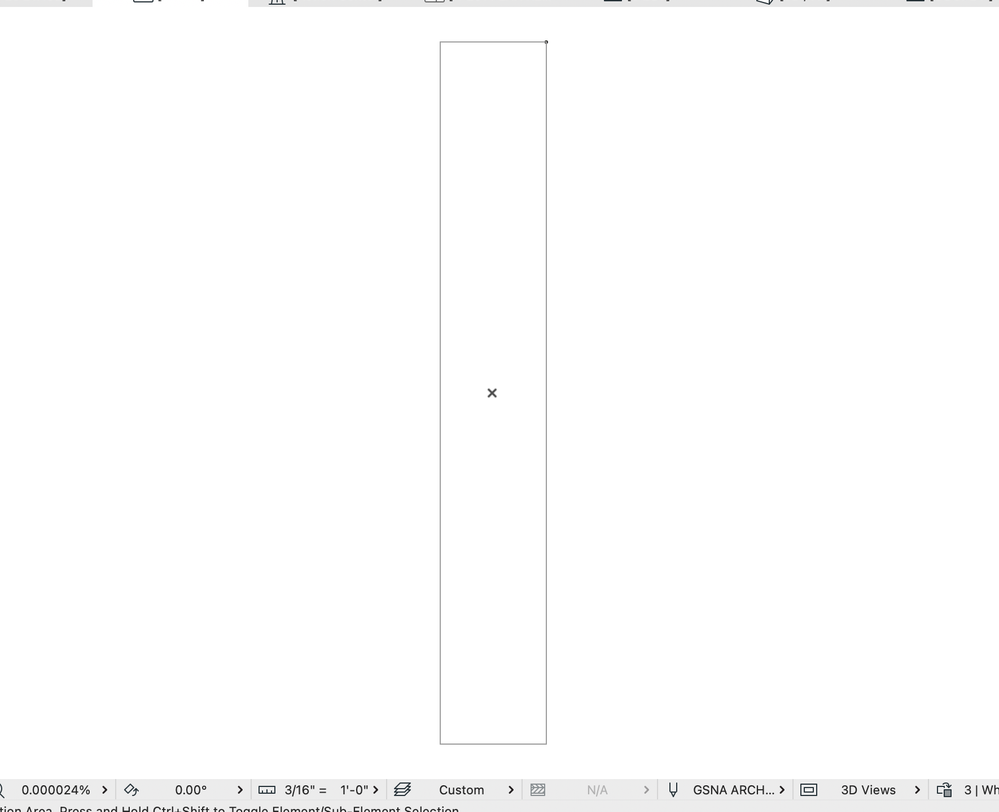
Archicad 25 - 5010
Macbook pro 13" /Big sur 11.4 + External 4K 27"
Macbook pro 13" /Big sur 11.4 + External 4K 27"
Solved! Go to Solution.
Solved
Read-Only
1 Solution
Accepted Solutions

Lingwisyer
Guru
Options
- Mark as New
- Bookmark
- Subscribe
- Mute
- Subscribe to RSS Feed
- Permalink
- Report Inappropriate Content
2021-11-10 07:49 AM
2021-11-10
07:49 AM
Might it be that your topo came with a Survey Point a few kilometres away?
| AC22-29 AUS 3200 | Help Those Help You - Add a Signature |
| Self-taught, bend it till it breaks | Creating a Thread |
| Win11 | i9 10850K | 64GB | RX6600 | Win11 | 7800X3D | 32GB | RTX5070TI |
Solution
4 Replies 4

DGSketcher
Legend
Options
- Mark as New
- Bookmark
- Subscribe
- Mute
- Subscribe to RSS Feed
- Permalink
- Report Inappropriate Content
2021-11-08 10:45 PM
2021-11-08
10:45 PM
You need to know the size of the external drawing. If you are importing a PDF, set the scale which you can see in your image to match the scale of the PDF. If it is a DWG then you should be able to bring it into the worksheet without worrying about the scale, but the DWG will have units that you need to match e.g. 1 unit = 1 foot. I'm metric so we usually just have a choice of 1 unit = 1mm or 1m.
You might get more help if you can better describe the drawing you are trying to import.
Apple iMac Intel i9 / macOS Sonoma / AC27UKI (most recent builds.. if they work)
Polar Bear
Booster
Options
- Mark as New
- Bookmark
- Subscribe
- Mute
- Subscribe to RSS Feed
- Permalink
- Report Inappropriate Content
2021-11-09 10:41 PM
2021-11-09
10:41 PM
Thanks
I am trying to import a dwg, site plan.
When i zoom out on autocad, i see only the topography area. When i import on pln, it comes with a huge huge area. i need to zoom in a tiny corner to realise the drawing is there. Therefore, i then need to explode and flush some stuff...
Thanks a lot
Archicad 25 - 5010
Macbook pro 13" /Big sur 11.4 + External 4K 27"
Macbook pro 13" /Big sur 11.4 + External 4K 27"
DGSketcher
Legend
Options
- Mark as New
- Bookmark
- Subscribe
- Mute
- Subscribe to RSS Feed
- Permalink
- Report Inappropriate Content
2021-11-09 11:54 PM
2021-11-09
11:54 PM
Good that you have identified the problem. You might also consider drawings that are a long way from the origin are prone to graphic problems. By the sounds of it you may want to drag the actual drawing closer to 0,0.
Apple iMac Intel i9 / macOS Sonoma / AC27UKI (most recent builds.. if they work)
Lingwisyer
Guru
Options
- Mark as New
- Bookmark
- Subscribe
- Mute
- Subscribe to RSS Feed
- Permalink
- Report Inappropriate Content
2021-11-10 07:49 AM
2021-11-10
07:49 AM
Might it be that your topo came with a Survey Point a few kilometres away?
| AC22-29 AUS 3200 | Help Those Help You - Add a Signature |
| Self-taught, bend it till it breaks | Creating a Thread |
| Win11 | i9 10850K | 64GB | RX6600 | Win11 | 7800X3D | 32GB | RTX5070TI |
Solution

Still looking?

Suggested topics
- Archicad 29 crashes when updating drawings linked to another Teamwork project in Teamwork & BIMcloud
- Importing DWG as external drawing wrong coordinates compared to XREF in Collaboration with other software
- Print Dialog Box with Tiny Font in Installation & update
- Dialog windows are the max extent of my screen and can't be resized Archicad 28 in Installation & update
- macOS CloudStorage (Dropbox) breaking PMK Drawing Links between team members (User Path Issue) in Project data & BIM
