
Turn on suggestions
Auto-suggest helps you quickly narrow down your search results by suggesting possible matches as you type.
Showing results for
EN
Turn on suggestions
Auto-suggest helps you quickly narrow down your search results by suggesting possible matches as you type.
Showing results for
Options
- Subscribe to RSS Feed
- Mark Topic as New
- Mark Topic as Read
- Pin this post for me
- Bookmark
- Subscribe to Topic
- Mute
- Printer Friendly Page

Anonymous
Not applicable
Options
- Mark as New
- Bookmark
- Subscribe
- Mute
- Subscribe to RSS Feed
- Permalink
- Report Inappropriate Content
2019-11-18 10:28 AM
Reducing the size of multiple text frames at one go
2019-11-18
10:28 AM
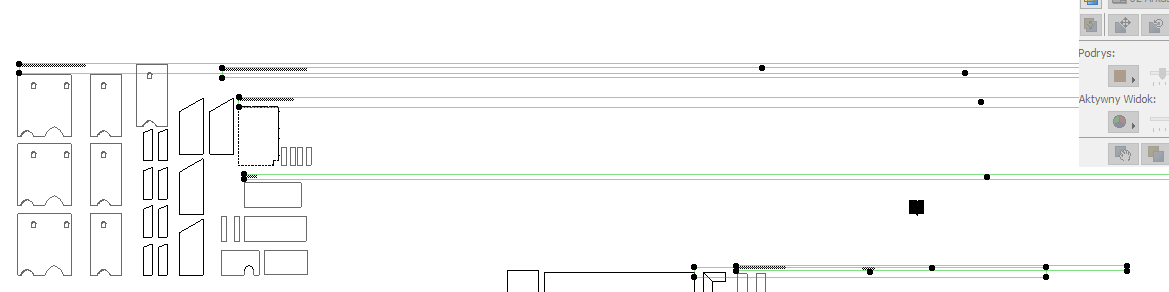
Due to too dense dashed line in this particular floor plan, I had to change the scale of the drawing from 1:10 to 1:100, all texts became obiviously too big after that.
So I reduced the text size by 10times, and all went ok except the text frames that have become very long.
Is there any way I could easily change them at one go, not to resize them one by one manually?
thanks!
Solved! Go to Solution.
1 Solution
Accepted Solutions

Barry Kelly
Moderator
Options
- Mark as New
- Bookmark
- Subscribe
- Mute
- Subscribe to RSS Feed
- Permalink
- Report Inappropriate Content
2019-11-18 10:42 AM
2019-11-18
10:42 AM
Select all of the text and turn of the 'Wrap text' option in the settings.
Then you can turn it back on if you want to.
Barry.
Then you can turn it back on if you want to.
Barry.
One of the forum moderators.
Versions 6.5 to 27
i7-10700 @ 2.9Ghz, 32GB ram, GeForce RTX 2060 (6GB), Windows 10
Lenovo Thinkpad - i7-1270P 2.20 GHz, 32GB RAM, Nvidia T550, Windows 11
Versions 6.5 to 27
i7-10700 @ 2.9Ghz, 32GB ram, GeForce RTX 2060 (6GB), Windows 10
Lenovo Thinkpad - i7-1270P 2.20 GHz, 32GB RAM, Nvidia T550, Windows 11
Solution
2 Replies 2
Barry Kelly
Moderator
Options
- Mark as New
- Bookmark
- Subscribe
- Mute
- Subscribe to RSS Feed
- Permalink
- Report Inappropriate Content
2019-11-18 10:42 AM
2019-11-18
10:42 AM
Select all of the text and turn of the 'Wrap text' option in the settings.
Then you can turn it back on if you want to.
Barry.
Then you can turn it back on if you want to.
Barry.
One of the forum moderators.
Versions 6.5 to 27
i7-10700 @ 2.9Ghz, 32GB ram, GeForce RTX 2060 (6GB), Windows 10
Lenovo Thinkpad - i7-1270P 2.20 GHz, 32GB RAM, Nvidia T550, Windows 11
Versions 6.5 to 27
i7-10700 @ 2.9Ghz, 32GB ram, GeForce RTX 2060 (6GB), Windows 10
Lenovo Thinkpad - i7-1270P 2.20 GHz, 32GB RAM, Nvidia T550, Windows 11
Solution
Anonymous
Not applicable
Options
- Mark as New
- Bookmark
- Subscribe
- Mute
- Subscribe to RSS Feed
- Permalink
- Report Inappropriate Content
2019-11-18 11:37 AM
2019-11-18
11:37 AM
Wow, thanks mate! it worked..
Still looking?

Suggested topics
- 'Random Origin' has no effect in 3D window in Visualization
- Split drawings across multiple layouts in Documentation
- Door and window schedule scheme setting 'view from outside' in Collaboration with other software
- Reducing the size of multiple text frames at one go in Modeling
- Use graphic override to change one material in object in Visualization
