
Turn on suggestions
Auto-suggest helps you quickly narrow down your search results by suggesting possible matches as you type.
Showing results for
EN
Turn on suggestions
Auto-suggest helps you quickly narrow down your search results by suggesting possible matches as you type.
Showing results for
Options
- Subscribe to RSS Feed
- Mark Topic as New
- Mark Topic as Read
- Pin this post for me
- Bookmark
- Subscribe to Topic
- Mute
- Printer Friendly Page

Brett Brown
Advocate
Options
- Mark as New
- Bookmark
- Subscribe
- Mute
- Subscribe to RSS Feed
- Permalink
- Report Inappropriate Content
2008-08-20 12:48 AM
Set up Template
2008-08-20
12:48 AM
Imac, Big Sur AC 20 NZ, AC 25 Solo UKI,
22 Replies 22

Dennis Lee
Booster
Options
- Mark as New
- Bookmark
- Subscribe
- Mute
- Subscribe to RSS Feed
- Permalink
- Report Inappropriate Content
2008-08-21 08:39 AM
2008-08-21
08:39 AM
Wow, this story marker seems like it can do everything! I hope the author is kind enough to share w/ us.
On another note, I wish there would be a more efficient way for GDL gurus to share their work w/ the rest of us, instead of bit here, bit there almost by chance. Hopefully they can be rewarded somehow by GS.
On another note, I wish there would be a more efficient way for GDL gurus to share their work w/ the rest of us, instead of bit here, bit there almost by chance. Hopefully they can be rewarded somehow by GS.
ArchiCAD 25 & 24 USA
Windows 10 x64
Since ArchiCAD 9
Windows 10 x64
Since ArchiCAD 9

RandyC
Advocate
Options
- Mark as New
- Bookmark
- Subscribe
- Mute
- Subscribe to RSS Feed
- Permalink
- Report Inappropriate Content
2008-08-22 01:19 AM
2008-08-22
01:19 AM
Thanks Matthew , as time permits.....
Link , I hope to see this story marker as well , maybe in the depository ?
Link , I hope to see this story marker as well , maybe in the depository ?
ArchiCAD 4.5 --- 27 , Win 10 , dual monitors, 64 gb ram,Nvidia GeforceRTX 2080 TI, I-9

 Link
Link
Graphisoft Partner
Options
- Mark as New
- Bookmark
- Subscribe
- Mute
- Subscribe to RSS Feed
- Permalink
- Report Inappropriate Content
2008-08-22 02:32 AM
2008-08-22
02:32 AM
RandyC wrote:Rod Jurich is taking a look at it and we'll see what he comes up with before posting it to the depository.
Thanks Matthew , as time permits.....
Link , I hope to see this story marker as well , maybe in the depository ?
Cheers,
Link.

__archiben
Booster
Options
- Mark as New
- Bookmark
- Subscribe
- Mute
- Subscribe to RSS Feed
- Permalink
- Report Inappropriate Content
2008-08-22 03:38 AM
2008-08-22
03:38 AM
Link wrote:link, rod and rob
Rod Jurich is taking a look at it and we'll see what he comes up with before posting it to the depository.
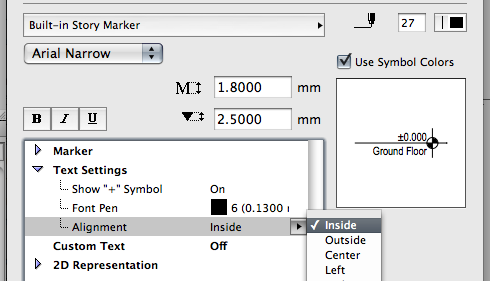
the one feature i find the absolute most important in the built-in marker is the ability to align the text to the INSIDE (or indeed OUTSIDE) as opposed to simply left/right/centre.
other storey markers i've seen don't have this functionality - does yours?
(incidentally, as well as the reference levels, another feature i've longed for in this is the ability to offset the marker
cheers!
b
b e n _ f r o s t
b f [a t ] p l a n b a r c h i t e c t u r e [d o t] n z
archicad | sketchup | morpholio | phpp
b f [a t ] p l a n b a r c h i t e c t u r e [d o t] n z
archicad | sketchup | morpholio | phpp

Rod Jurich
Contributor
Options
- Mark as New
- Bookmark
- Subscribe
- Mute
- Subscribe to RSS Feed
- Permalink
- Report Inappropriate Content
2008-08-22 06:39 AM

Rod Jurich
Contributor
Options
- Mark as New
- Bookmark
- Subscribe
- Mute
- Subscribe to RSS Feed
- Permalink
- Report Inappropriate Content
2008-08-22 06:42 AM
2008-08-22
06:42 AM
~/archiben wrote:And the interface.
/..other storey markers i've seen don't have this functionality - does yours/.

Rod Jurich
AC4.55 - AC14 INT (4204) | | OBJECTiVE |
AC4.55 - AC14 INT (4204) | | OBJECTiVE |

Anonymous
Not applicable
Options
- Mark as New
- Bookmark
- Subscribe
- Mute
- Subscribe to RSS Feed
- Permalink
- Report Inappropriate Content
2008-08-22 07:20 AM
2008-08-22
07:20 AM
~/archiben wrote:I think mine does it but I would have to check (and I've shut down for the night). It is certainly possible. I must admit though that the tool is so limited it is hard to get excited about making it do backflips through flaming hoops.
(incidentally, as well as the reference levels, another feature i've longed for in this is the ability to offset the markerintothe extent of the section cut rather than out away from it. is that even possible?)
Since independent level line markers are still needed most of my clients prefer just to use those and not have two different work methods for what is essentially the same task.
Brett Brown
Advocate
Options
- Mark as New
- Bookmark
- Subscribe
- Mute
- Subscribe to RSS Feed
- Permalink
- Report Inappropriate Content
2009-03-03 10:59 PM
2009-03-03
10:59 PM
Is Rod or Matthew going to kindly upload there markers?
Imac, Big Sur AC 20 NZ, AC 25 Solo UKI,
Anonymous
Not applicable
Options
- Mark as New
- Bookmark
- Subscribe
- Mute
- Subscribe to RSS Feed
- Permalink
- Report Inappropriate Content
2009-03-04 10:43 AM
2009-03-04
10:43 AM
Matthew wrote:Matthew... YOU ROCK MAN!Link wrote:Like this?
Maybe a GDL guru here can modify the Built-in Story Marker
It's not a modification of the GS marker (which always seems more trouble than it's worth) but rather written from scratch (well actually adapted from my level line marker).
It's rather simple since the story marker subtype is pathetically limited in functionality; most significantly it lacks any dynamic hotspots to provide individual adjustments for length and offsets. Since the markers cannot be individually adjusted there is little that can be accomplished even with manually typed parameter values.
To be honest I think that the story marker feature is an embarrassing effort to match a Revit feature (which is dramatically superior) and is nearly useless as a result.
Features:
There are parameters to select the reference elevation and to choose between decimal feet, feet & inches, and meters.
The default font is hard coded to Arial and there is a parameter to override this and use the font from the pop-up list. If anyone wants to hard code a different font name there are instructions in the master script.
There is also a parameter to adjust the marker (called "Extend marker...") that will shift the markers' positions relative to the sections' extents.

Rod Jurich
Contributor
Options
- Mark as New
- Bookmark
- Subscribe
- Mute
- Subscribe to RSS Feed
- Permalink
- Report Inappropriate Content
2009-03-05 02:42 AM
2009-03-05
02:42 AM
Brett wrote:Brett, part attached. Will upload later.
Is Rod or Matthew going to kindly upload there markers?
This part began as part of the 3dEdge Library.
It was further developed as part of the 4D Library.
The scripting is credited to Bruce Brunton, 3dEdge
and Ben Cohen, 4D ASP Pty Ltd.
Ben has added the ability to use imperial dimensions.
All credit must go to them.
TO NOTE
ALL stories MUST be selected to SHOW, for maker to have
associative dimension to function/show correctly in the
Elevation/Section window.
This has nothing to do with what is scripted in the part, it is
unfortunately a short coming with the way stories are are
handled within ArchiCAD.
Ben has scripted a library part as part of his 4D Library
which has much more flexibility than the marker and which
we use now instead of the Storey Marker.
The part is for v11 and can be loaded to work in v12.
A screen shot showing imperial settings as the default, follows.
Rod Jurich
AC4.55 - AC14 INT (4204) | | OBJECTiVE |
AC4.55 - AC14 INT (4204) | | OBJECTiVE |
Still looking?
Suggested topics
- Custom objects become invalid when downgraded from AC29 to 27 in Libraries & objects
- Missing libraries from TEMPLATE file in Libraries & objects
- USA "out-of-the-box" template AC29 in Installation & update
- Experienced ARCHICAD specialist Available for Remote drafting & BIM Services in General discussions
- ArchiXML - Attribute editor in Project data & BIM
