
Turn on suggestions
Auto-suggest helps you quickly narrow down your search results by suggesting possible matches as you type.
Showing results for
EN
Turn on suggestions
Auto-suggest helps you quickly narrow down your search results by suggesting possible matches as you type.
Showing results for
Options
- Subscribe to RSS Feed
- Mark Topic as New
- Mark Topic as Read
- Pin this post for me
- Bookmark
- Subscribe to Topic
- Mute
- Printer Friendly Page

Ode1
Booster
Options
- Mark as New
- Bookmark
- Subscribe
- Mute
- Subscribe to RSS Feed
- Permalink
- Report Inappropriate Content
2022-07-06 06:56 AM
Stair Tool - Lower Floor Treads Showing Upstairs
2022-07-06
06:56 AM
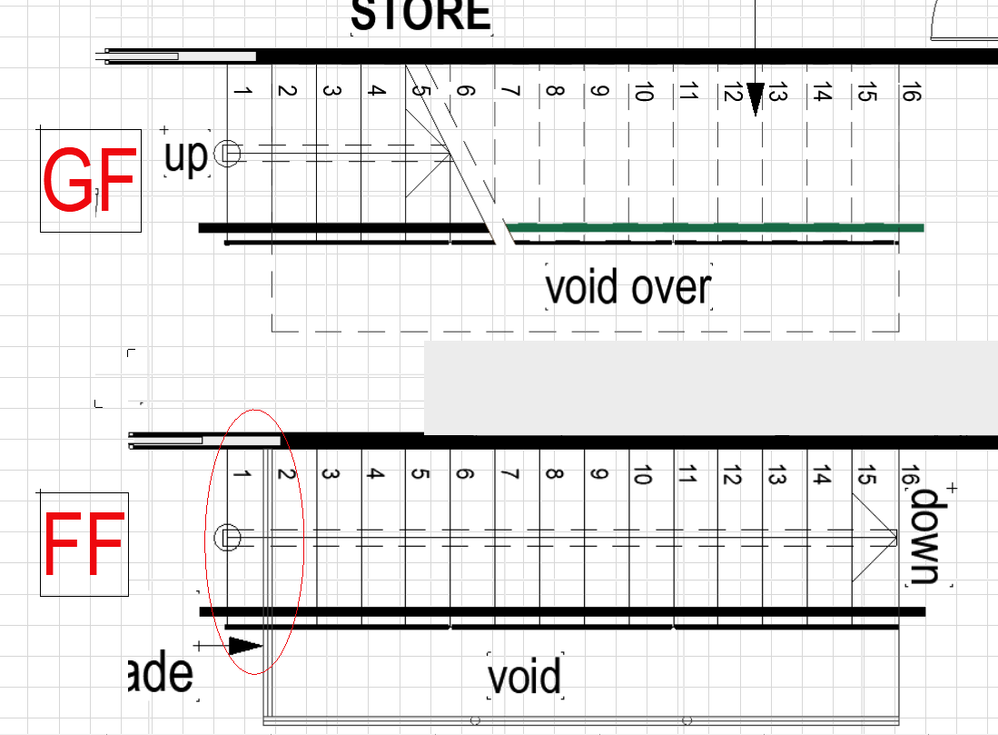
I have drawn a single flight of stairs with the upper floor hiding only the first tread and yet the first tread and associated railing are clearly visible on the first floor. Any ideas how to stop this from happening? I have changed the Floor Plan Display setting to be - With break mark hidden - visible but the tread and railing are still visible only now in dashed lines
Odette Salem
www.virtualhouse.com.au
AC22 AUS . Intel(R) Core(TM) i7-7800X CPU @ 3.50GHz . 32.0 GB ram . 64-bit operating system, x64-based processor
www.virtualhouse.com.au
AC22 AUS . Intel(R) Core(TM) i7-7800X CPU @ 3.50GHz . 32.0 GB ram . 64-bit operating system, x64-based processor
3 Replies 3

Lingwisyer
Guru
Options
- Mark as New
- Bookmark
- Subscribe
- Mute
- Subscribe to RSS Feed
- Permalink
- Report Inappropriate Content
2022-07-06 08:57 AM
2022-07-06
08:57 AM
Add a Cover Fill to your floor, or change your stairs Floor Plan Display and add a break when viewed from above.
Ling.
| AC22-29 AUS 3200 | Help Those Help You - Add a Signature |
| Self-taught, bend it till it breaks | Creating a Thread |
| Win11 | i9 10850K | 64GB | RX6600 | Win11 | 7800X3D | 32GB | RTX5070TI |
Ode1
Booster
Options
- Mark as New
- Bookmark
- Subscribe
- Mute
- Subscribe to RSS Feed
- Permalink
- Report Inappropriate Content
2022-07-08 02:22 AM
2022-07-08
02:22 AM
Thank you Ling.
I preface this with - I am just learning this tool - I tried adding a cover fill and it didn't do anything...and I couldn't seem to find a Floor Plan Display that worked...So for now I have used a fill.
Odette Salem
www.virtualhouse.com.au
AC22 AUS . Intel(R) Core(TM) i7-7800X CPU @ 3.50GHz . 32.0 GB ram . 64-bit operating system, x64-based processor
www.virtualhouse.com.au
AC22 AUS . Intel(R) Core(TM) i7-7800X CPU @ 3.50GHz . 32.0 GB ram . 64-bit operating system, x64-based processor
Lingwisyer
Guru
Options
- Mark as New
- Bookmark
- Subscribe
- Mute
- Subscribe to RSS Feed
- Permalink
- Report Inappropriate Content
2022-07-08 03:17 AM
2022-07-08
03:17 AM
Display Order? Have moving the stairs down in the hierarchy?
| AC22-29 AUS 3200 | Help Those Help You - Add a Signature |
| Self-taught, bend it till it breaks | Creating a Thread |
| Win11 | i9 10850K | 64GB | RX6600 | Win11 | 7800X3D | 32GB | RTX5070TI |

Still looking?

