
Turn on suggestions
Auto-suggest helps you quickly narrow down your search results by suggesting possible matches as you type.
Showing results for
EN
Turn on suggestions
Auto-suggest helps you quickly narrow down your search results by suggesting possible matches as you type.
Showing results for
Options
- Subscribe to RSS Feed
- Mark Topic as New
- Mark Topic as Read
- Pin this post for me
- Bookmark
- Subscribe to Topic
- Mute
- Printer Friendly Page

kokorajko
Participant
Options
- Mark as New
- Bookmark
- Subscribe
- Mute
- Subscribe to RSS Feed
- Permalink
- Report Inappropriate Content
2021-10-16 09:20 PM
change wall height
2021-10-16
09:20 PM
hi. It seems that I can only move walls, I can't chenge their height. I only have these tools on pallette when I click on corner. Anyone help?
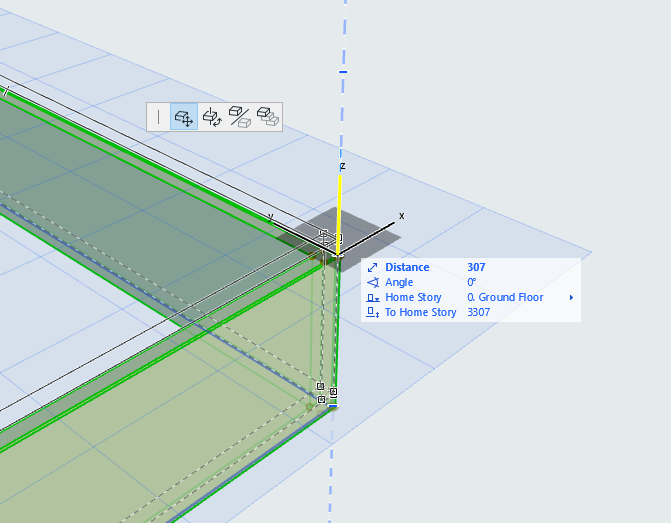
Solved! Go to Solution.
Solved
Read-Only
2 Solutions
Accepted Solutions
kokorajko
Participant
Options
- Mark as New
- Bookmark
- Subscribe
- Mute
- Subscribe to RSS Feed
- Permalink
- Report Inappropriate Content
2021-10-16 09:52 PM
Solution

Karl Ottenstein
Moderator Emeritus
Options
- Mark as New
- Bookmark
- Subscribe
- Mute
- Subscribe to RSS Feed
- Permalink
- Report Inappropriate Content
2021-10-16 11:02 PM
2021-10-16
11:02 PM
Sorry - yes, as you've discovered, if the wall is grouped with other walls, you have to suspend groups to do a variety of things.
Vote for Wish: Copy/Paste in 3D
AC 29 USA and earlier • hardware key • macOS Tahoe 26.7 MacBook Pro M2 Max 12CPU/30GPU cores, 32GB
AC 29 USA and earlier • hardware key • macOS Tahoe 26.7 MacBook Pro M2 Max 12CPU/30GPU cores, 32GB
3 Replies 3
Karl Ottenstein
Moderator Emeritus
Options
- Mark as New
- Bookmark
- Subscribe
- Mute
- Subscribe to RSS Feed
- Permalink
- Report Inappropriate Content
2021-10-16 09:47 PM - edited 2021-10-16 09:48 PM
2021-10-16
09:47 PM
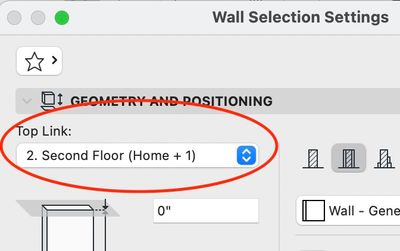
You cannot change the height of a wall that is linked to another story. You have to set the wall to unlinked and then you can dynamically adjust the height and will see additional items in the pet palette.
Vote for Wish: Copy/Paste in 3D
AC 29 USA and earlier • hardware key • macOS Tahoe 26.7 MacBook Pro M2 Max 12CPU/30GPU cores, 32GB
AC 29 USA and earlier • hardware key • macOS Tahoe 26.7 MacBook Pro M2 Max 12CPU/30GPU cores, 32GB
kokorajko
Participant
Options
- Mark as New
- Bookmark
- Subscribe
- Mute
- Subscribe to RSS Feed
- Permalink
- Report Inappropriate Content
2021-10-16 09:52 PM
2021-10-16
09:52 PM
ok, I click alt+g and pull option appears.
Solution
Karl Ottenstein
Moderator Emeritus
Options
- Mark as New
- Bookmark
- Subscribe
- Mute
- Subscribe to RSS Feed
- Permalink
- Report Inappropriate Content
2021-10-16 11:02 PM
2021-10-16
11:02 PM
Sorry - yes, as you've discovered, if the wall is grouped with other walls, you have to suspend groups to do a variety of things.
Vote for Wish: Copy/Paste in 3D
AC 29 USA and earlier • hardware key • macOS Tahoe 26.7 MacBook Pro M2 Max 12CPU/30GPU cores, 32GB
AC 29 USA and earlier • hardware key • macOS Tahoe 26.7 MacBook Pro M2 Max 12CPU/30GPU cores, 32GB

Still looking?

Suggested topics
