
Turn on suggestions
Auto-suggest helps you quickly narrow down your search results by suggesting possible matches as you type.
Showing results for
EN
Turn on suggestions
Auto-suggest helps you quickly narrow down your search results by suggesting possible matches as you type.
Showing results for
Options
- Subscribe to RSS Feed
- Mark Topic as New
- Mark Topic as Read
- Pin this post for me
- Bookmark
- Subscribe to Topic
- Mute
- Printer Friendly Page

cocoloco
Advisor
Options
- Mark as New
- Bookmark
- Subscribe
- Mute
- Subscribe to RSS Feed
- Permalink
- Report Inappropriate Content
2022-11-08 08:57 PM
changing fonts and lines based on layer
2022-11-08
08:57 PM
Hello!
'Is there a way to change all text same based by Layer? yes I know how to change text, all text, ... but I need to change text size/font based on layer, the same with lines..... turning off and on layers is lame option, anything else please?
after this huge upgrade in Archicad on layers, like now we can search through them (😵) I am sure something like this is there I just had not discovered it?
MacBook Pro, Sonoma: 2.6 GHz 6-Core Intel Core i7, Intel 16GB mem,
Archicad Solo 26 and 27 (in testing mode)
Archicad Solo 26 and 27 (in testing mode)
Solved! Go to Solution.
2 Solutions
Accepted Solutions

DGSketcher
Legend
Options
- Mark as New
- Bookmark
- Subscribe
- Mute
- Subscribe to RSS Feed
- Permalink
- Report Inappropriate Content
2022-11-08 11:45 PM
2022-11-08
11:45 PM
Have a look here ... Help: Find & Select
Apple iMac Intel i9 / macOS Sonoma / AC27UKI (most recent builds.. if they work)
Solution

Nathan Hildebrandt
Advisor
Options
- Mark as New
- Bookmark
- Subscribe
- Mute
- Subscribe to RSS Feed
- Permalink
- Report Inappropriate Content
2022-11-08 11:45 PM
2022-11-08
11:45 PM
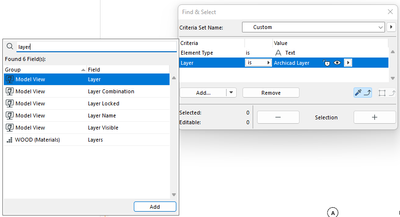
You use find and select an set the criteria to text and then add additional criteria, in your case you add Layer
Nathan Hildebrandt fraia
Director | Skewed
AC6 - AC29 | WIN 11 | Ultra 9 285K, 3.7Ghz | 64GB Ram | RTX4000
Director | Skewed
AC6 - AC29 | WIN 11 | Ultra 9 285K, 3.7Ghz | 64GB Ram | RTX4000
Solution
5 Replies 5
Nathan Hildebrandt
Advisor
Options
- Mark as New
- Bookmark
- Subscribe
- Mute
- Subscribe to RSS Feed
- Permalink
- Report Inappropriate Content
2022-11-08 11:16 PM
2022-11-08
11:16 PM
Just use find and select, and make the criteria Text and the Layer you want to change. Will only work per storey/view though. It won't change it globally.
Nathan Hildebrandt fraia
Director | Skewed
AC6 - AC29 | WIN 11 | Ultra 9 285K, 3.7Ghz | 64GB Ram | RTX4000
Director | Skewed
AC6 - AC29 | WIN 11 | Ultra 9 285K, 3.7Ghz | 64GB Ram | RTX4000
cocoloco
Advisor
Options
- Mark as New
- Bookmark
- Subscribe
- Mute
- Subscribe to RSS Feed
- Permalink
- Report Inappropriate Content
2022-11-08 11:34 PM
2022-11-08
11:34 PM
hi!
I chosen element type = text but it selects all. (Even when I select layer on Frontend). I don’t see any other layer setting. Please could you show me printscreen ?🙏🙏
MacBook Pro, Sonoma: 2.6 GHz 6-Core Intel Core i7, Intel 16GB mem,
Archicad Solo 26 and 27 (in testing mode)
Archicad Solo 26 and 27 (in testing mode)
DGSketcher
Legend
Options
- Mark as New
- Bookmark
- Subscribe
- Mute
- Subscribe to RSS Feed
- Permalink
- Report Inappropriate Content
2022-11-08 11:45 PM
2022-11-08
11:45 PM
Have a look here ... Help: Find & Select
Apple iMac Intel i9 / macOS Sonoma / AC27UKI (most recent builds.. if they work)
Solution
Nathan Hildebrandt
Advisor
Options
- Mark as New
- Bookmark
- Subscribe
- Mute
- Subscribe to RSS Feed
- Permalink
- Report Inappropriate Content
2022-11-08 11:45 PM
2022-11-08
11:45 PM
You use find and select an set the criteria to text and then add additional criteria, in your case you add Layer
Nathan Hildebrandt fraia
Director | Skewed
AC6 - AC29 | WIN 11 | Ultra 9 285K, 3.7Ghz | 64GB Ram | RTX4000
Director | Skewed
AC6 - AC29 | WIN 11 | Ultra 9 285K, 3.7Ghz | 64GB Ram | RTX4000
Solution
cocoloco
Advisor
Options
- Mark as New
- Bookmark
- Subscribe
- Mute
- Subscribe to RSS Feed
- Permalink
- Report Inappropriate Content
2022-11-08 11:54 PM
2022-11-08
11:54 PM
this is perfect thank you so much!!!! Very helpful to see it in print screen and I already tried and it works 🤗 If I only knew before..
MacBook Pro, Sonoma: 2.6 GHz 6-Core Intel Core i7, Intel 16GB mem,
Archicad Solo 26 and 27 (in testing mode)
Archicad Solo 26 and 27 (in testing mode)

Still looking?

Suggested topics
- ArchiXML - Attribute editor in Project data & BIM
- Changing Element Layer takes two attempts? in Project data & BIM
- Archicad to Revit for MEP: the workaround Graphisoft's own method couldn't give me in Collaboration with other software
- Why is my entire selection not changing layers? in Modeling
- Send to Back in General discussions
