
Turn on suggestions
Auto-suggest helps you quickly narrow down your search results by suggesting possible matches as you type.
Showing results for
EN
Turn on suggestions
Auto-suggest helps you quickly narrow down your search results by suggesting possible matches as you type.
Showing results for
Options
- Subscribe to RSS Feed
- Mark Topic as New
- Mark Topic as Read
- Pin this post for me
- Bookmark
- Subscribe to Topic
- Mute
- Printer Friendly Page

Lennox
Contributor
Options
- Mark as New
- Bookmark
- Subscribe
- Mute
- Subscribe to RSS Feed
- Permalink
- Report Inappropriate Content
2022-04-07 12:40 PM
how to create different sash widths usign basic window
2022-04-07
12:40 PM
Hi. Its a long time since ive been on this forum ! but wanted to start using Archicad more often and use
it for construction documentation as well as the design phase.
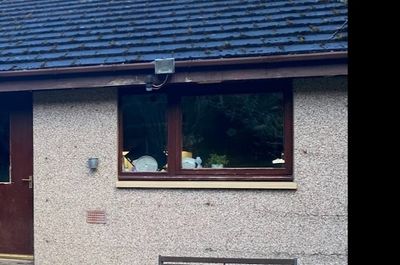
Im using AC 19 solo . Im using the double sash window in the basic windows library, however Im struggling to get one sash bigger than the other ( there is no editable GDL hot spot).
Anyone help?
Solved! Go to Solution.
Solved
Read-Only
1 Solution
Accepted Solutions

DGSketcher
Legend
Options
- Mark as New
- Bookmark
- Subscribe
- Mute
- Subscribe to RSS Feed
- Permalink
- Report Inappropriate Content
2022-04-07 04:06 PM
2022-04-07
04:06 PM
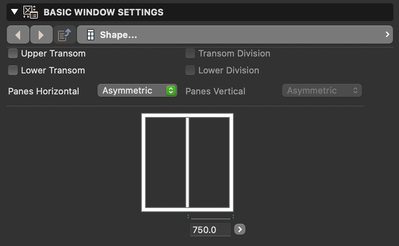
@Lennox I assume things haven't changed too much since AC19 and the following is relevant to the Solo version. Go to Basic Window Settings > Shape > Panes Horizontal and choose asymmetric.
Apple iMac Intel i9 / macOS Sonoma / AC27UKI (most recent builds.. if they work)
2 Replies 2
DGSketcher
Legend
Options
- Mark as New
- Bookmark
- Subscribe
- Mute
- Subscribe to RSS Feed
- Permalink
- Report Inappropriate Content
2022-04-07 04:06 PM
2022-04-07
04:06 PM
@Lennox I assume things haven't changed too much since AC19 and the following is relevant to the Solo version. Go to Basic Window Settings > Shape > Panes Horizontal and choose asymmetric.
Apple iMac Intel i9 / macOS Sonoma / AC27UKI (most recent builds.. if they work)
Lennox
Contributor
Options
- Mark as New
- Bookmark
- Subscribe
- Mute
- Subscribe to RSS Feed
- Permalink
- Report Inappropriate Content
2022-04-15 02:00 PM
2022-04-15
02:00 PM
many thanks DG Sketcher , couldnt see it for looking at it!!

Still looking?

