
Turn on suggestions
Auto-suggest helps you quickly narrow down your search results by suggesting possible matches as you type.
Showing results for
EN
Turn on suggestions
Auto-suggest helps you quickly narrow down your search results by suggesting possible matches as you type.
Showing results for
Options
- Subscribe to RSS Feed
- Mark Topic as New
- Mark Topic as Read
- Pin this post for me
- Bookmark
- Subscribe to Topic
- Mute
- Printer Friendly Page

Samuel EBULU-AMOUDA
Contributor
Options
- Mark as New
- Bookmark
- Subscribe
- Mute
- Subscribe to RSS Feed
- Permalink
- Report Inappropriate Content
2021-09-21 10:03 PM
rendering improvements
2021-09-21
10:03 PM
With so many parameters, I wonder if there is a shortcut to get a good quality rendering.
Read-Only
6 Replies 6

Qualifa
Booster
Options
- Mark as New
- Bookmark
- Subscribe
- Mute
- Subscribe to RSS Feed
- Permalink
- Report Inappropriate Content
2021-09-21 11:19 PM
2021-09-21
11:19 PM
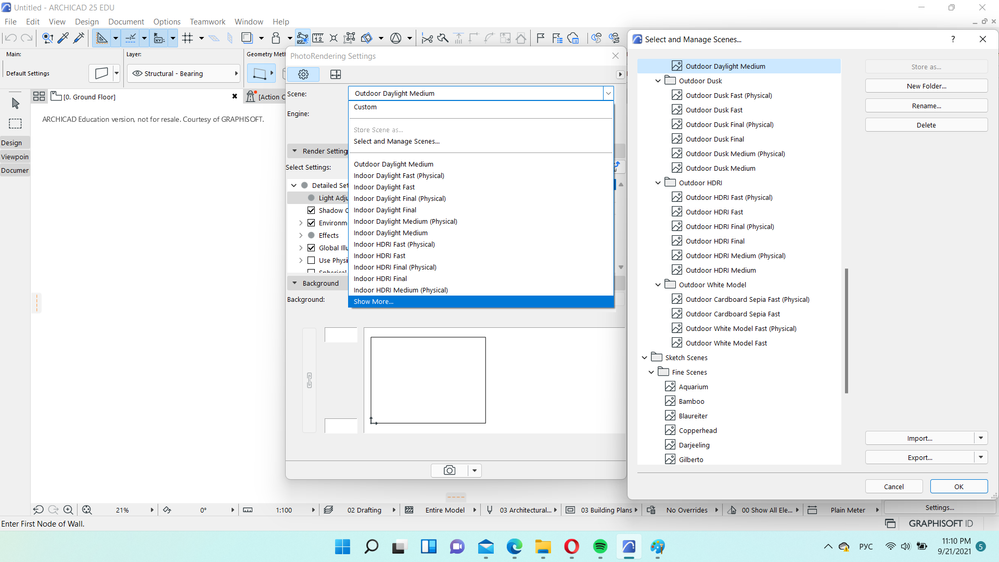
Hello. As I believe, individual visualization parameters are applicable for each work and it will be best to choose for yourself.
So, the Archicad has built-in scenes for certain conditions.
Proud member of UNION.ARCHI Network

Erwin Edel
Rockstar
Options
- Mark as New
- Bookmark
- Subscribe
- Mute
- Subscribe to RSS Feed
- Permalink
- Report Inappropriate Content
2021-09-22 08:45 AM
2021-09-22
08:45 AM
I was going to share two scenes so you could import them (one for exterior renders, one for interior renders), but I can't seem to find any way to attach files other than photos or videos in the way the forum is set up these days.
Maybe one of the moderators can clue me in.
Erwin Edel, Project Lead, Leloup Architecten
www.leloup.nl
ArchiCAD 9-29NED FULL
Windows 11 Pro for Workstations
Adobe Design Premium CS5
www.leloup.nl
ArchiCAD 9-29NED FULL
Windows 11 Pro for Workstations
Adobe Design Premium CS5

 Laszlo Nagy
Community Admin
Options
- Mark as New
- Bookmark
- Subscribe
- Mute
- Subscribe to RSS Feed
- Permalink
- Report Inappropriate Content
2021-09-22 01:22 PM
2021-09-22
01:22 PM
It seems like the Forum no longer allows ZIP files to be attached.
I will raise this issue with Khoros.

Loving Archicad since 1995 - Find Archicad Tips at x.com/laszlonagy
AMD Ryzen9 5900X CPU, 64 GB RAM 3600 MHz, Nvidia GTX 1060 6GB, 500 GB NVMe SSD
2x28" (2560x1440), Windows 10 PRO ENG, Ac20-Ac29
AMD Ryzen9 5900X CPU, 64 GB RAM 3600 MHz, Nvidia GTX 1060 6GB, 500 GB NVMe SSD
2x28" (2560x1440), Windows 10 PRO ENG, Ac20-Ac29
Erwin Edel
Rockstar
Options
- Mark as New
- Bookmark
- Subscribe
- Mute
- Subscribe to RSS Feed
- Permalink
- Report Inappropriate Content
2021-09-22 02:07 PM
2021-09-22
02:07 PM
Or maybe the exportable file types like xml, aat, scene, mod?
Erwin Edel, Project Lead, Leloup Architecten
www.leloup.nl
ArchiCAD 9-29NED FULL
Windows 11 Pro for Workstations
Adobe Design Premium CS5
www.leloup.nl
ArchiCAD 9-29NED FULL
Windows 11 Pro for Workstations
Adobe Design Premium CS5
Laszlo Nagy
Community Admin
Options
- Mark as New
- Bookmark
- Subscribe
- Mute
- Subscribe to RSS Feed
- Permalink
- Report Inappropriate Content
2021-09-22 02:25 PM
2021-09-22
02:25 PM
Based on the error message, XML already seems to be supported.
Bt all those AAT, Scene, MOD files could all be solved by ZIP format support as any of those files can be quickly zipped and then attached.
Loving Archicad since 1995 - Find Archicad Tips at x.com/laszlonagy
AMD Ryzen9 5900X CPU, 64 GB RAM 3600 MHz, Nvidia GTX 1060 6GB, 500 GB NVMe SSD
2x28" (2560x1440), Windows 10 PRO ENG, Ac20-Ac29
AMD Ryzen9 5900X CPU, 64 GB RAM 3600 MHz, Nvidia GTX 1060 6GB, 500 GB NVMe SSD
2x28" (2560x1440), Windows 10 PRO ENG, Ac20-Ac29

brucestar
Contributor
Options
- Mark as New
- Bookmark
- Subscribe
- Mute
- Subscribe to RSS Feed
- Permalink
- Report Inappropriate Content
2021-09-23 02:17 AM - edited 2021-09-23 02:19 AM
2021-09-23
02:17 AM
In the photo render settings you can save a style that works for you - as described by Qualifa in another answer. If you put the render button (looks like a camera) on your toolbar you just have to click that for it to produce a render immediately. I put the render settings button next to it as well.

Still looking?

Suggested topics
- After 3 years with Archicad, I'm honestly disappointed in General discussions
- How to structure prompts for AI Visualizer in Archicad 30 in AI solutions
- Enscape 4.3 Not Showing in Archicad 29 – Missing Enscape Plugin in Installation & update
- Ci Tools Keynotes | Archicad Keynotes | Properties | Attributes in Project data & BIM
- ArchiCAD Drafting Assitance in General discussions
