
Turn on suggestions
Auto-suggest helps you quickly narrow down your search results by suggesting possible matches as you type.
Showing results for
EN
Turn on suggestions
Auto-suggest helps you quickly narrow down your search results by suggesting possible matches as you type.
Showing results for
- English
- :
- Forum
- :
- Project data & BIM
- :
- Re: Appearance of guideline deteriorated in Archic...
Options
- Subscribe to RSS Feed
- Mark Topic as New
- Mark Topic as Read
- Pin this post for me
- Bookmark
- Subscribe to Topic
- Mute
- Printer Friendly Page

shrutiniwas
Contributor
Options
- Mark as New
- Bookmark
- Subscribe
- Mute
- Subscribe to RSS Feed
- Permalink
- Report Inappropriate Content
2022-08-04
10:28 AM
- last edited on
2023-06-07
02:58 AM
by
 Gordana Radonic
Appearance of guideline deteriorated in Archicad 26
2022-08-04
10:28 AM
Guide Lines in Archicad 26 are appearing in manner where the white dash line is not coinciding with the coloured dash line.
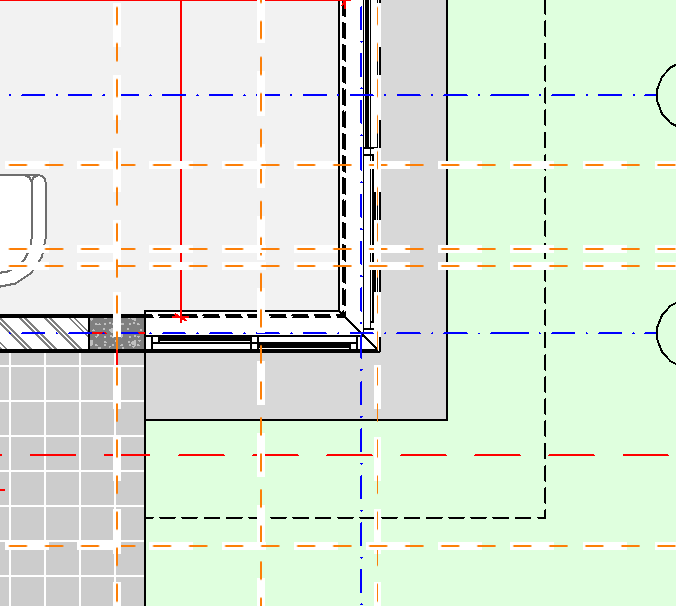
However, in Archicad 25, it seems just fine (the white dash lines are creating a subtle background for the coloured dash lines).
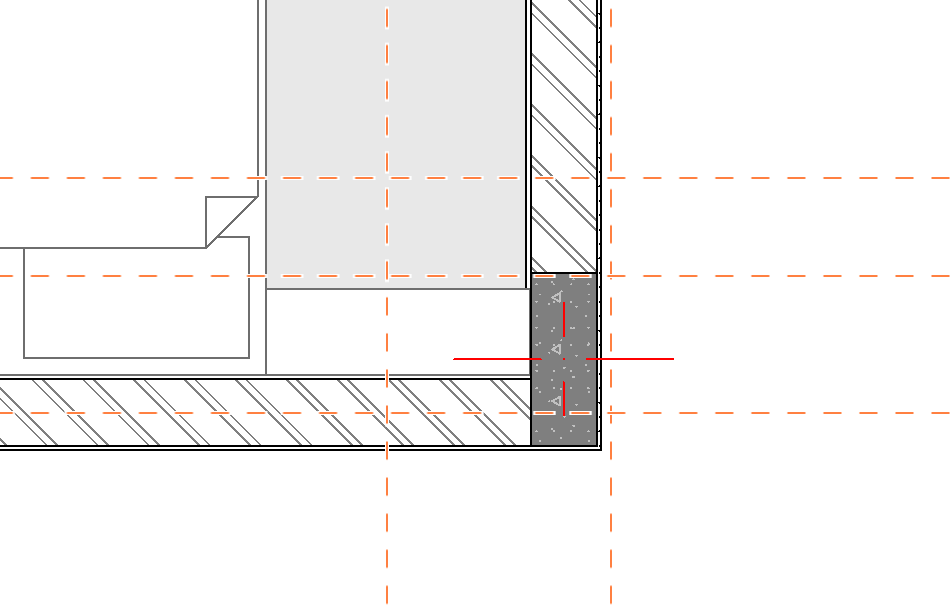
Not sure, how it is appearing on windows version. I am using Archicad 26 (as well as 25) on macOS Monterey, using m1 max MacBook Pro.
In my opinion, it's a bug and should be addressed.
Best Regards,
Shrutiniwas Sharma
Solved! Go to Solution.
1 Solution
Accepted Solutions

Karl Ottenstein
Moderator Emeritus
Options
- Mark as New
- Bookmark
- Subscribe
- Mute
- Subscribe to RSS Feed
- Permalink
- Report Inappropriate Content
2022-08-11 06:18 PM
2022-08-11
06:18 PM
Perhaps your antialiasing setting is turned off? See:
Vote for Wish: Copy/Paste in 3D
AC 29 USA and earlier • hardware key • macOS Tahoe 26.7 MacBook Pro M2 Max 12CPU/30GPU cores, 32GB
AC 29 USA and earlier • hardware key • macOS Tahoe 26.7 MacBook Pro M2 Max 12CPU/30GPU cores, 32GB
4 Replies 4
 Benjamin Dani
Graphisoft
Options
- Mark as New
- Bookmark
- Subscribe
- Mute
- Subscribe to RSS Feed
- Permalink
- Report Inappropriate Content
2022-08-11 06:00 PM
2022-08-11
06:00 PM
Dear Sharma,
Thank you for sharing this issue with us!
I checked on my Windows machine and I wasn't able to reproduce this error.
My first thought was that this might be happening because of some resolution settings.
May I ask you to check that on your machine?
Looking forward to hearing from you!
Kind regards,
Dani Benjamin
Technical Support Engineer
Karl Ottenstein
Moderator Emeritus
Options
- Mark as New
- Bookmark
- Subscribe
- Mute
- Subscribe to RSS Feed
- Permalink
- Report Inappropriate Content
2022-08-11 06:18 PM
2022-08-11
06:18 PM
Perhaps your antialiasing setting is turned off? See:
Vote for Wish: Copy/Paste in 3D
AC 29 USA and earlier • hardware key • macOS Tahoe 26.7 MacBook Pro M2 Max 12CPU/30GPU cores, 32GB
AC 29 USA and earlier • hardware key • macOS Tahoe 26.7 MacBook Pro M2 Max 12CPU/30GPU cores, 32GB
shrutiniwas
Contributor
Options
- Mark as New
- Bookmark
- Subscribe
- Mute
- Subscribe to RSS Feed
- Permalink
- Report Inappropriate Content
2022-08-13 08:49 PM
2022-08-13
08:49 PM
Many thanks!!
It had indeed solved the problem.

Tim Ball
Expert
Options
- Mark as New
- Bookmark
- Subscribe
- Mute
- Subscribe to RSS Feed
- Permalink
- Report Inappropriate Content
2023-03-04 12:26 PM
2023-03-04
12:26 PM
The horizontal and vertical guidelines are working normally but the angled guidelines are drawn in white, which makes it difficult to see them. Am I missing a setting somewhere?
Tim Ball
AC26, iMac
User since V5
AC26, iMac
User since V5

Didn't find the answer?
Check other topics in this Forum
Back to ForumRead the latest accepted solutions!
Accepted SolutionsStart a new conversation!

Suggested topics
- Guidelines and nodes don't appear in 3D in Modeling
- Circular guideline from origin point appears when moving elements - how to turn off? in Documentation
- Appearance of guideline deteriorated in Archicad 26 in Project data & BIM
- Guideline Handle slow to appear (ACAD23/24) in Modeling
- ? Get guidelines to appear when hovering over a snap-point ? in Modeling
