
Turn on suggestions
Auto-suggest helps you quickly narrow down your search results by suggesting possible matches as you type.
Showing results for
EN
Turn on suggestions
Auto-suggest helps you quickly narrow down your search results by suggesting possible matches as you type.
Showing results for
- English
- :
- Forum
- :
- Project data & BIM
- :
- Copy a building from one file to another
Options
- Subscribe to RSS Feed
- Mark Topic as New
- Mark Topic as Read
- Pin this post for me
- Bookmark
- Subscribe to Topic
- Mute
- Printer Friendly Page

Gisele
Advocate
Options
- Mark as New
- Bookmark
- Subscribe
- Mute
- Subscribe to RSS Feed
- Permalink
- Report Inappropriate Content
2023-05-15
09:34 PM
- last edited on
2025-01-02
02:27 PM
by
 Molinda Prey
Copy a building from one file to another
2023-05-15
09:34 PM
Is there a way to copy a two-story building with its annotation from one file to another without using a Hotlink?
AC 26 - 5002 USA FULL
Win11 Pro 22H2 - 13th Gen Intel(R) Core(TM) i9-13900KF 3.00 GHz - 64 GB - 64-bit operating system, x64-based processor
Win11 Pro 22H2 - 13th Gen Intel(R) Core(TM) i9-13900KF 3.00 GHz - 64 GB - 64-bit operating system, x64-based processor
Solved! Go to Solution.
Solved
Labels:
- Labels:
-
Project Migration
2 Solutions
Accepted Solutions

Gerry Leonor
Advisor
Options
- Mark as New
- Bookmark
- Subscribe
- Mute
- Subscribe to RSS Feed
- Permalink
- Report Inappropriate Content
2023-05-16 01:55 AM
2023-05-16
01:55 AM
you can try a Merge File operation.
just a heads up. i haven't done this in a long while but you might want to make sure that you have at least the same number of stories & same story heights in your active file (the one you're working on) as with your origin file (the file you're importing). Also, this will bring in all attributes & might not be a guarantee that the index numbers will align between your Active File & your Origin File.
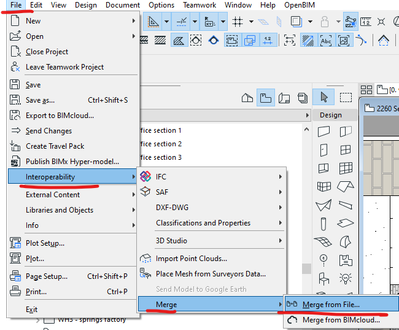
File > Interoperability > Merge > Merge from File
when the Merge File window pops up, make sure to select the "All Files" setting at the bottom
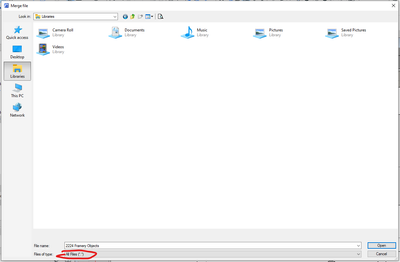
go to the directory of that .pln file & click Open
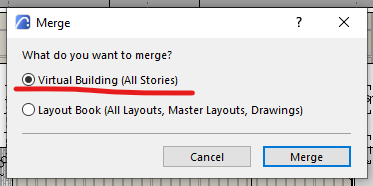
when the Merge pop up appears asking you which part of the PLN file to bring in, select the first option "Virtual Building (All Stories)"
on the other hand, you could simply do a Save As copy of your origin file & strip out the Layout Book if you don't need the drawings in there.
AC27 | Win11 | 64Gb RAM | Intel i7 13700F | RTX 4070 Ti
>come join our unofficial Discord server
https://discord.gg/XGHjyvutt8
>come join our unofficial Discord server
https://discord.gg/XGHjyvutt8
Gerry Leonor
Advisor
Options
- Mark as New
- Bookmark
- Subscribe
- Mute
- Subscribe to RSS Feed
- Permalink
- Report Inappropriate Content
2023-05-18 10:48 PM
2023-05-18
10:48 PM
if you don't have it open & if you have Windows Explorer open, go the directory & make a copy of the file with a different file name.
if you have the file open, go to File & click "Save As" & save it under a different file name.
open that second file & simply delete all the layouts in the Layout Book.
AC27 | Win11 | 64Gb RAM | Intel i7 13700F | RTX 4070 Ti
>come join our unofficial Discord server
https://discord.gg/XGHjyvutt8
>come join our unofficial Discord server
https://discord.gg/XGHjyvutt8
3 Replies 3
Gerry Leonor
Advisor
Options
- Mark as New
- Bookmark
- Subscribe
- Mute
- Subscribe to RSS Feed
- Permalink
- Report Inappropriate Content
2023-05-16 01:55 AM
2023-05-16
01:55 AM
you can try a Merge File operation.
just a heads up. i haven't done this in a long while but you might want to make sure that you have at least the same number of stories & same story heights in your active file (the one you're working on) as with your origin file (the file you're importing). Also, this will bring in all attributes & might not be a guarantee that the index numbers will align between your Active File & your Origin File.
File > Interoperability > Merge > Merge from File
when the Merge File window pops up, make sure to select the "All Files" setting at the bottom
go to the directory of that .pln file & click Open
when the Merge pop up appears asking you which part of the PLN file to bring in, select the first option "Virtual Building (All Stories)"
on the other hand, you could simply do a Save As copy of your origin file & strip out the Layout Book if you don't need the drawings in there.
AC27 | Win11 | 64Gb RAM | Intel i7 13700F | RTX 4070 Ti
>come join our unofficial Discord server
https://discord.gg/XGHjyvutt8
>come join our unofficial Discord server
https://discord.gg/XGHjyvutt8
Gisele
Advocate
Options
- Mark as New
- Bookmark
- Subscribe
- Mute
- Subscribe to RSS Feed
- Permalink
- Report Inappropriate Content
2023-05-18 10:25 PM
2023-05-18
10:25 PM
How to "Save As copy of the origin file & strip out the Layout Book?"
AC 26 - 5002 USA FULL
Win11 Pro 22H2 - 13th Gen Intel(R) Core(TM) i9-13900KF 3.00 GHz - 64 GB - 64-bit operating system, x64-based processor
Win11 Pro 22H2 - 13th Gen Intel(R) Core(TM) i9-13900KF 3.00 GHz - 64 GB - 64-bit operating system, x64-based processor
Gerry Leonor
Advisor
Options
- Mark as New
- Bookmark
- Subscribe
- Mute
- Subscribe to RSS Feed
- Permalink
- Report Inappropriate Content
2023-05-18 10:48 PM
2023-05-18
10:48 PM
if you don't have it open & if you have Windows Explorer open, go the directory & make a copy of the file with a different file name.
if you have the file open, go to File & click "Save As" & save it under a different file name.
open that second file & simply delete all the layouts in the Layout Book.
AC27 | Win11 | 64Gb RAM | Intel i7 13700F | RTX 4070 Ti
>come join our unofficial Discord server
https://discord.gg/XGHjyvutt8
>come join our unofficial Discord server
https://discord.gg/XGHjyvutt8

Didn't find the answer?
Check other topics in this Forum
Back to ForumRead the latest accepted solutions!
Accepted SolutionsStart a new conversation!

Suggested topics
- MEP AC29 Incorrect behavior of the Z mark in the tracking display when editing the Z mark of a pipe in Modeling
- Should I be using Archicad 28 instead of 29? in Teamwork & BIMcloud
- Trying to 'Save; and being forced to 'Save As' in General discussions
- BIMx does not save plans in BIMx
- Is there a way to hyperlink files in order to place their drawings into a common layout book? in Documentation
