
Turn on suggestions
Auto-suggest helps you quickly narrow down your search results by suggesting possible matches as you type.
Showing results for
EN
Turn on suggestions
Auto-suggest helps you quickly narrow down your search results by suggesting possible matches as you type.
Showing results for
- English
- :
- Forum
- :
- Project data & BIM
- :
- Re: Custom text for objects in schedules
Options
- Subscribe to RSS Feed
- Mark Topic as New
- Mark Topic as Read
- Pin this post for me
- Bookmark
- Subscribe to Topic
- Mute
- Printer Friendly Page

Strawbale23
Expert
Options
- Mark as New
- Bookmark
- Subscribe
- Mute
- Subscribe to RSS Feed
- Permalink
- Report Inappropriate Content
2023-01-15 10:37 PM
Custom text for objects in schedules
2023-01-15
10:37 PM
What is the easiest way to add custom text to a window and door schedule for individual objects?
thanks
AC26
https://www.zendsign.fr/
Solved! Go to Solution.
1 Solution
Accepted Solutions

Karl Ottenstein
Moderator Emeritus
Options
- Mark as New
- Bookmark
- Subscribe
- Mute
- Subscribe to RSS Feed
- Permalink
- Report Inappropriate Content
2023-01-15 11:44 PM
2023-01-15
11:44 PM
The easiest is to use the Remarks field, available for all openings - at least with the Properties available in the USA library. Presumably the FR version is similar.
The out-of-the-box USA 26 template (sample) schedules for Windows and Doors already includes the Remarks field. Here is where one would fill in the custom text in the WIndow/Door Settings dialog... and the next screenshot shows where you would select it as a scheduled field in the schedule customization dialog.

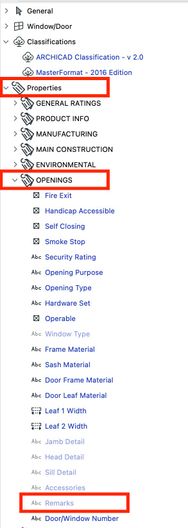
Note, the fields used in the "old days" - Custom 1, Custom 2, etc or User Def 1, User Def 2, etc are no longer part of the objects - gone since Properties were introduced some years ago (in case anyone searches the forums and finds old posts referring to them). The window/door objects themselves, at least in the USA library, do have a "Notes" field - available in the settings dialog - and to schedule by going to the library parameter section of the parameter selection list. But, I think the Remarks Property would be an easier choice...and of course, it is easy to add more properties if you need more than one custom field.
Vote for Wish: Copy/Paste in 3D
AC 29 USA and earlier • hardware key • macOS Tahoe 26.7 MacBook Pro M2 Max 12CPU/30GPU cores, 32GB
AC 29 USA and earlier • hardware key • macOS Tahoe 26.7 MacBook Pro M2 Max 12CPU/30GPU cores, 32GB
2 Replies 2
Karl Ottenstein
Moderator Emeritus
Options
- Mark as New
- Bookmark
- Subscribe
- Mute
- Subscribe to RSS Feed
- Permalink
- Report Inappropriate Content
2023-01-15 11:44 PM
2023-01-15
11:44 PM
The easiest is to use the Remarks field, available for all openings - at least with the Properties available in the USA library. Presumably the FR version is similar.
The out-of-the-box USA 26 template (sample) schedules for Windows and Doors already includes the Remarks field. Here is where one would fill in the custom text in the WIndow/Door Settings dialog... and the next screenshot shows where you would select it as a scheduled field in the schedule customization dialog.
Note, the fields used in the "old days" - Custom 1, Custom 2, etc or User Def 1, User Def 2, etc are no longer part of the objects - gone since Properties were introduced some years ago (in case anyone searches the forums and finds old posts referring to them). The window/door objects themselves, at least in the USA library, do have a "Notes" field - available in the settings dialog - and to schedule by going to the library parameter section of the parameter selection list. But, I think the Remarks Property would be an easier choice...and of course, it is easy to add more properties if you need more than one custom field.
Vote for Wish: Copy/Paste in 3D
AC 29 USA and earlier • hardware key • macOS Tahoe 26.7 MacBook Pro M2 Max 12CPU/30GPU cores, 32GB
AC 29 USA and earlier • hardware key • macOS Tahoe 26.7 MacBook Pro M2 Max 12CPU/30GPU cores, 32GB
Strawbale23
Expert
Options
- Mark as New
- Bookmark
- Subscribe
- Mute
- Subscribe to RSS Feed
- Permalink
- Report Inappropriate Content
2023-01-16 12:19 AM - edited 2023-01-16 12:48 AM
2023-01-16
12:19 AM
Thank you Karl , appreciated.
I found it with your detailed description!
Honestly GS, if this is what you have to do just to be able to add notes and remarks....
I really feel that GS needs some help on a lot of this basic UI stuff. Somehow that ware not getting it it seems.
AC26
https://www.zendsign.fr/

Didn't find the answer?
Check other topics in this Forum
Back to ForumRead the latest accepted solutions!
Accepted SolutionsStart a new conversation!

Suggested topics
- Climate and sunpath objects for analysis presentation in Libraries & objects
- Linking and Managing Office Custom Libraries in Libraries & objects
- Custom objects become invalid when downgraded from AC29 to 27 in Libraries & objects
- gdl custom object snaps back to older version upon opening the file in Libraries & objects
- Schedule values rounding on beams and columns in Modeling
