
Turn on suggestions
Auto-suggest helps you quickly narrow down your search results by suggesting possible matches as you type.
Showing results for
EN
Turn on suggestions
Auto-suggest helps you quickly narrow down your search results by suggesting possible matches as you type.
Showing results for
- English
- :
- Forum
- :
- Project data & BIM
- :
- Re: Zone Tool AC25
Options
- Subscribe to RSS Feed
- Mark Topic as New
- Mark Topic as Read
- Pin this post for me
- Bookmark
- Subscribe to Topic
- Mute
- Printer Friendly Page

omerckr
Participant
Options
- Mark as New
- Bookmark
- Subscribe
- Mute
- Subscribe to RSS Feed
- Permalink
- Report Inappropriate Content
2022-05-03
05:12 PM
- last edited on
2022-09-29
01:28 PM
by
 Oleksandra Vakariuk
Zone Tool AC25
2022-05-03
05:12 PM
Hello everyone!
I have a question about the use of the zone tool. I haven't really used it before and wanted to use the zone tool for interior wizard elements.
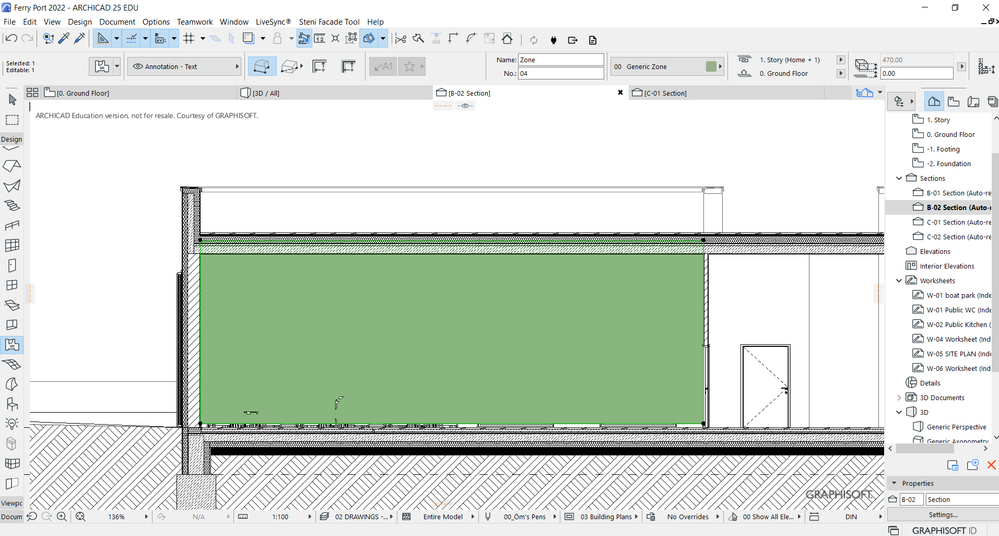
I draw the area with the zone tool but the zone fill (or colour) also appears on my sections as well and blocks the proper view. Is there a way to remove the zone fill from the section and elevation views but keep it kinda hidden on the floor plans?
Thanks!
Solved! Go to Solution.
1 Solution
Accepted Solutions

Barry Kelly
Moderator
Options
- Mark as New
- Bookmark
- Subscribe
- Mute
- Subscribe to RSS Feed
- Permalink
- Report Inappropriate Content
2022-05-04 03:26 AM
2022-05-04
03:26 AM
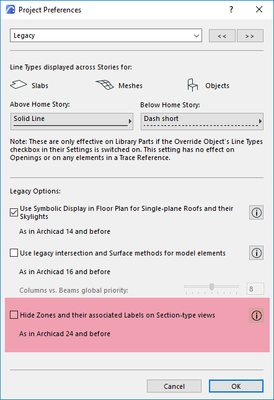
Zones can be turned of in sections by a switch in Project Preferences > Legacy.
Or you can leave the zones on and make them transparent, or an easier (I think) is to have the zones in their own layer, and just turn the layer off in sections (layer combinations required).
Here is some more reading on the subject.
Barry.
One of the forum moderators.
Versions 6.5 to 27
i7-10700 @ 2.9Ghz, 32GB ram, GeForce RTX 2060 (6GB), Windows 10
Lenovo Thinkpad - i7-1270P 2.20 GHz, 32GB RAM, Nvidia T550, Windows 11
Versions 6.5 to 27
i7-10700 @ 2.9Ghz, 32GB ram, GeForce RTX 2060 (6GB), Windows 10
Lenovo Thinkpad - i7-1270P 2.20 GHz, 32GB RAM, Nvidia T550, Windows 11
Solution
2 Replies 2
Barry Kelly
Moderator
Options
- Mark as New
- Bookmark
- Subscribe
- Mute
- Subscribe to RSS Feed
- Permalink
- Report Inappropriate Content
2022-05-04 03:26 AM
2022-05-04
03:26 AM
Zones can be turned of in sections by a switch in Project Preferences > Legacy.
Or you can leave the zones on and make them transparent, or an easier (I think) is to have the zones in their own layer, and just turn the layer off in sections (layer combinations required).
Here is some more reading on the subject.
Barry.
One of the forum moderators.
Versions 6.5 to 27
i7-10700 @ 2.9Ghz, 32GB ram, GeForce RTX 2060 (6GB), Windows 10
Lenovo Thinkpad - i7-1270P 2.20 GHz, 32GB RAM, Nvidia T550, Windows 11
Versions 6.5 to 27
i7-10700 @ 2.9Ghz, 32GB ram, GeForce RTX 2060 (6GB), Windows 10
Lenovo Thinkpad - i7-1270P 2.20 GHz, 32GB RAM, Nvidia T550, Windows 11
Solution
omerckr
Participant
Options
- Mark as New
- Bookmark
- Subscribe
- Mute
- Subscribe to RSS Feed
- Permalink
- Report Inappropriate Content
2022-05-06 04:00 PM
2022-05-06
04:00 PM
Thanks for the help! These work just fine. Especially the first recommendation.

Didn't find the answer?
Check other topics in this Forum
Back to ForumRead the latest accepted solutions!
Accepted SolutionsStart a new conversation!
Suggested topics
- Trying to calculate ACTUAL Wall Areas in Project data & BIM
- ArchiXML - Attribute editor in Project data & BIM
- Archicad to Revit for MEP: the workaround Graphisoft's own method couldn't give me in Collaboration with other software
- Creating HLA drawings for PHPP calcs in Sustainable design
- Show different heights on stamp after zone crop in Documentation
