
Turn on suggestions
Auto-suggest helps you quickly narrow down your search results by suggesting possible matches as you type.
Showing results for
EN
Turn on suggestions
Auto-suggest helps you quickly narrow down your search results by suggesting possible matches as you type.
Showing results for
- English
- :
- Forum
- :
- Teamwork & BIMcloud
- :
- Re: How to change layer combinations in AC13 teamw...
Options
- Subscribe to RSS Feed
- Mark Topic as New
- Mark Topic as Read
- Pin this post for me
- Bookmark
- Subscribe to Topic
- Mute
- Printer Friendly Page

Anonymous
Not applicable
Options
- Mark as New
- Bookmark
- Subscribe
- Mute
- Subscribe to RSS Feed
- Permalink
- Report Inappropriate Content
2009-10-12 10:13 PM
How to change layer combinations in AC13 teamwork??
2009-10-12
10:13 PM
Help?!?!
16 Replies 16
Anonymous
Not applicable
Options
- Mark as New
- Bookmark
- Subscribe
- Mute
- Subscribe to RSS Feed
- Permalink
- Report Inappropriate Content
2009-10-12 10:51 PM
2009-10-12
10:51 PM
Is it the same like in AC 12 that is only team leader can change it ? 
cheers
cheers

Karl Ottenstein
Moderator Emeritus
Options
- Mark as New
- Bookmark
- Subscribe
- Mute
- Subscribe to RSS Feed
- Permalink
- Report Inappropriate Content
2009-10-12 10:52 PM
2009-10-12
10:52 PM
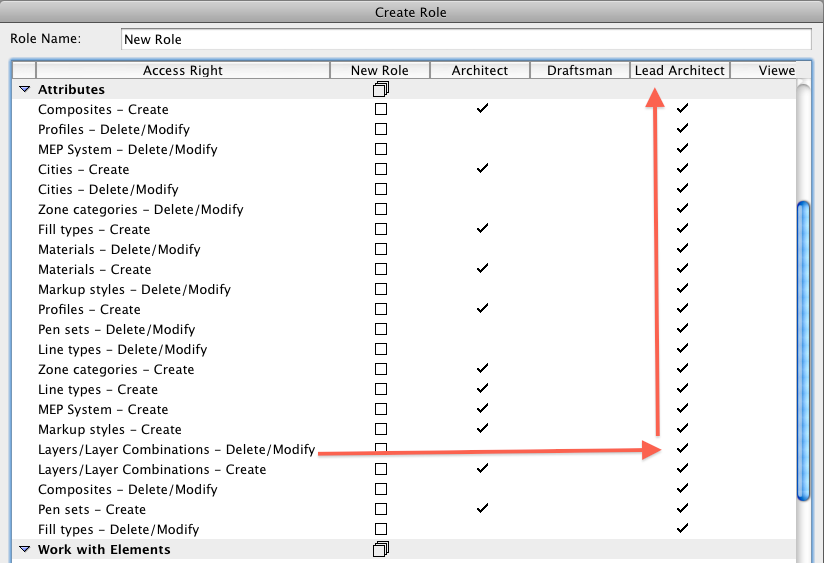
Steven wrote:You probably created your user account as an "Architect" rather than "Lead Architect", assuming that you used the default user Roles and did not create a new Role.
I'm trying to change layer combinations in AC13 teamwork. I can reserve layers by clicking on the reserve button below, and I understand that reserves all the layers, but the Update button under layer combinations is grayed out no matter what I do.
Help?!?!
In the defaults, only the Lead Architect has the ability to modify combos. An architect can create new layers and combos in those defaults, but not delete or modify. See attached screenshot reached from your BIM Server manager > Roles group Settings or Create buttons.
Hope that's it, anyway.
Cheers,
Karl
Vote for Wish: Copy/Paste in 3D
AC 29 USA and earlier • hardware key • macOS Tahoe 26.7 MacBook Pro M2 Max 12CPU/30GPU cores, 32GB
AC 29 USA and earlier • hardware key • macOS Tahoe 26.7 MacBook Pro M2 Max 12CPU/30GPU cores, 32GB
Anonymous
Not applicable
Options
- Mark as New
- Bookmark
- Subscribe
- Mute
- Subscribe to RSS Feed
- Permalink
- Report Inappropriate Content
2009-10-12 10:53 PM
2009-10-12
10:53 PM
I believe I found it. You have to be team architect in the BIM server to be able to change layer combinations. You have to have the BIM server administrator change your settings, then force you to leave, then resign into the project.
Anonymous
Not applicable
Options
- Mark as New
- Bookmark
- Subscribe
- Mute
- Subscribe to RSS Feed
- Permalink
- Report Inappropriate Content
2009-10-12 10:55 PM
2009-10-12
10:55 PM
Karl wrote:You beat me by a minute Karl!!!!!!!!
You probably created your user account as an "Architect" rather than "Lead Architect", assuming that you used the default user Roles and did not create a new Role.
Anonymous
Not applicable
Options
- Mark as New
- Bookmark
- Subscribe
- Mute
- Subscribe to RSS Feed
- Permalink
- Report Inappropriate Content
2009-10-12 10:56 PM
2009-10-12
10:56 PM
Thanks! This also fixes my other problem.... same issue.
http://archicad-talk.graphisoft.com/viewtopic.php?t=29785&highlight=
Karl Ottenstein
Moderator Emeritus
Options
- Mark as New
- Bookmark
- Subscribe
- Mute
- Subscribe to RSS Feed
- Permalink
- Report Inappropriate Content
2009-10-12 11:12 PM
2009-10-12
11:12 PM
Good news on both counts! 🙂
Of course you can create custom roles, also, or customize the ones that are there - such as giving Architects the ability to delete/modify layers and combos (but not, e.g., draftsmen).
I do not know (want to test?) if you are signed in under the Architect role and an admin adds a new ability (such as delete/modify), if that ability is immediately available to the signed-in user, or if they have to do a send/receive or something...
Karl
Of course you can create custom roles, also, or customize the ones that are there - such as giving Architects the ability to delete/modify layers and combos (but not, e.g., draftsmen).
I do not know (want to test?) if you are signed in under the Architect role and an admin adds a new ability (such as delete/modify), if that ability is immediately available to the signed-in user, or if they have to do a send/receive or something...
Karl
Vote for Wish: Copy/Paste in 3D
AC 29 USA and earlier • hardware key • macOS Tahoe 26.7 MacBook Pro M2 Max 12CPU/30GPU cores, 32GB
AC 29 USA and earlier • hardware key • macOS Tahoe 26.7 MacBook Pro M2 Max 12CPU/30GPU cores, 32GB

 Laszlo Nagy
Community Admin
Options
- Mark as New
- Bookmark
- Subscribe
- Mute
- Subscribe to RSS Feed
- Permalink
- Report Inappropriate Content
2009-10-13 01:11 PM
2009-10-13
01:11 PM
Karl wrote:I think if there is a change in the Role the User has to Leave the Project, then Join again. Only then will the Role changes take effect.
Good news on both counts!🙂
Of course you can create custom roles, also, or customize the ones that are there - such as giving Architects the ability to delete/modify layers and combos (but not, e.g., draftsmen).
I do not know (want to test?) if you are signed in under the Architect role and an admin adds a new ability (such as delete/modify), if that ability is immediately available to the signed-in user, or if they have to do a send/receive or something...
Karl
Loving Archicad since 1995 - Find Archicad Tips at x.com/laszlonagy
AMD Ryzen9 5900X CPU, 64 GB RAM 3600 MHz, Nvidia GTX 1060 6GB, 500 GB NVMe SSD
2x28" (2560x1440), Windows 10 PRO ENG, Ac20-Ac29
AMD Ryzen9 5900X CPU, 64 GB RAM 3600 MHz, Nvidia GTX 1060 6GB, 500 GB NVMe SSD
2x28" (2560x1440), Windows 10 PRO ENG, Ac20-Ac29
Anonymous
Not applicable
Options
- Mark as New
- Bookmark
- Subscribe
- Mute
- Subscribe to RSS Feed
- Permalink
- Report Inappropriate Content
2009-10-13 02:11 PM
2009-10-13
02:11 PM
laszlonagy wrote:Yes, I can confirm that.
I think if there is a change in the Role the User has to Leave the Project, then Join again. Only then will the Role changes take effect.
Karl Ottenstein
Moderator Emeritus
Options
- Mark as New
- Bookmark
- Subscribe
- Mute
- Subscribe to RSS Feed
- Permalink
- Report Inappropriate Content
2009-10-13 04:31 PM
2009-10-13
04:31 PM
Thanks. Too bad it is not dynamic.
Cheers,
Karl
Cheers,
Karl
Vote for Wish: Copy/Paste in 3D
AC 29 USA and earlier • hardware key • macOS Tahoe 26.7 MacBook Pro M2 Max 12CPU/30GPU cores, 32GB
AC 29 USA and earlier • hardware key • macOS Tahoe 26.7 MacBook Pro M2 Max 12CPU/30GPU cores, 32GB
Didn't find the answer?
Check other topics in this Forum
Back to ForumRead the latest accepted solutions!
Accepted SolutionsStart a new conversation!

Suggested topics
- Error Export Bimcloud26 teamwork project in Teamwork & BIMcloud
- Fill Display Order on Internal Elevations in Modeling
- ArchiXML - Attribute editor in Project data & BIM
- Archicad 29 crashes when updating drawings linked to another Teamwork project in Teamwork & BIMcloud
- Archicad 29 Teamwork changes not syncing and reverting when reserved by another user in Teamwork & BIMcloud
