
Turn on suggestions
Auto-suggest helps you quickly narrow down your search results by suggesting possible matches as you type.
Showing results for
EN
Turn on suggestions
Auto-suggest helps you quickly narrow down your search results by suggesting possible matches as you type.
Showing results for
- English
- :
- Forum
- :
- Visualization
- :
- Black area on Artlantis renders.
Options
- Subscribe to RSS Feed
- Mark Topic as New
- Mark Topic as Read
- Pin this post for me
- Bookmark
- Subscribe to Topic
- Mute
- Printer Friendly Page

Anonymous
Not applicable
Options
- Mark as New
- Bookmark
- Subscribe
- Mute
- Subscribe to RSS Feed
- Permalink
- Report Inappropriate Content
2010-08-29
04:18 AM
- last edited on
2023-05-11
12:11 PM
by
 Noemi Balogh
Black area on Artlantis renders.
2010-08-29
04:18 AM
When I do any renders and am using the Heliodon there is a huge black background. I can live with it most of the time but now it is showing up in window reflections and I really hate it.
Can anybody shed some light?
I'm still self - learning so there are some things I just don't know about yet.
Ill post an example because no doubt my explanation doesn't make sense!
Thanks, Hayden
3 Replies 3
Anonymous
Not applicable
Options
- Mark as New
- Bookmark
- Subscribe
- Mute
- Subscribe to RSS Feed
- Permalink
- Report Inappropriate Content
2010-08-29 10:17 AM
2010-08-29
10:17 AM
hi Hayden,
you need to goto the objects palette, from there choose equipment layer, then scene information.
then check the ground marker, and change the ground level as required, add shaders etc.
heres a screenshot,
im sure there are other ways to get to the ground palette, but this is how i do it.
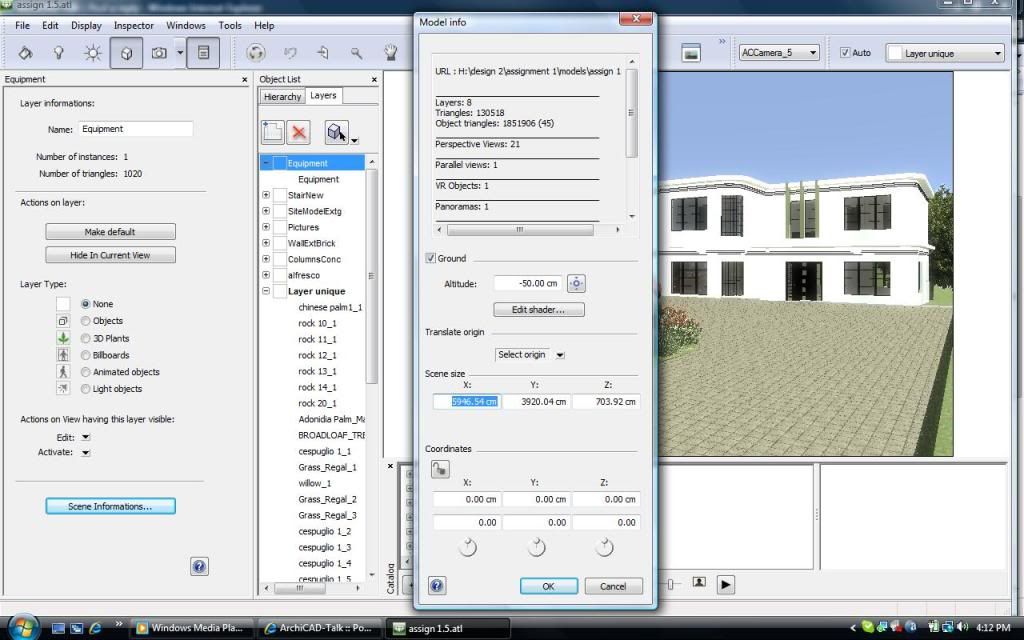
you need to goto the objects palette, from there choose equipment layer, then scene information.
then check the ground marker, and change the ground level as required, add shaders etc.
heres a screenshot,
im sure there are other ways to get to the ground palette, but this is how i do it.

adzik
Newcomer
Options
- Mark as New
- Bookmark
- Subscribe
- Mute
- Subscribe to RSS Feed
- Permalink
- Report Inappropriate Content
2010-08-29 11:39 PM
2010-08-29
11:39 PM
I'm not aware what version of Artlantis you are using but in 3.0 you should get to that settings box by pressing Ctrl+I.
Running ArchiCAD 23 INT.
Anonymous
Not applicable
Options
- Mark as New
- Bookmark
- Subscribe
- Mute
- Subscribe to RSS Feed
- Permalink
- Report Inappropriate Content
2010-08-30 01:35 AM
2010-08-30
01:35 AM
Okay yes, thats worked perfectly!
Thanks so much, it worked the way splitlid told me and your shortcut also worked.
Problem solved
Hayden.
Thanks so much, it worked the way splitlid told me and your shortcut also worked.
Problem solved
Hayden.
Didn't find the answer?
Check other topics in this Forum
Back to ForumRead the latest accepted solutions!
Accepted SolutionsStart a new conversation!

