
Turn on suggestions
Auto-suggest helps you quickly narrow down your search results by suggesting possible matches as you type.
Showing results for
EN
Turn on suggestions
Auto-suggest helps you quickly narrow down your search results by suggesting possible matches as you type.
Showing results for
- English
- :
- Developer Hub
- :
- Archicad C++ API
- :
- Re: Why null char[] checking not working?
Options
- Subscribe to RSS Feed
- Mark Topic as New
- Mark Topic as Read
- Pin this post for me
- Bookmark
- Subscribe to Topic
- Mute
- Printer Friendly Page

Newbie
Participant
Options
- Mark as New
- Bookmark
- Subscribe
- Mute
- Subscribe to RSS Feed
- Permalink
- Report Inappropriate Content
2023-07-10
05:17 AM
- last edited on
2023-07-17
10:13 PM
by
 Laszlo Nagy
Why null char[] checking not working?
2023-07-10
05:17 AM
I am try to put a condition checking for empty value of char[] as below code but still not working.
GS::Array<API_NavigatorItem> items;
API_NavigatorItem item = {};
char str[128];
memset(str, '\0', sizeof(str));
item.guid = guid;
item.mapId = mapId; //NavigatorPaletteTestGlobals::GetInstance().GetNavigatorMapID();
GSErrCode err = ACAPI_Navigator(APINavigator_GetNavigatorChildrenItemsID, &item, nullptr, &items);
if (err != NoError)
return;
for (API_NavigatorItem& childItem : items) {
if (GS::UniString(childItem.uiId).ToCStr().Get() != NULL) {
ACAPI_WriteReport("Value >>%s<>%s =>%i", true, GS::UniString(childItem.uiId).ToCStr().Get(), GS::UniString(str).ToCStr().Get(),childItem.isIndependent);
}
}
Appreciated for any help to fix this issue.
Solved! Go to Solution.
Solved
Labels:
- Labels:
-
Add-On (C++)
1 Solution
Accepted Solutions

BerndSchwarzenb
Mentor
Options
- Mark as New
- Bookmark
- Subscribe
- Mute
- Subscribe to RSS Feed
- Permalink
- Report Inappropriate Content
2023-07-11 09:53 PM
2023-07-11
09:53 PM
OK now I think I've understood. And I've tested it a bit.
It seems that you can't delete items which are part of a cloned folder as you've found out.
The cloned folders have itemType = API_UndefinedNavItem.
So you could check if an items parent has this item type.
To get an items parent you can use APINavigator_GetNavigatorParentItemID.
Hope that helps!
Automating Archicad with Add-Ons, GDL-Objects & Python Archi-XT.com
Solution
6 Replies 6
BerndSchwarzenb
Mentor
Options
- Mark as New
- Bookmark
- Subscribe
- Mute
- Subscribe to RSS Feed
- Permalink
- Report Inappropriate Content
2023-07-10 08:44 AM - edited 2023-07-10 08:44 AM
2023-07-10
08:44 AM
I think this condition
GS::UniString(childItem.uiId).ToCStr().Get() != NULL
will never be true, since you are creating an UniString object right there and this will have a pointer existing.
It's a bit unclear what exactly you want to achieve.
Maybe you need this?
!GS::UniString(childItem.uiId).IsEmpty()
Automating Archicad with Add-Ons, GDL-Objects & Python Archi-XT.com
Newbie
Participant
Options
- Mark as New
- Bookmark
- Subscribe
- Mute
- Subscribe to RSS Feed
- Permalink
- Report Inappropriate Content
2023-07-10 10:24 AM
2023-07-10
10:24 AM
Hello bschwb,
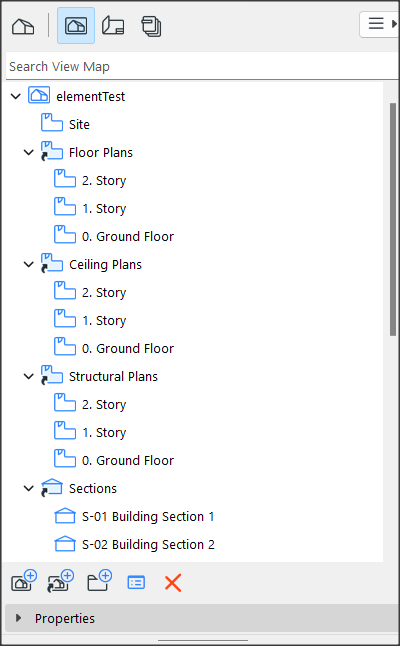
Actually I want to list the viewmap of navigator and check whether the item can be deleted or not as below picture but still can't find our the way.
Not sure you have any suggestion or not.
Thanks in advance.
BerndSchwarzenb
Mentor
Options
- Mark as New
- Bookmark
- Subscribe
- Mute
- Subscribe to RSS Feed
- Permalink
- Report Inappropriate Content
2023-07-11 01:31 PM
2023-07-11
01:31 PM
Which ones in the picture do you want to delete?
Automating Archicad with Add-Ons, GDL-Objects & Python Archi-XT.com
Newbie
Participant
Options
- Mark as New
- Bookmark
- Subscribe
- Mute
- Subscribe to RSS Feed
- Permalink
- Report Inappropriate Content
2023-07-11 04:24 PM
2023-07-11
04:24 PM
Hello bschwb,
From the given picture, if you select 'Floor Plans' then you can delete, but it's sub items such as story 1 you can't delete. I still can't find way to check whether the selected item can or can not delete from API function.
Thanks.
BerndSchwarzenb
Mentor
Options
- Mark as New
- Bookmark
- Subscribe
- Mute
- Subscribe to RSS Feed
- Permalink
- Report Inappropriate Content
2023-07-11 09:53 PM
2023-07-11
09:53 PM
OK now I think I've understood. And I've tested it a bit.
It seems that you can't delete items which are part of a cloned folder as you've found out.
The cloned folders have itemType = API_UndefinedNavItem.
So you could check if an items parent has this item type.
To get an items parent you can use APINavigator_GetNavigatorParentItemID.
Hope that helps!
Automating Archicad with Add-Ons, GDL-Objects & Python Archi-XT.com
Solution
Newbie
Participant
Options
- Mark as New
- Bookmark
- Subscribe
- Mute
- Subscribe to RSS Feed
- Permalink
- Report Inappropriate Content
2023-07-12 04:49 AM
2023-07-12
04:49 AM

Didn't find the answer?
Check other topics in this Forum
Back to ForumRead the latest accepted solutions!
Accepted SolutionsStart a new conversation!

Suggested topics
- OpenBrep: AI-Powered GDL Development from Your Terminal in GDL
- Req("Serial_number") works differently in 28 with cloud license than in prev. version:intentional? in GDL
- Call ArchiCAD api functions from Wpf window button in Archicad C++ API
- Project Settings Preferences in Archicad C++ API
- Inaccurate Bounding Box Coordinates for Door Labels with ARCHICAD API in Archicad C++ API
