
Turn on suggestions
Auto-suggest helps you quickly narrow down your search results by suggesting possible matches as you type.
Showing results for
EN
Turn on suggestions
Auto-suggest helps you quickly narrow down your search results by suggesting possible matches as you type.
Showing results for
- English
- :
- Forum
- :
- Collaboration with other software
- :
- Re: Dimensions
Options
- Subscribe to RSS Feed
- Mark Topic as New
- Mark Topic as Read
- Pin this post for me
- Bookmark
- Subscribe to Topic
- Mute
- Printer Friendly Page

Q257
Participant
Options
- Mark as New
- Bookmark
- Subscribe
- Mute
- Subscribe to RSS Feed
- Permalink
- Report Inappropriate Content
2022-01-17 07:11 AM
Dimensions
2022-01-17
07:11 AM
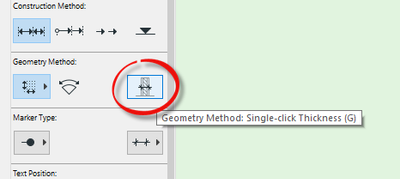
When I click on multiple walls and then click to bring up the hammer only the thickness dimension of the individual walls appear and not the dimensions between them. If there is one dimension in place I an ctrl/click and the line will be extended to as many objects as you want. Some setting has changed and I can't find what it is.
Solved! Go to Solution.
Solved
Read-Only
1 Solution
Accepted Solutions

Barry Kelly
Moderator
Options
- Mark as New
- Bookmark
- Subscribe
- Mute
- Subscribe to RSS Feed
- Permalink
- Report Inappropriate Content
2022-01-17 07:52 AM
2022-01-17
07:52 AM
You have probably activated the 'Single Click Thickness' button in the dimension geometry settings.
Barry.
One of the forum moderators.
Versions 6.5 to 27
i7-10700 @ 2.9Ghz, 32GB ram, GeForce RTX 2060 (6GB), Windows 10
Lenovo Thinkpad - i7-1270P 2.20 GHz, 32GB RAM, Nvidia T550, Windows 11
Versions 6.5 to 27
i7-10700 @ 2.9Ghz, 32GB ram, GeForce RTX 2060 (6GB), Windows 10
Lenovo Thinkpad - i7-1270P 2.20 GHz, 32GB RAM, Nvidia T550, Windows 11
Solution
2 Replies 2
Barry Kelly
Moderator
Options
- Mark as New
- Bookmark
- Subscribe
- Mute
- Subscribe to RSS Feed
- Permalink
- Report Inappropriate Content
2022-01-17 07:52 AM
2022-01-17
07:52 AM
You have probably activated the 'Single Click Thickness' button in the dimension geometry settings.
Barry.
One of the forum moderators.
Versions 6.5 to 27
i7-10700 @ 2.9Ghz, 32GB ram, GeForce RTX 2060 (6GB), Windows 10
Lenovo Thinkpad - i7-1270P 2.20 GHz, 32GB RAM, Nvidia T550, Windows 11
Versions 6.5 to 27
i7-10700 @ 2.9Ghz, 32GB ram, GeForce RTX 2060 (6GB), Windows 10
Lenovo Thinkpad - i7-1270P 2.20 GHz, 32GB RAM, Nvidia T550, Windows 11
Solution
Q257
Participant
Options
- Mark as New
- Bookmark
- Subscribe
- Mute
- Subscribe to RSS Feed
- Permalink
- Report Inappropriate Content
2022-01-17 11:47 PM
2022-01-17
11:47 PM
Absolutely correct Barry, I didn't even know that button was there. Many thanks.

Still looking?

Suggested topics
- Introducing the EasyBIM Add-On Suite for ArchiCAD in General discussions
- How can I combine model data and schedule totals into one building data summary table? in Project data & BIM
- Dimensions in Documentation
- Broken Dimension style in Documentation
- Archicad 29 Dimension Lagging issue in Documentation
