
Turn on suggestions
Auto-suggest helps you quickly narrow down your search results by suggesting possible matches as you type.
Showing results for
EN
Turn on suggestions
Auto-suggest helps you quickly narrow down your search results by suggesting possible matches as you type.
Showing results for
- English
- :
- Forum
- :
- Collaboration with other software
- :
- Re: Glazed Area
Options
- Subscribe to RSS Feed
- Mark Topic as New
- Mark Topic as Read
- Pin this post for me
- Bookmark
- Subscribe to Topic
- Mute
- Printer Friendly Page

Electric Flute
Booster
Options
- Mark as New
- Bookmark
- Subscribe
- Mute
- Subscribe to RSS Feed
- Permalink
- Report Inappropriate Content
2018-08-04 04:57 PM
Glazed Area
2018-08-04
04:57 PM
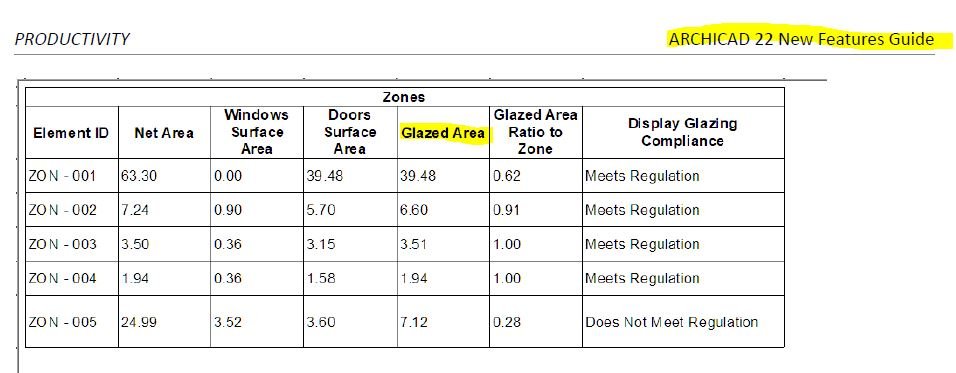
So, Glazed Area of a zone is not just a sum of Windows Surface Area and Doors Surface Area, its quite more complex. I have made a search on this Forum, and found the gs_list_glassarea parameter, but seems its not working with windows AC22.
Page 86 of ArchiCAD 22 New Feature Guide shows Glazed Area field (see image attached), but it its just the sum of windows and doors surface area. So, not usable at all!
Graphisoft, is it possible to have TRUE Glazed Area?
AC26 > AC5 - Win10
Read-Only
Labels:
- Labels:
-
Data management
4 Replies 4

Erwin Edel
Rockstar
Options
- Mark as New
- Bookmark
- Subscribe
- Mute
- Subscribe to RSS Feed
- Permalink
- Report Inappropriate Content
2018-08-06 08:55 AM
2018-08-06
08:55 AM
With the way most door leaf objects work, I doubt it.
You could try creating a surface schedule for the glass surface used, but I know that with graphic override (for example) archicad tends to see doors/windows as one base surface, so that might not work either. You might get double the numbers too, if it schedules both sides as surface.
You could try creating a surface schedule for the glass surface used, but I know that with graphic override (for example) archicad tends to see doors/windows as one base surface, so that might not work either. You might get double the numbers too, if it schedules both sides as surface.
Erwin Edel, Project Lead, Leloup Architecten
www.leloup.nl
ArchiCAD 9-29NED FULL
Windows 11 Pro for Workstations
Adobe Design Premium CS5
www.leloup.nl
ArchiCAD 9-29NED FULL
Windows 11 Pro for Workstations
Adobe Design Premium CS5
Electric Flute
Booster
Options
- Mark as New
- Bookmark
- Subscribe
- Mute
- Subscribe to RSS Feed
- Permalink
- Report Inappropriate Content
2018-08-06 05:54 PM
2018-08-06
05:54 PM
Thanks Erwin for the reply.
So, the BIM inside and out advertise is not able to get glazed areas.
So, the BIM inside and out advertise is not able to get glazed areas.
AC26 > AC5 - Win10
Electric Flute
Booster
Options
- Mark as New
- Bookmark
- Subscribe
- Mute
- Subscribe to RSS Feed
- Permalink
- Report Inappropriate Content
2018-08-16 11:41 PM
2018-08-16
11:41 PM
Hello,
My name is Nikoletta Csak, and I am contacting you from Technical Support Team at GRAPHISOFT.
Thank you for sharing your case with us.
Indeed it needs additional efforts to calculate the glazed area for doors, since there is no option to exclude non-glazed ones from calculations based on their surface.
Getting a really accurate calculation is even more difficult, when door leaf is only partly made of glass and therefor we cannot count with the opening’s nominal sizes. The precise area of glazing can be found for each door under its own Selection Settings/Descriptions…/Total Glazed Area. Unfortunately currently it is not possible to list this value in schedules or in labels as AutoText directly, however we can use the information to create a new property.
What I think of as a possible solution might only be sensible if there are only a few different door types in the project. In this case I would look up the true glazed area and create two new properties.
One of them would be an option set named “glazing type” with options “glazing 1”, “glazing 2” etc. This needs then to be set for each door manually. The second property would have following logic, where values 1,70; 1,14; and 0,00 stand for each door type’s glazed area:
IF ( glazing type = "glazing 1"; 1,70; ( IF ( glazing type = "glazing 2"; 1,14; ( IF ( glazing type = "glazing 1"; 0,00; 0 ) ) ) ) )
Please remember to set both property’s availability for classification “Door”
After all above is set up, I would create a Surfaces Scheme with following criteria:
Element Type is Door
And following fields:
- To Zone Number
- Type and/or Element ID (or any other field which helps you to identify the openings)
- W/D Opening Nominal Surface Area
- both newly created properties
Optionally, if you set up the same property “glazing type” for the windows as well, then all openings can be included in the same list.
Please let me know if this helps or any further support is needed
Best regards,
Nikoletta
Csák, Nikoletta
Technical Support Engineer
My name is Nikoletta Csak, and I am contacting you from Technical Support Team at GRAPHISOFT.
Thank you for sharing your case with us.
Indeed it needs additional efforts to calculate the glazed area for doors, since there is no option to exclude non-glazed ones from calculations based on their surface.
Getting a really accurate calculation is even more difficult, when door leaf is only partly made of glass and therefor we cannot count with the opening’s nominal sizes. The precise area of glazing can be found for each door under its own Selection Settings/Descriptions…/Total Glazed Area. Unfortunately currently it is not possible to list this value in schedules or in labels as AutoText directly, however we can use the information to create a new property.
What I think of as a possible solution might only be sensible if there are only a few different door types in the project. In this case I would look up the true glazed area and create two new properties.
One of them would be an option set named “glazing type” with options “glazing 1”, “glazing 2” etc. This needs then to be set for each door manually. The second property would have following logic, where values 1,70; 1,14; and 0,00 stand for each door type’s glazed area:
IF ( glazing type = "glazing 1"; 1,70; ( IF ( glazing type = "glazing 2"; 1,14; ( IF ( glazing type = "glazing 1"; 0,00; 0 ) ) ) ) )
Please remember to set both property’s availability for classification “Door”
After all above is set up, I would create a Surfaces Scheme with following criteria:
Element Type is Door
And following fields:
- To Zone Number
- Type and/or Element ID (or any other field which helps you to identify the openings)
- W/D Opening Nominal Surface Area
- both newly created properties
Optionally, if you set up the same property “glazing type” for the windows as well, then all openings can be included in the same list.
Please let me know if this helps or any further support is needed
Best regards,
Nikoletta
Csák, Nikoletta
Technical Support Engineer
AC26 > AC5 - Win10

Barry Kelly
Moderator
Options
- Mark as New
- Bookmark
- Subscribe
- Mute
- Subscribe to RSS Feed
- Permalink
- Report Inappropriate Content
2018-08-17 04:01 AM
2018-08-17
04:01 AM
Electric wrote:
The precise area of glazing can be found for each door under its own Selection Settings/Descriptions…/Total Glazed Area. Unfortunately currently it is not possible to list this value in schedules or in labels as AutoText directly, however we can use the information to create a new property.
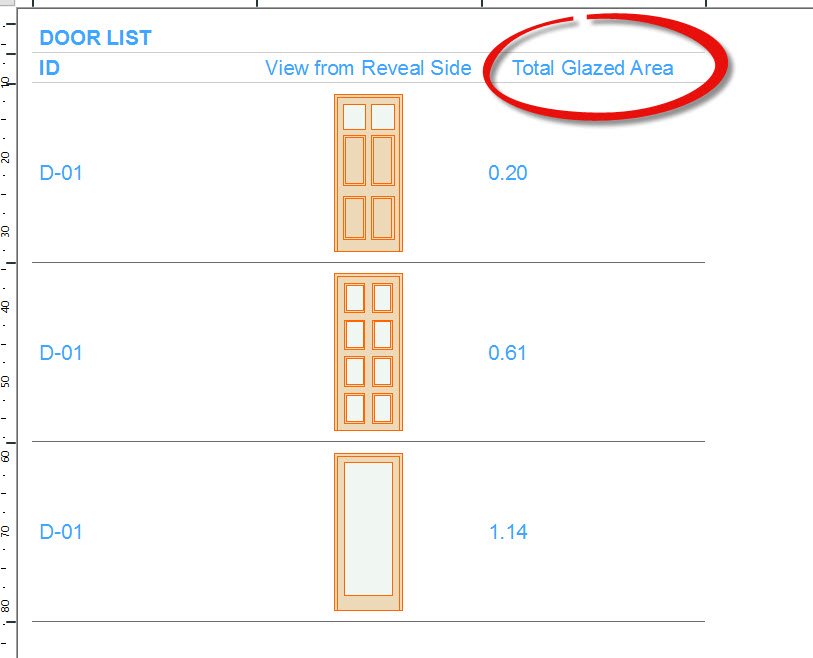
If the total glazed area is available as a parameter in the door object, then it can be listed in a schedule.
The question is, is this parameter available for all door objects? - I don't actually use the Graphisoft doors so I can't say for sure.
I don't think this parameter will be available to the zone stamp for zone schedules and certainly isn't available to expressions in properties as we can't access object parameters.
But here I just tried with 'Door 22' in a door schedule and the glazed area can be displayed.
Barry.
One of the forum moderators.
Versions 6.5 to 27
i7-10700 @ 2.9Ghz, 32GB ram, GeForce RTX 2060 (6GB), Windows 10
Lenovo Thinkpad - i7-1270P 2.20 GHz, 32GB RAM, Nvidia T550, Windows 11
Versions 6.5 to 27
i7-10700 @ 2.9Ghz, 32GB ram, GeForce RTX 2060 (6GB), Windows 10
Lenovo Thinkpad - i7-1270P 2.20 GHz, 32GB RAM, Nvidia T550, Windows 11

Still looking?

Suggested topics
- How can I combine model data and schedule totals into one building data summary table? in Project data & BIM
- Some free useful objects: Road signs, parametric pathway, roof crickets, crowds in Libraries & objects
- Surface / Component Schedule Bug: Automatic Column Wrapping Ignores Folded Geometry and Returns Flat in Project data & BIM
- walls show a single plane in Modeling
- Trying to calculate ACTUAL Wall Areas in Project data & BIM
