
Turn on suggestions
Auto-suggest helps you quickly narrow down your search results by suggesting possible matches as you type.
Showing results for
EN
Turn on suggestions
Auto-suggest helps you quickly narrow down your search results by suggesting possible matches as you type.
Showing results for
- English
- :
- Forum
- :
- Collaboration with other software
- :
- Re: Graphic Overrides
Options
- Subscribe to RSS Feed
- Mark Topic as New
- Mark Topic as Read
- Pin this post for me
- Bookmark
- Subscribe to Topic
- Mute
- Printer Friendly Page

onkey89
Newcomer
Options
- Mark as New
- Bookmark
- Subscribe
- Mute
- Subscribe to RSS Feed
- Permalink
- Report Inappropriate Content
2022-03-26 12:11 PM
Graphic Overrides
2022-03-26
12:11 PM
I’m a new user of Archicad. I recently stumbled on the graphic overrides setting but it only allows me to use graphic overrides in the model space of the drawing but when I place a drawing onto a layout, it reverts away from the graphic overrides. Anyone know how to change this?
Read-Only
3 Replies 3

Mahmoud Qenawi
Ace
Options
- Mark as New
- Bookmark
- Subscribe
- Mute
- Subscribe to RSS Feed
- Permalink
- Report Inappropriate Content
2022-03-26 01:05 PM
2022-03-26
01:05 PM
@onkey89 , read these pages and they will give you an overview of the process

AC 29 INT 4006/WIN 11
AMD Ryzen 7 5800H with Radeon Graphics 3.20 GHz 16.0 GB
AMD Ryzen 7 5800H with Radeon Graphics 3.20 GHz 16.0 GB

hevi
Ace
Options
- Mark as New
- Bookmark
- Subscribe
- Mute
- Subscribe to RSS Feed
- Permalink
- Report Inappropriate Content
2022-03-26 01:13 PM - edited 2022-03-26 01:45 PM
2022-03-26
01:13 PM
You need to redefine the View.
Either right click on the View in the View Map > View Settings > Graphic Override and change it to the saved combination you want to use.
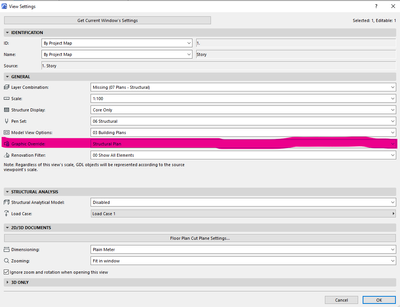
Or right click on the View in the View Map > Redefine with Current Window Settings but note that this will redefine the View for all settings that differ between the Window and the View.

 Rubia Torres
Graphisoft
Options
- Mark as New
- Bookmark
- Subscribe
- Mute
- Subscribe to RSS Feed
- Permalink
- Report Inappropriate Content
2022-03-26 01:50 PM - edited 2022-03-26 01:59 PM
2022-03-26
01:50 PM
Hi @onkey89. Welcome on-board!
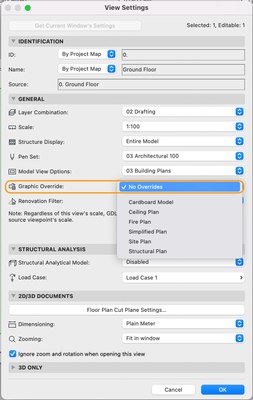
You need to change the settings of the view which you want to place/have placed in the layout.
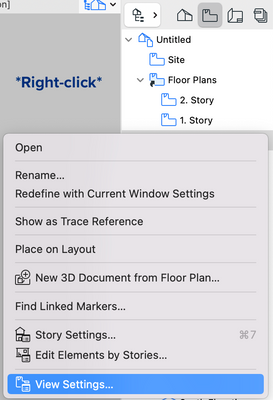
In the View Settings dialog, go to Graphic Override and assign the desired one, then save it. Back in the layout, update the drawing (right-click > update).
I hope this helps 😉
Rubia Torres
Community Expert | GRAPHISOFT SE
Did you get a helpful answer on the forum?
Give it back to the Community by marking it as an accepted solution!

Still looking?

