
Turn on suggestions
Auto-suggest helps you quickly narrow down your search results by suggesting possible matches as you type.
Showing results for
EN
Turn on suggestions
Auto-suggest helps you quickly narrow down your search results by suggesting possible matches as you type.
Showing results for
- English
- :
- Forum
- :
- Collaboration with other software
- :
- Objective tool, changing profile color
Options
- Subscribe to RSS Feed
- Mark Topic as New
- Mark Topic as Read
- Pin this post for me
- Bookmark
- Subscribe to Topic
- Mute
- Printer Friendly Page

Anonymous
Not applicable
Options
- Mark as New
- Bookmark
- Subscribe
- Mute
- Subscribe to RSS Feed
- Permalink
- Report Inappropriate Content
2011-07-01 01:01 PM
Objective tool, changing profile color
2011-07-01
01:01 PM
Thanks


2 Replies 2

Ralph Wessel
Virtuoso
Options
- Mark as New
- Bookmark
- Subscribe
- Mute
- Subscribe to RSS Feed
- Permalink
- Report Inappropriate Content
2011-07-01 10:03 PM
2011-07-01
10:03 PM
nestorovski wrote:If you have questions about OBJECTiVE, you can contact Encina directly for support.
I was wondering how can I make one profile but change the color on the sides and the front and back color of the profile. In this case, (I attached an image) you can see that it's a complex profile and I want to make the top and bottom of the profile with different material that the rest of the body.
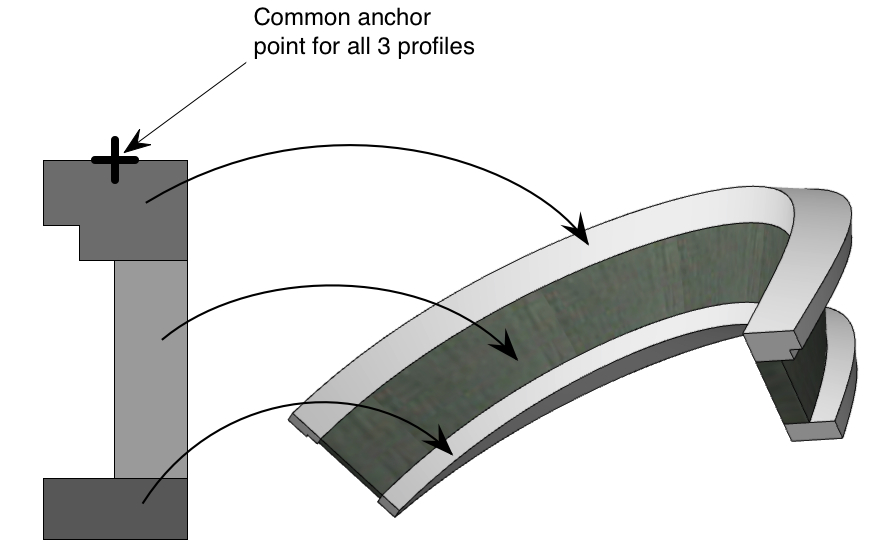
In answer to your question, make the profile from as many different parts as you require materials for. In this case you would need 3 parts - top, middle, and base - so split the profile fill into 3 parts. Then make a profile object for each part. Make sure the anchor is on the same position for all the parts - then they will act as one when you use tools like
Ralph Wessel BArch
Central Innovation
Central Innovation
Anonymous
Not applicable
Options
- Mark as New
- Bookmark
- Subscribe
- Mute
- Subscribe to RSS Feed
- Permalink
- Report Inappropriate Content
2011-07-04 09:16 AM
2011-07-04
09:16 AM
Ralph wrote:Thanks, that's a good solutionnestorovski wrote:If you have questions about OBJECTiVE, you can contact Encina directly for support.
I was wondering how can I make one profile but change the color on the sides and the front and back color of the profile. In this case, (I attached an image) you can see that it's a complex profile and I want to make the top and bottom of the profile with different material that the rest of the body.
In answer to your question, make the profile from as many different parts as you require materials for. In this case you would need 3 parts - top, middle, and base - so split the profile fill into 3 parts. Then make a profile object for each part. Make sure the anchor is on the same position for all the parts - then they will act as one when you use tools likeBendand Offset(see attached image).
Still looking?
Suggested topics
