
Turn on suggestions
Auto-suggest helps you quickly narrow down your search results by suggesting possible matches as you type.
Showing results for
EN
Turn on suggestions
Auto-suggest helps you quickly narrow down your search results by suggesting possible matches as you type.
Showing results for
- English
- :
- Forum
- :
- Documentation
- :
- Re: 3D View - How to hide doors frame lines
Options
- Subscribe to RSS Feed
- Mark Topic as New
- Mark Topic as Read
- Pin this post for me
- Bookmark
- Subscribe to Topic
- Mute
- Printer Friendly Page

alegafs_92
Participant
Options
- Mark as New
- Bookmark
- Subscribe
- Mute
- Subscribe to RSS Feed
- Permalink
- Report Inappropriate Content
2022-09-01
10:58 AM
- last edited on
2022-09-22
05:59 PM
by
 Oleksandra Vakariuk
3D View - How to hide doors frame lines
2022-09-01
10:58 AM
Hi everyone,
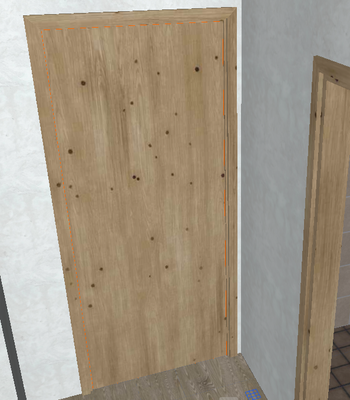
I want to hide the lines (the orange one) of the frame of the doors in the 3D View. I've managed to hide the opening lines but not the frame lines. How can I do it?
I have deactivated them in the View Model Options but it seems not to have any effect on them
I hope I've been clear, thanks a lot!
1 Reply 1

Miha_M
Advisor
Options
- Mark as New
- Bookmark
- Subscribe
- Mute
- Subscribe to RSS Feed
- Permalink
- Report Inappropriate Content
2022-09-01 12:21 PM
2022-09-01
12:21 PM
You can eliminate all contour lines in the View > 3D View Options > 3D Styles window, where you have to disable the Show Contours option.
You can't hide only this line, you can only change the color. This can be done within the library element settings, but the location depends on the library element itself. An example here:

| Archicad 4.5 - 29
| HP Z840 | 2× E5-2643 v4 | 64 GB RAM | Quadro M5000 | Windows 10 Pro x64
| HP Z4 G4 | W-2245 | 64 GB RAM | RTX A4000 | Windows 11

Still looking?

Suggested topics
- Railing and Curtain Wall in Modeling
- Archicad to Revit for MEP: the workaround Graphisoft's own method couldn't give me in Collaboration with other software
- Wall reference line location and Reference GDL door in Grasshopper in Parametric design
- Outside casing width limit in Wood Windows AC27 USA? in Libraries & objects
- Favourites Preview Incorrect in Libraries & objects
