
Turn on suggestions
Auto-suggest helps you quickly narrow down your search results by suggesting possible matches as you type.
Showing results for
EN
Turn on suggestions
Auto-suggest helps you quickly narrow down your search results by suggesting possible matches as you type.
Showing results for
- English
- :
- Forum
- :
- Documentation
- :
- Re: Automatic text label position parameters - why...
Options
- Subscribe to RSS Feed
- Mark Topic as New
- Mark Topic as Read
- Pin this post for me
- Bookmark
- Subscribe to Topic
- Mute
- Printer Friendly Page

amgam
Booster
Options
- Mark as New
- Bookmark
- Subscribe
- Mute
- Subscribe to RSS Feed
- Permalink
- Report Inappropriate Content
2021-11-16
02:22 PM
- last edited on
2023-05-09
03:16 PM
by
 Gordana Radonic
Automatic text label position parameters - why can't this be set?
2021-11-16
02:22 PM
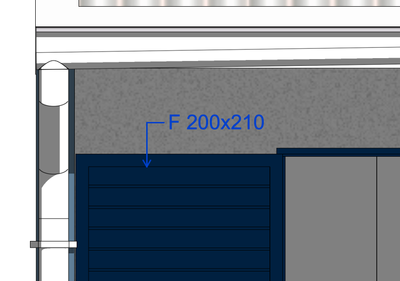
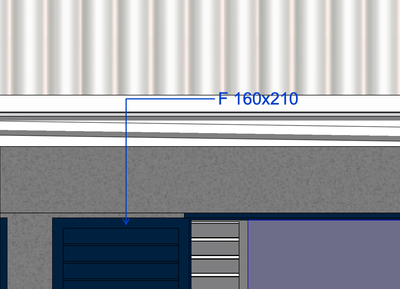
It's mind boggling for me that we have these automatic labels, and yet I have to set their position EVERY time manually bc even though I copy the set label - it will still show with a really large distance from the annotated element.
Is there any way to copy/paste these settings? Making the label position itself at a certain x,y, direction?
Desired position:
Automatic position set by Archicad EVERY offing time:
ArchiCAD 25 FRA 3011 + TwinMotion 2021.1.4
iMac Retina 27 2020 3,8 GHz Intel Core i7 8 cœurs
64 Go 2667 MHz DDR4
AMD Radeon Pro 5700 XT 16 Go
iMac Retina 27 2020 3,8 GHz Intel Core i7 8 cœurs
64 Go 2667 MHz DDR4
AMD Radeon Pro 5700 XT 16 Go
Solved! Go to Solution.
1 Solution
Accepted Solutions

marian_sdraila
Booster
Options
- Mark as New
- Bookmark
- Subscribe
- Mute
- Subscribe to RSS Feed
- Permalink
- Report Inappropriate Content
2021-11-17 09:36 AM
2021-11-17
09:36 AM
If the scale in your view is set to 1:50 you can change it to 1:20 or 1:30 and than label the elements you need and then go back to the original scale! It will make the length of the lines shorter! It's a workaround that I found recently!
ArchiCAD user since V10
Intel Core Ultra 9 285K CPU | 128 GB RAM 4400 MT/s | NVIDIA RTX 4500 Ada Generation,
1TB NVMe SSD | 40" (5120 x 2160) | Windows 11 Pro ENG | ArchiCAD 29
Intel Core Ultra 9 285K CPU | 128 GB RAM 4400 MT/s | NVIDIA RTX 4500 Ada Generation,
1TB NVMe SSD | 40" (5120 x 2160) | Windows 11 Pro ENG | ArchiCAD 29
Solution
6 Replies 6

LERAT Bruno
Booster
Options
- Mark as New
- Bookmark
- Subscribe
- Mute
- Subscribe to RSS Feed
- Permalink
- Report Inappropriate Content
2021-11-16 02:54 PM
2021-11-16
02:54 PM
Hello,
i don't copy the settings of my text label,
if i want an other text label, i duplicate one of my text label and, when my new text label is in his place, i click + "comand" (on mac) on the élément !
Sorry for my english ! 😉
Archicad version 28 3110 since the 6.00
Mac OS Sonoma 14.4.1
mac studio M2 max
Mac OS Sonoma 14.4.1
mac studio M2 max

Barry Kelly
Moderator
Options
- Mark as New
- Bookmark
- Subscribe
- Mute
- Subscribe to RSS Feed
- Permalink
- Report Inappropriate Content
2021-11-16 03:37 PM
2021-11-16
03:37 PM
There are no parameters for the lengths of the pointer line.
Only the pointer starting angle.
So when you copy the settings, only the pointer line angle will be set.
I know it is 2 extra clicks, but use the 'detailed' placement method rather than 'simple'.
Then you get the pointer arrow exactly as you want it.
Barry.
One of the forum moderators.
Versions 6.5 to 27
i7-10700 @ 2.9Ghz, 32GB ram, GeForce RTX 2060 (6GB), Windows 10
Lenovo Thinkpad - i7-1270P 2.20 GHz, 32GB RAM, Nvidia T550, Windows 11
Versions 6.5 to 27
i7-10700 @ 2.9Ghz, 32GB ram, GeForce RTX 2060 (6GB), Windows 10
Lenovo Thinkpad - i7-1270P 2.20 GHz, 32GB RAM, Nvidia T550, Windows 11
amgam
Booster
Options
- Mark as New
- Bookmark
- Subscribe
- Mute
- Subscribe to RSS Feed
- Permalink
- Report Inappropriate Content
2021-11-16 07:34 PM
2021-11-16
07:34 PM
That isn't the problem. The problem is automatic labelling of many elements - you have to manually set the position of each label.
I hope we will get options to set that all at once soon. Much needed.
ArchiCAD 25 FRA 3011 + TwinMotion 2021.1.4
iMac Retina 27 2020 3,8 GHz Intel Core i7 8 cœurs
64 Go 2667 MHz DDR4
AMD Radeon Pro 5700 XT 16 Go
iMac Retina 27 2020 3,8 GHz Intel Core i7 8 cœurs
64 Go 2667 MHz DDR4
AMD Radeon Pro 5700 XT 16 Go
marian_sdraila
Booster
Options
- Mark as New
- Bookmark
- Subscribe
- Mute
- Subscribe to RSS Feed
- Permalink
- Report Inappropriate Content
2021-11-17 09:36 AM
2021-11-17
09:36 AM
If the scale in your view is set to 1:50 you can change it to 1:20 or 1:30 and than label the elements you need and then go back to the original scale! It will make the length of the lines shorter! It's a workaround that I found recently!
ArchiCAD user since V10
Intel Core Ultra 9 285K CPU | 128 GB RAM 4400 MT/s | NVIDIA RTX 4500 Ada Generation,
1TB NVMe SSD | 40" (5120 x 2160) | Windows 11 Pro ENG | ArchiCAD 29
Intel Core Ultra 9 285K CPU | 128 GB RAM 4400 MT/s | NVIDIA RTX 4500 Ada Generation,
1TB NVMe SSD | 40" (5120 x 2160) | Windows 11 Pro ENG | ArchiCAD 29
Solution
amgam
Booster
Options
- Mark as New
- Bookmark
- Subscribe
- Mute
- Subscribe to RSS Feed
- Permalink
- Report Inappropriate Content
2021-11-17 02:57 PM
2021-11-17
02:57 PM
Thank you! Interesting method 😄 Will try it our ASAP
ArchiCAD 25 FRA 3011 + TwinMotion 2021.1.4
iMac Retina 27 2020 3,8 GHz Intel Core i7 8 cœurs
64 Go 2667 MHz DDR4
AMD Radeon Pro 5700 XT 16 Go
iMac Retina 27 2020 3,8 GHz Intel Core i7 8 cœurs
64 Go 2667 MHz DDR4
AMD Radeon Pro 5700 XT 16 Go

CaticonC
Contributor
Options
- Mark as New
- Bookmark
- Subscribe
- Mute
- Subscribe to RSS Feed
- Permalink
- Report Inappropriate Content
2022-11-02 10:17 PM
2022-11-02
10:17 PM
This is the best workaround i've ever found, thank you very much!
ArchiCAD 24
Windows 10
AMD Ryzen 7 2700 CPU @ 3.20GHz
Radeon RX 570 Series 4 GB - 32 gb RAM
Windows 10
AMD Ryzen 7 2700 CPU @ 3.20GHz
Radeon RX 570 Series 4 GB - 32 gb RAM

Still looking?
Suggested topics
- Railing break mark in Modeling
- Window with adjustable frame extensions (jamb) and automatic insulation return – AC29 / GDL in Modeling
- Archicad to Revit for MEP: the workaround Graphisoft's own method couldn't give me in Collaboration with other software
- Use Object from library returns Null in Parametric design
- Window closures, what the hell are they doing at GS? in Libraries & objects
