
Turn on suggestions
Auto-suggest helps you quickly narrow down your search results by suggesting possible matches as you type.
Showing results for
EN
Turn on suggestions
Auto-suggest helps you quickly narrow down your search results by suggesting possible matches as you type.
Showing results for
- English
- :
- Forum
- :
- Documentation
- :
- Re: Cross Selection Not Working Anymore
Options
- Subscribe to RSS Feed
- Mark Topic as New
- Mark Topic as Read
- Pin this post for me
- Bookmark
- Subscribe to Topic
- Mute
- Printer Friendly Page

dhnguyen
Contributor
Options
- Mark as New
- Bookmark
- Subscribe
- Mute
- Subscribe to RSS Feed
- Permalink
- Report Inappropriate Content
2022-09-23 03:20 PM
Cross Selection Not Working Anymore
2022-09-23
03:20 PM
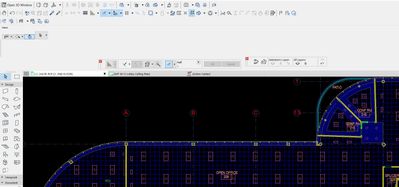
Recently I haven't been able to select multiple items at once anymore. My rectangle bounding box disappear whenever I want to do a cross selection, it becomes a line instead a bounding box and it asks me to to "enter rotation vector of selection rectangle"
This is my current work preference, what do I turn on or select in order for me to get my rectangle bounding box back?
DNguyen
ArchiCAD 18- 25
(expert in AutoCAD, novice in ArchiCAD)
ArchiCAD 18- 25
(expert in AutoCAD, novice in ArchiCAD)
Solved! Go to Solution.
Solved
Read-Only
2 Solutions
Accepted Solutions

hevi
Ace
Options
- Mark as New
- Bookmark
- Subscribe
- Mute
- Subscribe to RSS Feed
- Permalink
- Report Inappropriate Content
2022-09-23 03:34 PM
2022-09-23
03:34 PM
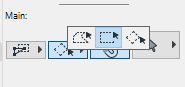
You have it set to rotated rectangle, click on the geometry method of the selection tool and change to rectangle.
Solution

Miha_M
Advisor
Options
- Mark as New
- Bookmark
- Subscribe
- Mute
- Subscribe to RSS Feed
- Permalink
- Report Inappropriate Content
2022-09-23 04:42 PM
2022-09-23
04:42 PM
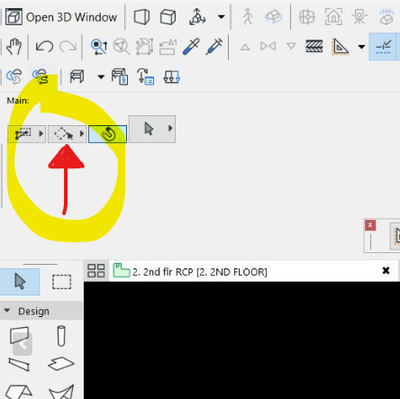
Try changing the selection method on this button:
| Archicad 4.5 - 29
| HP Z840 | 2× E5-2643 v4 | 64 GB RAM | Quadro M5000 | Windows 10 Pro x64
| HP Z4 G4 | W-2245 | 64 GB RAM | RTX A4000 | Windows 11
Solution
3 Replies 3
hevi
Ace
Options
- Mark as New
- Bookmark
- Subscribe
- Mute
- Subscribe to RSS Feed
- Permalink
- Report Inappropriate Content
2022-09-23 03:34 PM
2022-09-23
03:34 PM
You have it set to rotated rectangle, click on the geometry method of the selection tool and change to rectangle.
Solution
dhnguyen
Contributor
Options
- Mark as New
- Bookmark
- Subscribe
- Mute
- Subscribe to RSS Feed
- Permalink
- Report Inappropriate Content
2022-09-23 03:48 PM
2022-09-23
03:48 PM
perfect, thank you!
DNguyen
ArchiCAD 18- 25
(expert in AutoCAD, novice in ArchiCAD)
ArchiCAD 18- 25
(expert in AutoCAD, novice in ArchiCAD)
Miha_M
Advisor
Options
- Mark as New
- Bookmark
- Subscribe
- Mute
- Subscribe to RSS Feed
- Permalink
- Report Inappropriate Content
2022-09-23 04:42 PM
2022-09-23
04:42 PM
Try changing the selection method on this button:
| Archicad 4.5 - 29
| HP Z840 | 2× E5-2643 v4 | 64 GB RAM | Quadro M5000 | Windows 10 Pro x64
| HP Z4 G4 | W-2245 | 64 GB RAM | RTX A4000 | Windows 11
Solution

Still looking?

Suggested topics
- Cloud cursor stops me from snapping to point cloud in Modeling
- Iceberg Method – Plan Rotation and Module Displacement in Project data & BIM
- working with hotlinks in archicad is a pain in the neck ! in Project data & BIM
- Edit selection set bug - AC27 in General discussions
- Workflow between Modules and Bimcloud Saas in Teamwork & BIMcloud
