
Turn on suggestions
Auto-suggest helps you quickly narrow down your search results by suggesting possible matches as you type.
Showing results for
EN
Turn on suggestions
Auto-suggest helps you quickly narrow down your search results by suggesting possible matches as you type.
Showing results for
- English
- :
- Forum
- :
- Documentation
- :
- Re: Custom Line Type Reference Line Justified to O...
Options
- Subscribe to RSS Feed
- Mark Topic as New
- Mark Topic as Read
- Pin this post for me
- Bookmark
- Subscribe to Topic
- Mute
- Printer Friendly Page

EH21
Enthusiast
Options
- Mark as New
- Bookmark
- Subscribe
- Mute
- Subscribe to RSS Feed
- Permalink
- Report Inappropriate Content
2022-07-27
10:16 PM
- last edited on
2023-05-09
06:10 PM
by
 Gordana Radonic
Custom Line Type Reference Line Justified to One Side
2022-07-27
10:16 PM
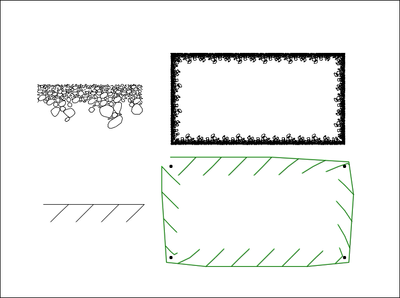
Does anybody know how to create a custom, asymmetrical line? I.E., when I draw the line, I want the symbol to be justified to one side and not centered on the custom symbol created. There is a stone symbol in Archicad which does this, but I cannot find a way to replicate the phenomenon. See attached images which show how the symbol relates to the drawn rectangle. The new one I'm trying to create (bottom) is using the center point of the symbol I drew as the reference line while the stone symbol (top) uses the top horizontal axis of the symbol as the reference line.

Solved! Go to Solution.
1 Solution
Accepted Solutions

Andrii Levko
Expert
Options
- Mark as New
- Bookmark
- Subscribe
- Mute
- Subscribe to RSS Feed
- Permalink
- Report Inappropriate Content
2022-07-28 12:44 AM
2022-07-28
12:44 AM
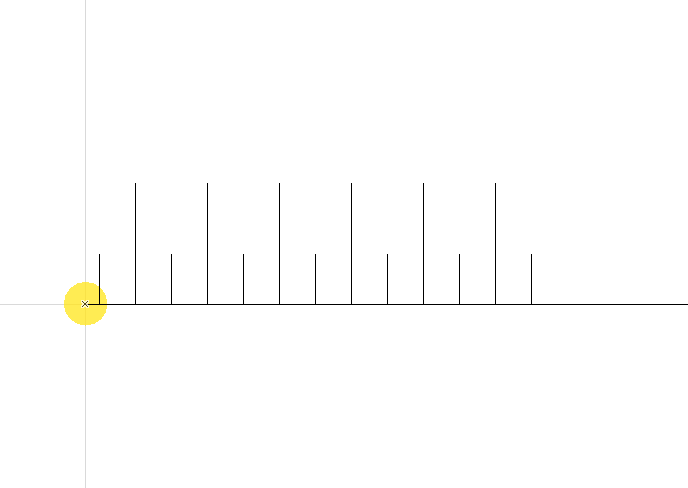
The Project Origin have to located within the bounding box of the copied elements, then it will be used for alignment.
Andrii
AC 8.1 - 28 INT/POL 3001
Win11
AC 8.1 - 28 INT/POL 3001
Win11
Solution
9 Replies 9
Andrii Levko
Expert
Options
- Mark as New
- Bookmark
- Subscribe
- Mute
- Subscribe to RSS Feed
- Permalink
- Report Inappropriate Content
2022-07-28 12:44 AM
2022-07-28
12:44 AM
The Project Origin have to located within the bounding box of the copied elements, then it will be used for alignment.
Andrii
AC 8.1 - 28 INT/POL 3001
Win11
AC 8.1 - 28 INT/POL 3001
Win11
Solution
Andrii Levko
Expert
Options
- Mark as New
- Bookmark
- Subscribe
- Mute
- Subscribe to RSS Feed
- Permalink
- Report Inappropriate Content
2022-07-28 12:52 AM
2022-07-28
12:52 AM
Something like this ( Project Origin Highlighted yellow )
Andrii
AC 8.1 - 28 INT/POL 3001
Win11
AC 8.1 - 28 INT/POL 3001
Win11

David Shorter
Advisor
Options
- Mark as New
- Bookmark
- Subscribe
- Mute
- Subscribe to RSS Feed
- Permalink
- Report Inappropriate Content
2022-07-28 09:46 AM - edited 2022-07-28 09:49 AM
2022-07-28
09:46 AM
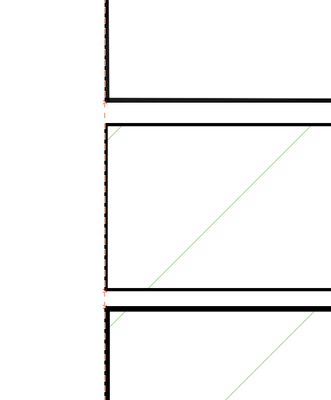
@EH21 Do you mean like this?
Archicad 4.1 to 28 Tech Preview. Apple Silicon
you can't build a line
Mac Studio
iPad Pro
iPhone
you can't build a line
Mac Studio
iPad Pro
iPhone
David Shorter
Advisor
Options
- Mark as New
- Bookmark
- Subscribe
- Mute
- Subscribe to RSS Feed
- Permalink
- Report Inappropriate Content
2022-07-28 10:30 AM
2022-07-28
10:30 AM
See below
Unfortunately it doesn't work for the separator skins on a composite
Archicad 4.1 to 28 Tech Preview. Apple Silicon
you can't build a line
Mac Studio
iPad Pro
iPhone
you can't build a line
Mac Studio
iPad Pro
iPhone
Andrii Levko
Expert
Options
- Mark as New
- Bookmark
- Subscribe
- Mute
- Subscribe to RSS Feed
- Permalink
- Report Inappropriate Content
2022-07-28 10:40 AM - edited 2022-07-28 10:42 AM
2022-07-28
10:40 AM
@David Shorter We are talking about creating line when the symbol to be justified to one side but not centered on the custom symbol created. There is a line created in the attached photo.

Andrii
AC 8.1 - 28 INT/POL 3001
Win11
AC 8.1 - 28 INT/POL 3001
Win11
David Shorter
Advisor
Options
- Mark as New
- Bookmark
- Subscribe
- Mute
- Subscribe to RSS Feed
- Permalink
- Report Inappropriate Content
2022-07-28 10:58 AM
2022-07-28
10:58 AM
Thats what I have shown below. Here its 2220% zoom at 1:5

Archicad 4.1 to 28 Tech Preview. Apple Silicon
you can't build a line
Mac Studio
iPad Pro
iPhone
you can't build a line
Mac Studio
iPad Pro
iPhone
Andrii Levko
Expert
Options
- Mark as New
- Bookmark
- Subscribe
- Mute
- Subscribe to RSS Feed
- Permalink
- Report Inappropriate Content
2022-07-28 11:07 AM - edited 2022-07-28 11:14 AM
2022-07-28
11:07 AM
@David Shorter Maybe you should create a topic and describe your issues in detail.
Andrii
AC 8.1 - 28 INT/POL 3001
Win11
AC 8.1 - 28 INT/POL 3001
Win11
David Shorter
Advisor
Options
- Mark as New
- Bookmark
- Subscribe
- Mute
- Subscribe to RSS Feed
- Permalink
- Report Inappropriate Content
2022-07-28 11:16 AM
2022-07-28
11:16 AM
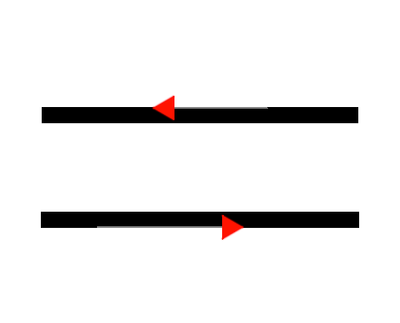
I thought I was answering the original question where the linetype was thickened on one side of the ref line and not centred
Archicad 4.1 to 28 Tech Preview. Apple Silicon
you can't build a line
Mac Studio
iPad Pro
iPhone
you can't build a line
Mac Studio
iPad Pro
iPhone
EH21
Enthusiast
Options
- Mark as New
- Bookmark
- Subscribe
- Mute
- Subscribe to RSS Feed
- Permalink
- Report Inappropriate Content
2022-07-28 03:43 PM
2022-07-28
03:43 PM
Thanks for the input...Andrii's response seemed to solve the problem

Still looking?

