
Turn on suggestions
Auto-suggest helps you quickly narrow down your search results by suggesting possible matches as you type.
Showing results for
EN
Turn on suggestions
Auto-suggest helps you quickly narrow down your search results by suggesting possible matches as you type.
Showing results for
- English
- :
- Forum
- :
- Documentation
- :
- Cut plane problem
Options
- Subscribe to RSS Feed
- Mark Topic as New
- Mark Topic as Read
- Pin this post for me
- Bookmark
- Subscribe to Topic
- Mute
- Printer Friendly Page

Anonymous
Not applicable
Options
- Mark as New
- Bookmark
- Subscribe
- Mute
- Subscribe to RSS Feed
- Permalink
- Report Inappropriate Content
2006-10-06
11:32 PM
- last edited on
2025-02-07
03:33 PM
by
 Aruzhan Ilaikova
Cut plane problem
2006-10-06
11:32 PM
Maybe someone has solved this one:
I have a plan with a short wall (4'-8"h) beside taller wall.
The tall wall has a window with a sill height of 4'-9".
I want both walls to appear "cut" and the window to appear in plan. If the cut plane is set to cut through the window (4'-9" or higher) then the short wall is not cut. If the cut plane is set to cut through the low wall then it is below the window...you see what I mean.
A gold start goes to the first person to solve the problem. 😉
Thanks,
I have a plan with a short wall (4'-8"h) beside taller wall.
The tall wall has a window with a sill height of 4'-9".
I want both walls to appear "cut" and the window to appear in plan. If the cut plane is set to cut through the window (4'-9" or higher) then the short wall is not cut. If the cut plane is set to cut through the low wall then it is below the window...you see what I mean.
A gold start goes to the first person to solve the problem. 😉
Thanks,
20 Replies 20

__archiben
Enthusiast
Options
- Mark as New
- Bookmark
- Subscribe
- Mute
- Subscribe to RSS Feed
- Permalink
- Report Inappropriate Content
2006-10-11 12:12 AM
2006-10-11
12:12 AM
Eric wrote:shouldn't be a problem. depending on your cut plane height:
A gold start goes to the first person to solve the problem.😉
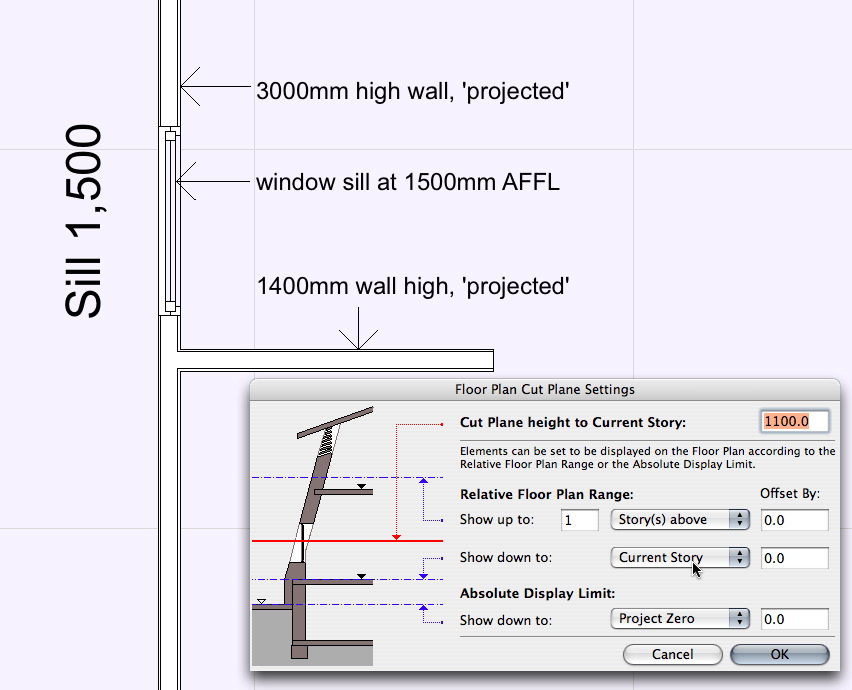
in the example below...
cut plane at 1100mm (3' 7") AFFL;
wall with window 3000mm (approx. 10') high, base at 0mm, 'projected';
perpendicular wall 1400mm (4' 7") high, base at 0mm, 'projected';
window sill at 1500mm (4' 11") AFFL, 'symbolic'.
if you want your window 'projected' rather than 'symbolic', you need to raise your cut plane above the sill level and switch the low-level wall to 'symbolic' . . .
unless i'm misunderstanding . . .

~/archiben
b e n _ f r o s t
b f [a t ] p l a n b a r c h i t e c t u r e [d o t] n z
archicad | sketchup | morpholio | phpp
b f [a t ] p l a n b a r c h i t e c t u r e [d o t] n z
archicad | sketchup | morpholio | phpp

Jefferson
Participant
Options
- Mark as New
- Bookmark
- Subscribe
- Mute
- Subscribe to RSS Feed
- Permalink
- Report Inappropriate Content
2006-10-11 12:17 AM
2006-10-11
12:17 AM
Hi Eric -
I have taken to setting my cut planes to 0, with 0 in both floor plan range settings..........from there I adjust individual elements only as needed, on an instance by instance basis to show up when and how I need them to display. Almost all walls are set to projected. [Projected with overhead is seldom used, so far anyway.] Windows and doors are set to symbolic. It is my attempt to keep the complexity to minimum, AND, to keep myself from having to think through the ramifications of every elements settings constantly..........I should add that my work is relegated to single family residential, [
A simple stepped foundation wall, using cut planes with settings other than 0, or a situation like you're experiencing now, can give you fits, trying to track on all elements settings becomes way too much work, IMHO.
With cut planes and floor plan ranges set to 0, it is very similar to drawing in ver 9, [8.1 for me], yet I can, when I want adjust the appearance of specific and individual elements to appear on other stories. [A multi-story wall, set to projected, which used to be a major work-around, basically now solves itself.]
So far, this is how it all is working best for me.........
I have taken to setting my cut planes to 0, with 0 in both floor plan range settings..........from there I adjust individual elements only as needed, on an instance by instance basis to show up when and how I need them to display. Almost all walls are set to projected. [Projected with overhead is seldom used, so far anyway.] Windows and doors are set to symbolic. It is my attempt to keep the complexity to minimum, AND, to keep myself from having to think through the ramifications of every elements settings constantly..........I should add that my work is relegated to single family residential, [
A simple stepped foundation wall, using cut planes with settings other than 0, or a situation like you're experiencing now, can give you fits, trying to track on all elements settings becomes way too much work, IMHO.
With cut planes and floor plan ranges set to 0, it is very similar to drawing in ver 9, [8.1 for me], yet I can, when I want adjust the appearance of specific and individual elements to appear on other stories. [A multi-story wall, set to projected, which used to be a major work-around, basically now solves itself.]
So far, this is how it all is working best for me.........
jeff white
w3d design
AC 23 Solo US / current build & library
Windoze 10 Pro 64
HP ZBook 17 G4
Intel Zeon 3.0
Twin 2GB SSD
32 GB memory
http://w3d-design.com
w3d design
AC 23 Solo US / current build & library
Windoze 10 Pro 64
HP ZBook 17 G4
Intel Zeon 3.0
Twin 2GB SSD
32 GB memory
http://w3d-design.com
__archiben
Enthusiast
Options
- Mark as New
- Bookmark
- Subscribe
- Mute
- Subscribe to RSS Feed
- Permalink
- Report Inappropriate Content
2006-10-11 12:19 AM
2006-10-11
12:19 AM
ah! i see link got there before i'd composed my reply! gold star sir! 
~/archiben
Link wrote:agreed. that was the principle i was working to in my example . . . your solution no.1
IMHO as a rule of thumb, it is best to leave your cut plane at one set height, and force the odd element to Symbolic where the Cut Plane does not cut through them.
~/archiben
b e n _ f r o s t
b f [a t ] p l a n b a r c h i t e c t u r e [d o t] n z
archicad | sketchup | morpholio | phpp
b f [a t ] p l a n b a r c h i t e c t u r e [d o t] n z
archicad | sketchup | morpholio | phpp
 Link
Link
Graphisoft Partner
Options
- Mark as New
- Bookmark
- Subscribe
- Mute
- Subscribe to RSS Feed
- Permalink
- Report Inappropriate Content
2006-10-11 12:49 AM
2006-10-11
12:49 AM
Jeff wrote:
 Glad to hear it is still working well. There is an inherent problem in ArchiCAD 10 in that if you want to dimension a slanted wall, there is no way to dimension it the way a builder wants it - by it's base thickness. Setting the cut plane down at this height (0), as Jeff suggests, solves this problem. Plus it just simplifies the cut plane - at least on simpler models!
Cheers,
Link.
Hi Eric -Yes - I was lucky enough to be there when Jeff had this stroke of genius!
I have taken to setting my cut planes to 0, with 0 in both floor plan range settings..........from there I adjust individual elements only as needed, on an instance by instance basis to show up when and how I need them to display. Almost all walls are set to projected. [Projected with overhead is seldom used, so far anyway.] Windows and doors are set to symbolic. It is my attempt to keep the complexity to minimum, AND, to keep myself from having to think through the ramifications of every elements settings constantly..........I should add that my work is relegated to single family residential, [THANK GOD!]
A simple stepped foundation wall, using cut planes with settings other than 0, or a situation like you're experiencing now, can give you fits, trying to track on all elements settings becomes way too much work, IMHO.
With cut planes and floor plan ranges set to 0, it is very similar to drawing in ver 9, [8.1 for me], yet I can, when I want adjust the appearance of specific and individual elements to appear on other stories. [A multi-story wall, set to projected, which used to be a major work-around, basically now solves itself.]
So far, this is how it all is working best for me.........
Glad to hear it is still working well. There is an inherent problem in ArchiCAD 10 in that if you want to dimension a slanted wall, there is no way to dimension it the way a builder wants it - by it's base thickness. Setting the cut plane down at this height (0), as Jeff suggests, solves this problem. Plus it just simplifies the cut plane - at least on simpler models!Cheers,
Link.
Jefferson
Participant
Options
- Mark as New
- Bookmark
- Subscribe
- Mute
- Subscribe to RSS Feed
- Permalink
- Report Inappropriate Content
2006-10-11 12:56 AM
2006-10-11
12:56 AM
I'll take that as a compliment Mr. Ellis, thank you............was that discovered before beers or after, can't recall?
jeff white
w3d design
AC 23 Solo US / current build & library
Windoze 10 Pro 64
HP ZBook 17 G4
Intel Zeon 3.0
Twin 2GB SSD
32 GB memory
http://w3d-design.com
w3d design
AC 23 Solo US / current build & library
Windoze 10 Pro 64
HP ZBook 17 G4
Intel Zeon 3.0
Twin 2GB SSD
32 GB memory
http://w3d-design.com
Anonymous
Not applicable
Options
- Mark as New
- Bookmark
- Subscribe
- Mute
- Subscribe to RSS Feed
- Permalink
- Report Inappropriate Content
2006-10-11 04:00 AM
2006-10-11
04:00 AM
Sorry for not getting back to this thread soon enough. I totally neglected to mention that both walls are complex profiles and I fear this may have someting to do with it.
I am familiar with the symbolic representation of doors & windows and if I recall correctly the window is already set to symbolic. I will verify in the morning at the office.
If that's not the case and it still doesn't work I will upload a module for reference.
I am familiar with the symbolic representation of doors & windows and if I recall correctly the window is already set to symbolic. I will verify in the morning at the office.
If that's not the case and it still doesn't work I will upload a module for reference.
Anonymous
Not applicable
Options
- Mark as New
- Bookmark
- Subscribe
- Mute
- Subscribe to RSS Feed
- Permalink
- Report Inappropriate Content
2006-10-11 04:05 PM
2006-10-11
04:05 PM
I just realized I had offered a gold "start", whatever that is! Typing too fast.
(Thinks to himself: system-wide inline spellcheck on the Mac would have caught that.....stupid Windows XP)
I discovered that the wall containing the window was set to display "cut only" and when set like this the window does not display, even when the window is set to symbolic. The wall display setting overrides the window display setting.
After setting the wall to "projected" it displays as expected. So, I guess Aussie John gets the gold star since that was actually the option that fixed it.
Thanks for the help!
(Thinks to himself: system-wide inline spellcheck on the Mac would have caught that.....stupid Windows XP)
I discovered that the wall containing the window was set to display "cut only" and when set like this the window does not display, even when the window is set to symbolic. The wall display setting overrides the window display setting.
After setting the wall to "projected" it displays as expected. So, I guess Aussie John gets the gold star since that was actually the option that fixed it.
Thanks for the help!

Aussie John
Newcomer
Options
- Mark as New
- Bookmark
- Subscribe
- Mute
- Subscribe to RSS Feed
- Permalink
- Report Inappropriate Content
2006-10-12 12:48 AM
2006-10-12
12:48 AM
awww I was looking forward to the gold start
Cheers John
John Hyland : ARINA : www.arina.biz
User ver 4 to 12 - Jumped to v22 - so many options and settings!!!
OSX 10.15.6 [Catalina] : Archicad 22 : 15" MacBook Pro 2019 [/size]
John Hyland : ARINA : www.arina.biz
User ver 4 to 12 - Jumped to v22 - so many options and settings!!!
OSX 10.15.6 [Catalina] : Archicad 22 : 15" MacBook Pro 2019 [/size]
Link
Graphisoft Partner
Options
- Mark as New
- Bookmark
- Subscribe
- Mute
- Subscribe to RSS Feed
- Permalink
- Report Inappropriate Content
2006-10-12 12:59 AM
2006-10-12
12:59 AM
Eric wrote:So are you saying that the Mac would have picked up the word 'Start' as a spelling mistake? Gimme Windows XP anyday!
I just realized I had offered a gold "start", whatever that is! Typing too fast.
(Thinks to himself: system-wide inline spellcheck on the Mac would have caught that.....stupid Windows XP)
Eric wrote:While I think John is always gold star worthy, I think your solution sounds dodgey mate. Complex walls can be set to Cut Only and still show windows. It's just that the cut plane has to cut through the Window! Still sounds like a Cut Plane Height problem to me....
I discovered that the wall containing the window was set to display "cut only" and when set like this the window does not display, even when the window is set to symbolic. The wall display setting overrides the window display setting.
After setting the wall to "projected" it displays as expected. So, I guess Aussie John gets the gold star since that was actually the option that fixed it.
Thanks for the help!

Cheers,
Link.
Anonymous
Not applicable
Options
- Mark as New
- Bookmark
- Subscribe
- Mute
- Subscribe to RSS Feed
- Permalink
- Report Inappropriate Content
2006-10-12 01:17 AM
2006-10-12
01:17 AM
OK, I guess I wasn't spelling OR thinking. 
Trust me...that's what the fix was. I'll be happy to show you the file.
When the wall was set to cut only and the window was set to symbolic only the wall showed. If the wall was set to projected and the window was symbolic the window was visible.
Trust me...that's what the fix was. I'll be happy to show you the file.
When the wall was set to cut only and the window was set to symbolic only the wall showed. If the wall was set to projected and the window was symbolic the window was visible.
Still looking?

Suggested topics
