
Turn on suggestions
Auto-suggest helps you quickly narrow down your search results by suggesting possible matches as you type.
Showing results for
EN
Turn on suggestions
Auto-suggest helps you quickly narrow down your search results by suggesting possible matches as you type.
Showing results for
- English
- :
- Forum
- :
- Documentation
- :
- Re: Elevation marker lines
Options
- Subscribe to RSS Feed
- Mark Topic as New
- Mark Topic as Read
- Pin this post for me
- Bookmark
- Subscribe to Topic
- Mute
- Printer Friendly Page

Strawbale23
Expert
Options
- Mark as New
- Bookmark
- Subscribe
- Mute
- Subscribe to RSS Feed
- Permalink
- Report Inappropriate Content
2023-04-06
06:43 PM
- last edited on
2023-05-10
11:31 AM
by
 Gordana Radonic
Elevation marker lines
2023-04-06
06:43 PM
Hi
Trying to find the setting to turn on the line between the marker heads.
I have turned it off or changed the colour, but cannot find the setting that controls this in the info box.
AC info box settings are a complete nightmare for finding settings. The layout is non
AC26
https://www.zendsign.fr/
Solved! Go to Solution.
Solved
Labels:
- Labels:
-
Elevations
1 Solution
Accepted Solutions

Miha_M
Advisor
Options
- Mark as New
- Bookmark
- Subscribe
- Mute
- Subscribe to RSS Feed
- Permalink
- Report Inappropriate Content
2023-04-06 09:02 PM
2023-04-06
09:02 PM
Aaah, sorry, I understand now. I don't think you can have this line (for output) in between both marker heads with the built-in elevation marker.
However you can control the "virtual" visibility of this marker line through View > On-Screen View Options.

You can also adjust this color in the Work Environment UI:

| Archicad 4.5 - 29
| HP Z840 | 2× E5-2643 v4 | 64 GB RAM | Quadro M5000 | Windows 10 Pro x64
| HP Z4 G4 | W-2245 | 64 GB RAM | RTX A4000 | Windows 11
10 Replies 10
Miha_M
Advisor
Options
- Mark as New
- Bookmark
- Subscribe
- Mute
- Subscribe to RSS Feed
- Permalink
- Report Inappropriate Content
2023-04-06 08:19 PM - edited 2023-04-06 08:21 PM
2023-04-06
08:19 PM
Section Selection Setting > Story Levels

and

...if you need to have these lines in your published docs.
| Archicad 4.5 - 29
| HP Z840 | 2× E5-2643 v4 | 64 GB RAM | Quadro M5000 | Windows 10 Pro x64
| HP Z4 G4 | W-2245 | 64 GB RAM | RTX A4000 | Windows 11
Strawbale23
Expert
Options
- Mark as New
- Bookmark
- Subscribe
- Mute
- Subscribe to RSS Feed
- Permalink
- Report Inappropriate Content
2023-04-06 08:27 PM
2023-04-06
08:27 PM
Hi thanks you. I am however refering to the marker lines on plan view, between the marker heads
Thanks
AC26
https://www.zendsign.fr/
Miha_M
Advisor
Options
- Mark as New
- Bookmark
- Subscribe
- Mute
- Subscribe to RSS Feed
- Permalink
- Report Inappropriate Content
2023-04-06 08:31 PM
2023-04-06
08:31 PM
Sorry, the thread title mentions elevation. Which elevation marker lines on plan view, could you make a screenshot of this marker head?
| Archicad 4.5 - 29
| HP Z840 | 2× E5-2643 v4 | 64 GB RAM | Quadro M5000 | Windows 10 Pro x64
| HP Z4 G4 | W-2245 | 64 GB RAM | RTX A4000 | Windows 11
Strawbale23
Expert
Options
- Mark as New
- Bookmark
- Subscribe
- Mute
- Subscribe to RSS Feed
- Permalink
- Report Inappropriate Content
2023-04-06 08:34 PM
2023-04-06
08:34 PM
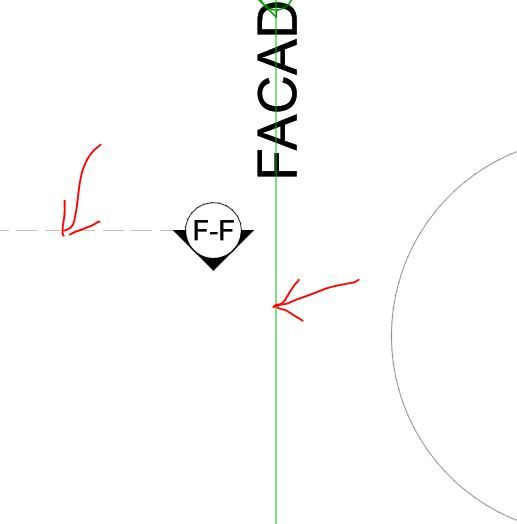
Sorry, I ment the elevation marker on plan view, which I want to show the line of the elevation across the plan, similar to the section marker.
AC26
https://www.zendsign.fr/
Miha_M
Advisor
Options
- Mark as New
- Bookmark
- Subscribe
- Mute
- Subscribe to RSS Feed
- Permalink
- Report Inappropriate Content
2023-04-06 09:02 PM
2023-04-06
09:02 PM
Aaah, sorry, I understand now. I don't think you can have this line (for output) in between both marker heads with the built-in elevation marker.
However you can control the "virtual" visibility of this marker line through View > On-Screen View Options.
You can also adjust this color in the Work Environment UI:
| Archicad 4.5 - 29
| HP Z840 | 2× E5-2643 v4 | 64 GB RAM | Quadro M5000 | Windows 10 Pro x64
| HP Z4 G4 | W-2245 | 64 GB RAM | RTX A4000 | Windows 11
Miha_M
Advisor
Options
- Mark as New
- Bookmark
- Subscribe
- Mute
- Subscribe to RSS Feed
- Permalink
- Report Inappropriate Content
2023-04-06 09:17 PM
2023-04-06
09:17 PM
There are other elevation markers in other localization libraries which have extandable lines at the marker head, but I haven't seen any on which one could turn on/off the middle segment like in my previous elevation marker post.
| Archicad 4.5 - 29
| HP Z840 | 2× E5-2643 v4 | 64 GB RAM | Quadro M5000 | Windows 10 Pro x64
| HP Z4 G4 | W-2245 | 64 GB RAM | RTX A4000 | Windows 11
Strawbale23
Expert
Options
- Mark as New
- Bookmark
- Subscribe
- Mute
- Subscribe to RSS Feed
- Permalink
- Report Inappropriate Content
2023-04-06 10:11 PM
2023-04-06
10:11 PM
Ah Ok, thanks. I had a memory of markers lines being possible for elevation markers on plan view.
Thanks for your help!
AC26
https://www.zendsign.fr/

Barry Kelly
Moderator
Options
- Mark as New
- Bookmark
- Subscribe
- Mute
- Subscribe to RSS Feed
- Permalink
- Report Inappropriate Content
2023-04-08 11:12 AM
2023-04-08
11:12 AM
I don't have Archicad running at the moment, but I think with elevations, there is an option for 2 marker heads and then they act like the sections.
Barry.
One of the forum moderators.
Versions 6.5 to 27
i7-10700 @ 2.9Ghz, 32GB ram, GeForce RTX 2060 (6GB), Windows 10
Lenovo Thinkpad - i7-1270P 2.20 GHz, 32GB RAM, Nvidia T550, Windows 11
Versions 6.5 to 27
i7-10700 @ 2.9Ghz, 32GB ram, GeForce RTX 2060 (6GB), Windows 10
Lenovo Thinkpad - i7-1270P 2.20 GHz, 32GB RAM, Nvidia T550, Windows 11
Miha_M
Advisor
Options
- Mark as New
- Bookmark
- Subscribe
- Mute
- Subscribe to RSS Feed
- Permalink
- Report Inappropriate Content
2023-04-08 01:40 PM
2023-04-08
01:40 PM
There is the option with two marker heads, but there is no option for a line connecting the marker heads. However a section marker could be used for the same purpose.
| Archicad 4.5 - 29
| HP Z840 | 2× E5-2643 v4 | 64 GB RAM | Quadro M5000 | Windows 10 Pro x64
| HP Z4 G4 | W-2245 | 64 GB RAM | RTX A4000 | Windows 11

Still looking?
Suggested topics
- Making shelves in the base cabinet object show as dashed hidden lines in Modeling
- Texture Fill with boundary lines in elevation. in Documentation
- Unlinked section marker unavailable in Teamwork in Documentation
- Grid line (D) in elevation keeps disappearing in Documentation
- Creating HLA drawings for PHPP calcs in Sustainable design
