
Turn on suggestions
Auto-suggest helps you quickly narrow down your search results by suggesting possible matches as you type.
Showing results for
EN
Turn on suggestions
Auto-suggest helps you quickly narrow down your search results by suggesting possible matches as you type.
Showing results for
- English
- :
- Forum
- :
- Documentation
- :
- Re: Elevations and sections turned into 2D Lines a...
Options
- Subscribe to RSS Feed
- Mark Topic as New
- Mark Topic as Read
- Pin this post for me
- Bookmark
- Subscribe to Topic
- Mute
- Printer Friendly Page

Edmon
Contributor
Options
- Mark as New
- Bookmark
- Subscribe
- Mute
- Subscribe to RSS Feed
- Permalink
- Report Inappropriate Content
2022-03-04 07:35 PM
Elevations and sections turned into 2D Lines and fills
2022-03-04
07:35 PM
All my elevations, sections and wall sections suddenly changed into 2D lines and Fills. I don't know what I did wrong and why this happened.
Edwin Monserratte
Archicad 25
MacBook Pro 2018
macOS Monterey 12.2.1

Solved! Go to Solution.
Solved
Read-Only
2 Solutions
Accepted Solutions

Jp1138
Advisor
Options
- Mark as New
- Bookmark
- Subscribe
- Mute
- Subscribe to RSS Feed
- Permalink
- Report Inappropriate Content
2022-03-11 12:12 PM
2022-03-11
12:12 PM
Well, sorry for the delay, it´s been a crazy week.
It seems many of your sections and elevations are made as independent views.
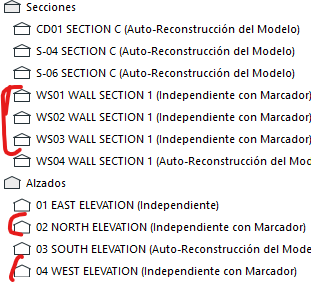
This views don´t generate from the model, they are just a drawing you make and can be referenced to this position in the model.
https://helpcenter.graphisoft.com/user-guide/137234/#XREF_40192_Create_an
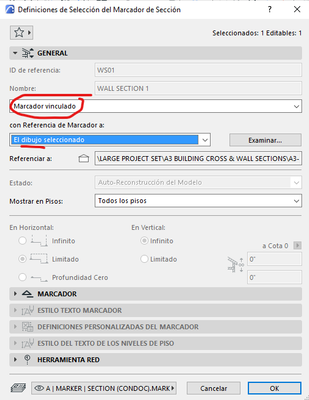
As these sections are not generated from the model, any changes you make would not propagate to the section.
Maybe the last section you draw was a independent section and selecting the tool is taking the previuos configuration.
If you want to have a live section, be sure to select a section source maker, not a independent view section.
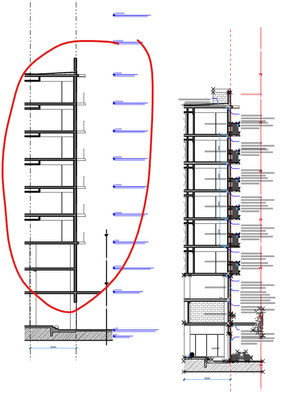
Your independent views cannot be made a live section again, but you can make a new section in the same position and copy and paste your drawn lines on top of the live section, so you can keep the elements you need that are ot on the model. Here I pasted your section WS01 besides a new real live section on the left.
I don´t know if all I´m saying is obviuos and the probem you are having is somewhere else.
ARCHICAD 29 SPA (as long as the server works)
Windows 10
Windows 10

 Laszlo Nagy
Community Admin
Options
- Mark as New
- Bookmark
- Subscribe
- Mute
- Subscribe to RSS Feed
- Permalink
- Report Inappropriate Content
2022-03-15 02:22 AM
2022-03-15
02:22 AM
If you have an Independent Section Viewpoint, then you can place a linked Marker, select it to link to the Independent Section, click OK to accept changes, then go back to the Dialog and change the Marker to a Source Marker. Then you will have a Section Viewpoint that generates 3D and can be updated when the model changes.
Loving Archicad since 1995 - Find Archicad Tips at x.com/laszlonagy
AMD Ryzen9 5900X CPU, 64 GB RAM 3600 MHz, Nvidia GTX 1060 6GB, 500 GB NVMe SSD
2x28" (2560x1440), Windows 10 PRO ENG, Ac20-Ac29
AMD Ryzen9 5900X CPU, 64 GB RAM 3600 MHz, Nvidia GTX 1060 6GB, 500 GB NVMe SSD
2x28" (2560x1440), Windows 10 PRO ENG, Ac20-Ac29
18 Replies 18
Jp1138
Advisor
Options
- Mark as New
- Bookmark
- Subscribe
- Mute
- Subscribe to RSS Feed
- Permalink
- Report Inappropriate Content
2022-03-04 09:26 PM
2022-03-04
09:26 PM
I suppose somehow this got changed in your elevation and section view definitions (sorry, my Archicad is in Spanish, I hope you got where this is located)
:
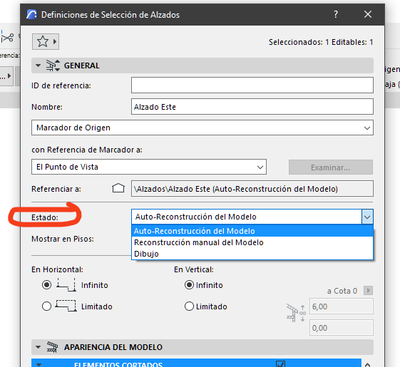
ARCHICAD 29 SPA (as long as the server works)
Windows 10
Windows 10
Edmon
Contributor
Options
- Mark as New
- Bookmark
- Subscribe
- Mute
- Subscribe to RSS Feed
- Permalink
- Report Inappropriate Content
2022-03-05 12:34 AM
2022-03-05
12:34 AM
Thanks Jp1138, but unfortunately (for me) the status mode is kind of greenish. I can change it. I'm not even Know haw that happened. BTW. I speak Spanish too.
Edwin Monserratte
Archicad 25
MacBook Pro 2018
macOS Monterey 12.2.1

Jp1138
Advisor
Options
- Mark as New
- Bookmark
- Subscribe
- Mute
- Subscribe to RSS Feed
- Permalink
- Report Inappropriate Content
2022-03-05 12:21 PM
2022-03-05
12:21 PM
I think your problem is here:
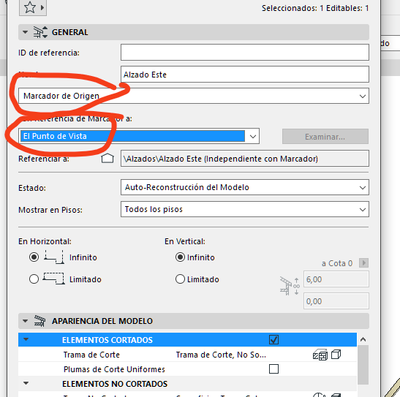
ARCHICAD 29 SPA (as long as the server works)
Windows 10
Windows 10
Edmon
Contributor
Options
- Mark as New
- Bookmark
- Subscribe
- Mute
- Subscribe to RSS Feed
- Permalink
- Report Inappropriate Content
2022-03-05 11:53 PM
2022-03-05
11:53 PM
Thanks again Jp1138, you're almost there. I change everything as you direct me but now I can't hit ok. I'm desperate. I'm loosing a lot of work. elevations, sections and wall sections.
Edwin Monserratte
Archicad 25
MacBook Pro 2018
macOS Monterey 12.2.1


DGSketcher
Legend
Options
- Mark as New
- Bookmark
- Subscribe
- Mute
- Subscribe to RSS Feed
- Permalink
- Report Inappropriate Content
2022-03-06 08:59 AM
2022-03-06
08:59 AM
The OK button is usually greyed out when the element you are editing is on a locked layer.
Apple iMac Intel i9 / macOS Sonoma / AC27UKI (most recent builds.. if they work)
Jp1138
Advisor
Options
- Mark as New
- Bookmark
- Subscribe
- Mute
- Subscribe to RSS Feed
- Permalink
- Report Inappropriate Content
2022-03-06 10:40 AM
2022-03-06
10:40 AM
I think, as DGSketcher said, that the layer is blocked: you can see it´s in italics in your screenshot:
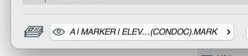
ARCHICAD 29 SPA (as long as the server works)
Windows 10
Windows 10
Edmon
Contributor
Options
- Mark as New
- Bookmark
- Subscribe
- Mute
- Subscribe to RSS Feed
- Permalink
- Report Inappropriate Content
2022-03-07 01:39 AM
2022-03-07
01:39 AM
Thanks Jp1138 and DGSketcher you have been very helpful. I've done everything you guys have told me to do but the elevations and sections didn't change to their original 3D state. I decided re do them all over again but I don't want to repeat the same mistakes. How should I accomplish this task without the fear that it will happen again?

Jp1138
Advisor
Options
- Mark as New
- Bookmark
- Subscribe
- Mute
- Subscribe to RSS Feed
- Permalink
- Report Inappropriate Content
2022-03-07 09:54 AM - edited 2022-03-07 11:56 AM
2022-03-07
09:54 AM
There must be a simple way to fix things that we are missing. Couldn´t you upload a partial file with the problem for us to look at it?
Without knowing what´s causing the problem, it´s difficult to guess how to prevent it. Check the default options your elevation and section tools, because they retain the configuration of the last time they were used, and if the problem is there, it would propagate to the new ones you make. But as you say everything works with your new ones, I suppose that isn´t the problem.
If you have elevations that work and ones that don´t, you could try to tranfer the properties of the former to the later...
ARCHICAD 29 SPA (as long as the server works)
Windows 10
Windows 10
Edmon
Contributor
Options
- Mark as New
- Bookmark
- Subscribe
- Mute
- Subscribe to RSS Feed
- Permalink
- Report Inappropriate Content
2022-03-07 11:08 AM
2022-03-07
11:08 AM
Hi Jp1138. The problem persists with the new ones too. When I did them the firs time they came out perfectly well. I added them to layouts and everything was good. I just changed the names and suddenly this thing happened.
How can I partially upload a file.
And, thanks again for your help.
Edwin Monserratte
Archicad 25
MacBook Pro 2018
macOS Monterey 12.2.1

Still looking?

