
Turn on suggestions
Auto-suggest helps you quickly narrow down your search results by suggesting possible matches as you type.
Showing results for
EN
Turn on suggestions
Auto-suggest helps you quickly narrow down your search results by suggesting possible matches as you type.
Showing results for
- English
- :
- Forum
- :
- Documentation
- :
- Re: Exporting a PDF creates empty files
Options
- Subscribe to RSS Feed
- Mark Topic as New
- Mark Topic as Read
- Pin this post for me
- Bookmark
- Subscribe to Topic
- Mute
- Printer Friendly Page

jamesMorris
Expert
Options
- Mark as New
- Bookmark
- Subscribe
- Mute
- Subscribe to RSS Feed
- Permalink
- Report Inappropriate Content
2020-11-26
02:25 PM
- last edited on
2023-05-19
10:06 PM
by
 Gordana Radonic
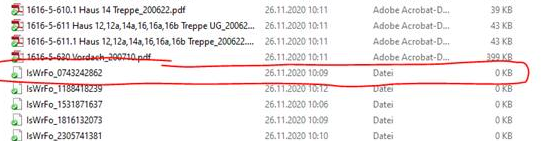
Exporting a PDF creates empty files
2020-11-26
02:25 PM
Does anybody else have the same problem?
Solved! Go to Solution.
1 Solution
Accepted Solutions

Barry Kelly
Moderator
Options
- Mark as New
- Bookmark
- Subscribe
- Mute
- Subscribe to RSS Feed
- Permalink
- Report Inappropriate Content
2020-11-27 02:41 AM
2020-11-27
02:41 AM
It looks like you are saving to a cloud-share folder.
I wouldn't save directly to that folder as it may start to share while you are still creating the file.
I find it better to work in a non-shared folder and then when you do want to share, copy the file over.
Barry.
I wouldn't save directly to that folder as it may start to share while you are still creating the file.
I find it better to work in a non-shared folder and then when you do want to share, copy the file over.
Barry.
One of the forum moderators.
Versions 6.5 to 27
i7-10700 @ 2.9Ghz, 32GB ram, GeForce RTX 2060 (6GB), Windows 10
Lenovo Thinkpad - i7-1270P 2.20 GHz, 32GB RAM, Nvidia T550, Windows 11
Versions 6.5 to 27
i7-10700 @ 2.9Ghz, 32GB ram, GeForce RTX 2060 (6GB), Windows 10
Lenovo Thinkpad - i7-1270P 2.20 GHz, 32GB RAM, Nvidia T550, Windows 11
Solution
2 Replies 2
Barry Kelly
Moderator
Options
- Mark as New
- Bookmark
- Subscribe
- Mute
- Subscribe to RSS Feed
- Permalink
- Report Inappropriate Content
2020-11-27 02:41 AM
2020-11-27
02:41 AM
It looks like you are saving to a cloud-share folder.
I wouldn't save directly to that folder as it may start to share while you are still creating the file.
I find it better to work in a non-shared folder and then when you do want to share, copy the file over.
Barry.
I wouldn't save directly to that folder as it may start to share while you are still creating the file.
I find it better to work in a non-shared folder and then when you do want to share, copy the file over.
Barry.
One of the forum moderators.
Versions 6.5 to 27
i7-10700 @ 2.9Ghz, 32GB ram, GeForce RTX 2060 (6GB), Windows 10
Lenovo Thinkpad - i7-1270P 2.20 GHz, 32GB RAM, Nvidia T550, Windows 11
Versions 6.5 to 27
i7-10700 @ 2.9Ghz, 32GB ram, GeForce RTX 2060 (6GB), Windows 10
Lenovo Thinkpad - i7-1270P 2.20 GHz, 32GB RAM, Nvidia T550, Windows 11
Solution
jamesMorris
Expert
Options
- Mark as New
- Bookmark
- Subscribe
- Mute
- Subscribe to RSS Feed
- Permalink
- Report Inappropriate Content
2020-11-27 06:58 PM
2020-11-27
06:58 PM
It is an SMB folder that is accessed with a VPN, so you are probably right.
Cheers!
Cheers!

Still looking?

Suggested topics
- Archicad 29 crashes when updating drawings linked to another Teamwork project in Teamwork & BIMcloud
- Publisher reports "Saved" but no DWG or PDF files are created (Archicad 29) in Documentation
- [Python tool] Exporting symbol fills in autocad in Collaboration with other software
- Doors and windows missing in IFC exported from Archicad in Collaboration with other software
- Archicad 29 unable to export PDF as PDF/A when grouping in to one file in Documentation
