
Turn on suggestions
Auto-suggest helps you quickly narrow down your search results by suggesting possible matches as you type.
Showing results for
EN
Turn on suggestions
Auto-suggest helps you quickly narrow down your search results by suggesting possible matches as you type.
Showing results for
- English
- :
- Forum
- :
- Documentation
- :
- I would like to know how to select Graphic Overrid...
Options
- Subscribe to RSS Feed
- Mark Topic as New
- Mark Topic as Read
- Pin this post for me
- Bookmark
- Subscribe to Topic
- Mute
- Printer Friendly Page

LeeJaeYoung
Virtuoso
Options
- Mark as New
- Bookmark
- Subscribe
- Mute
- Subscribe to RSS Feed
- Permalink
- Report Inappropriate Content
2022-06-27 04:29 PM - edited 2022-06-27 04:54 PM
I would like to know how to select Graphic Override Combinations for door & window markers.
2022-06-27
04:29 PM
I would like to know how to select Graphic Override Combinations for door & window markers.
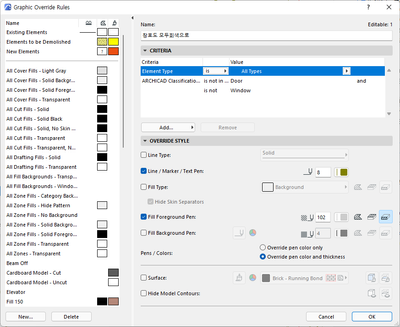

I want the marker to remain black.
AC27 on window 11
Read-Only
6 Replies 6

BrunoH
Expert
Options
- Mark as New
- Bookmark
- Subscribe
- Mute
- Subscribe to RSS Feed
- Permalink
- Report Inappropriate Content
2022-06-27 05:41 PM
2022-06-27
05:41 PM
Currently GO only override the whole element.
You can automatically mask the marker with Model View Options.
ArchiCad 3.43 to 28
MacOS Monterey
MacOS Monterey
LeeJaeYoung
Virtuoso
Options
- Mark as New
- Bookmark
- Subscribe
- Mute
- Subscribe to RSS Feed
- Permalink
- Report Inappropriate Content
2022-06-27 05:50 PM
2022-06-27
05:50 PM
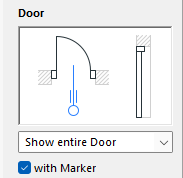
Isn't it ON/OFF in MVO?
AC27 on window 11
BrunoH
Expert
Options
- Mark as New
- Bookmark
- Subscribe
- Mute
- Subscribe to RSS Feed
- Permalink
- Report Inappropriate Content
2022-06-27 05:57 PM
2022-06-27
05:57 PM
Uncheck the Marker box

ArchiCad 3.43 to 28
MacOS Monterey
MacOS Monterey
LeeJaeYoung
Virtuoso
Options
- Mark as New
- Bookmark
- Subscribe
- Mute
- Subscribe to RSS Feed
- Permalink
- Report Inappropriate Content
2022-06-27 06:21 PM
2022-06-27
06:21 PM
I asked this question because I wanted to keep the marker color as it is. The purpose is to exclude from being grayed out, not asking about disappearing.
I use translate.google.com
AC27 on window 11
BrunoH
Expert
Options
- Mark as New
- Bookmark
- Subscribe
- Mute
- Subscribe to RSS Feed
- Permalink
- Report Inappropriate Content
2022-06-27 06:56 PM
2022-06-27
06:56 PM
As said before You can only override the whole element so it's actually impossible to grayed out the door symbol without the marker.
Use the Label Tool to create your marker and deactivate the door marker, this way you will be able to achieve what you want.
ArchiCad 3.43 to 28
MacOS Monterey
MacOS Monterey
LeeJaeYoung
Virtuoso
Options
- Mark as New
- Bookmark
- Subscribe
- Mute
- Subscribe to RSS Feed
- Permalink
- Report Inappropriate Content
2022-06-27 10:54 PM
2022-06-27
10:54 PM
I have grayed it out.
LINE Pline TEXT Wall... grayed out one by one.
Thank you for your answer.
AC27 on window 11

Still looking?

Suggested topics
- Archicad 30: what the official MCP and Tapir 1.7.1 can each do (side-by-side table) in AI solutions
- Built-in Drawing Title Problem in Archicad 29 in Libraries & objects
- Rennovation Filter - Overriding Demolition Elements to match Existing Elements, on an Existing Renno in Documentation
- Graphic Override Combinations - "Affected View" Count in Documentation
- Window Reveal visible in Core Only Display in Libraries & objects
