
Turn on suggestions
Auto-suggest helps you quickly narrow down your search results by suggesting possible matches as you type.
Showing results for
EN
Turn on suggestions
Auto-suggest helps you quickly narrow down your search results by suggesting possible matches as you type.
Showing results for
- English
- :
- Forum
- :
- Documentation
- :
- Layout book ID
Options
- Subscribe to RSS Feed
- Mark Topic as New
- Mark Topic as Read
- Pin this post for me
- Bookmark
- Subscribe to Topic
- Mute
- Printer Friendly Page

Anonymous
Not applicable
Options
- Mark as New
- Bookmark
- Subscribe
- Mute
- Subscribe to RSS Feed
- Permalink
- Report Inappropriate Content
2012-08-09
04:10 PM
- last edited on
2023-05-26
02:28 AM
by
 Gordana Radonic
Layout book ID
2012-08-09
04:10 PM
I have a question with IDs of LAyout book. We have an ID standard which required a middle set of numbers in the ID code.
This simple means:
project number.drawing number. type of project
eg.:
1234567.A01.400
1234567.A02.400
1234567.A03.400
Is that possible to set our subset like this form
8 Replies 8

sinceV6
Expert
Options
- Mark as New
- Bookmark
- Subscribe
- Mute
- Subscribe to RSS Feed
- Permalink
- Report Inappropriate Content
2012-08-09 06:48 PM
2012-08-09
06:48 PM
Sure. Since it looks like the only thing changing is the drawing number, use project info, layouts IDs & autotext:
project number - from project info
drawing number - from layouts ID or subset
type of project - from project info
Hope this helps.
project number - from project info
drawing number - from layouts ID or subset
type of project - from project info
Hope this helps.

Karl Ottenstein
Moderator Emeritus
Options
- Mark as New
- Bookmark
- Subscribe
- Mute
- Subscribe to RSS Feed
- Permalink
- Report Inappropriate Content
2012-08-09 06:55 PM
2012-08-09
06:55 PM
sincev6 posted the only solution I see while I was capturing screenshots. 😉
I don't see the ability to include autotext in the sheet ID parameters (?) - so you can append all of the bits as sincev6 suggests, which would be best - your template will work immediately in future projects. I recommend that approach although it won't generate a sheet index with the desired ID - only the number (middle) part of your string.
Alternatively - attached - you can hard-code the project number as part of the prefix - and then append the project type autotext wherever you use the ID in your title block. (Default template title block - so your string is too wide there.)
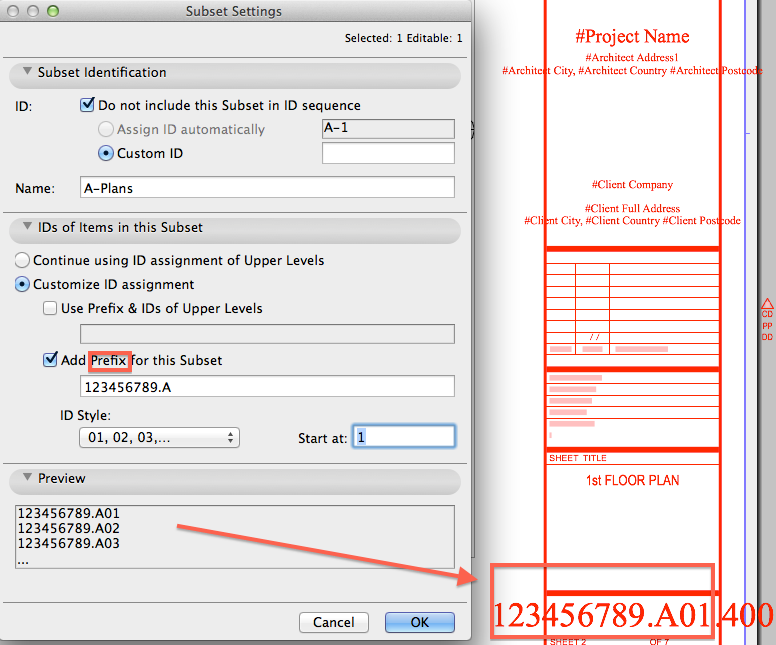
I don't see the ability to include autotext in the sheet ID parameters (?) - so you can append all of the bits as sincev6 suggests, which would be best - your template will work immediately in future projects. I recommend that approach although it won't generate a sheet index with the desired ID - only the number (middle) part of your string.
Alternatively - attached - you can hard-code the project number as part of the prefix - and then append the project type autotext wherever you use the ID in your title block. (Default template title block - so your string is too wide there.)
Vote for Wish: Copy/Paste in 3D
AC 29 USA and earlier • hardware key • macOS Tahoe 26.7 MacBook Pro M2 Max 12CPU/30GPU cores, 32GB
AC 29 USA and earlier • hardware key • macOS Tahoe 26.7 MacBook Pro M2 Max 12CPU/30GPU cores, 32GB
Karl Ottenstein
Moderator Emeritus
Options
- Mark as New
- Bookmark
- Subscribe
- Mute
- Subscribe to RSS Feed
- Permalink
- Report Inappropriate Content
2012-08-09 06:56 PM
2012-08-09
06:56 PM
Project Info after Adding a new field for the Project Type ... and inserting that autotext field in the layout ID string in the title block of the master.
Vote for Wish: Copy/Paste in 3D
AC 29 USA and earlier • hardware key • macOS Tahoe 26.7 MacBook Pro M2 Max 12CPU/30GPU cores, 32GB
AC 29 USA and earlier • hardware key • macOS Tahoe 26.7 MacBook Pro M2 Max 12CPU/30GPU cores, 32GB

Anonymous
Not applicable
Options
- Mark as New
- Bookmark
- Subscribe
- Mute
- Subscribe to RSS Feed
- Permalink
- Report Inappropriate Content
2012-08-10 03:21 AM
2012-08-10
03:21 AM
Make it easy on yourself. Incorporate 1234567 into your title block (I assume it is the same number for all the sheets in your project) & use the standard sheet numbering system.
Karl Ottenstein
Moderator Emeritus
Options
- Mark as New
- Bookmark
- Subscribe
- Mute
- Subscribe to RSS Feed
- Permalink
- Report Inappropriate Content
2012-08-10 06:39 AM
2012-08-10
06:39 AM
jcrarch wrote:...and do so as autotext. Yeah, my example should be ignored. Would be really dumb to type the project number for every subfolder as shown.
Make it easy on yourself. Incorporate 1234567 into your title block (I assume it is the same number for all the sheets in your project) & use the standard sheet numbering system.
Vote for Wish: Copy/Paste in 3D
AC 29 USA and earlier • hardware key • macOS Tahoe 26.7 MacBook Pro M2 Max 12CPU/30GPU cores, 32GB
AC 29 USA and earlier • hardware key • macOS Tahoe 26.7 MacBook Pro M2 Max 12CPU/30GPU cores, 32GB
Anonymous
Not applicable
Options
- Mark as New
- Bookmark
- Subscribe
- Mute
- Subscribe to RSS Feed
- Permalink
- Report Inappropriate Content
2012-08-10 01:16 PM
2012-08-10
01:16 PM
Thank you ,
sinceV6
Expert
Options
- Mark as New
- Bookmark
- Subscribe
- Mute
- Subscribe to RSS Feed
- Permalink
- Report Inappropriate Content
2012-08-10 06:59 PM
2012-08-10
06:59 PM
Karl wrote:I would also follow jcrarch's suggestion, in autotext like Karl says. Is the efficient solution.jcrarch wrote:...and do so as autotext. Yeah, my example should be ignored. Would be really dumb to type the project number for every subfolder as shown.
Make it easy on yourself. Incorporate 1234567 into your title block (I assume it is the same number for all the sheets in your project) & use the standard sheet numbering system.
Oh, and the other way to hard-code the project number as Karl suggests is to do it in the layout book level: right click the book (top tree level) and select "Book settings". There, use the ID Prefix field. Then you can use this (or not) per subset. Still... this doesn't save you from using autotext to append the rest of the info, as I can't see how to use the 3 records in that order from the layout numbering system.
Just out of curiosity... can't you change the order to be:
project number. type of project.drawing number
It would make things easier if you don't want to use autotext; as it can be done directly from the layout IDs.
Best regards
Anonymous
Not applicable
Options
- Mark as New
- Bookmark
- Subscribe
- Mute
- Subscribe to RSS Feed
- Permalink
- Report Inappropriate Content
2012-08-12 11:06 PM
2012-08-12
11:06 PM
Not sure what other iterations you have in mind for Project Type, and how drawings are classified, but can you use a Subset Name, and use the Subset Name autotext in the title master?
So your subsets would simply be called "400", "500" or whatever.
So your subsets would simply be called "400", "500" or whatever.
Still looking?

Suggested topics
- Spaces in AI Assistant + MCP: what would you check your model against? in AI solutions
- Stairs disappear in the Layout Book in Documentation
- Introducing the EasyBIM Add-On Suite for ArchiCAD in General discussions
- How can I combine model data and schedule totals into one building data summary table? in Project data & BIM
- Parking layouts and solar parks in a site polygon in Libraries & objects
