
Turn on suggestions
Auto-suggest helps you quickly narrow down your search results by suggesting possible matches as you type.
Showing results for
EN
Turn on suggestions
Auto-suggest helps you quickly narrow down your search results by suggesting possible matches as you type.
Showing results for
- English
- :
- Forum
- :
- Documentation
- :
- Re: Navigator -layout book
Options
- Subscribe to RSS Feed
- Mark Topic as New
- Mark Topic as Read
- Pin this post for me
- Bookmark
- Subscribe to Topic
- Mute
- Printer Friendly Page

dhnguyen
Contributor
Options
- Mark as New
- Bookmark
- Subscribe
- Mute
- Subscribe to RSS Feed
- Permalink
- Report Inappropriate Content
2018-09-13
05:09 PM
- last edited on
2023-05-26
02:24 AM
by
 Gordana Radonic
Navigator -layout book
2018-09-13
05:09 PM
I often find myself clicking the "x" on the upper right corner to close it to get more view screen, then go to the Window pull-down menu to open it again. I wish there is a way to quickly show and hide it whenever I want.
DNguyen
ArchiCAD 18- 25
(expert in AutoCAD, novice in ArchiCAD)
ArchiCAD 18- 25
(expert in AutoCAD, novice in ArchiCAD)
Solved! Go to Solution.
1 Solution
Accepted Solutions

Eduardo Rolon
Moderator
Options
- Mark as New
- Bookmark
- Subscribe
- Mute
- Subscribe to RSS Feed
- Permalink
- Report Inappropriate Content
2018-09-13 05:23 PM
2018-09-13
05:23 PM
KBS?
Eduardo Rolón AIA NCARB
AC29 US/INT -> AC08
AC29 US/INT -> AC08
Mac Studio M4 Max 64GB ram, OS X 10.XX latest
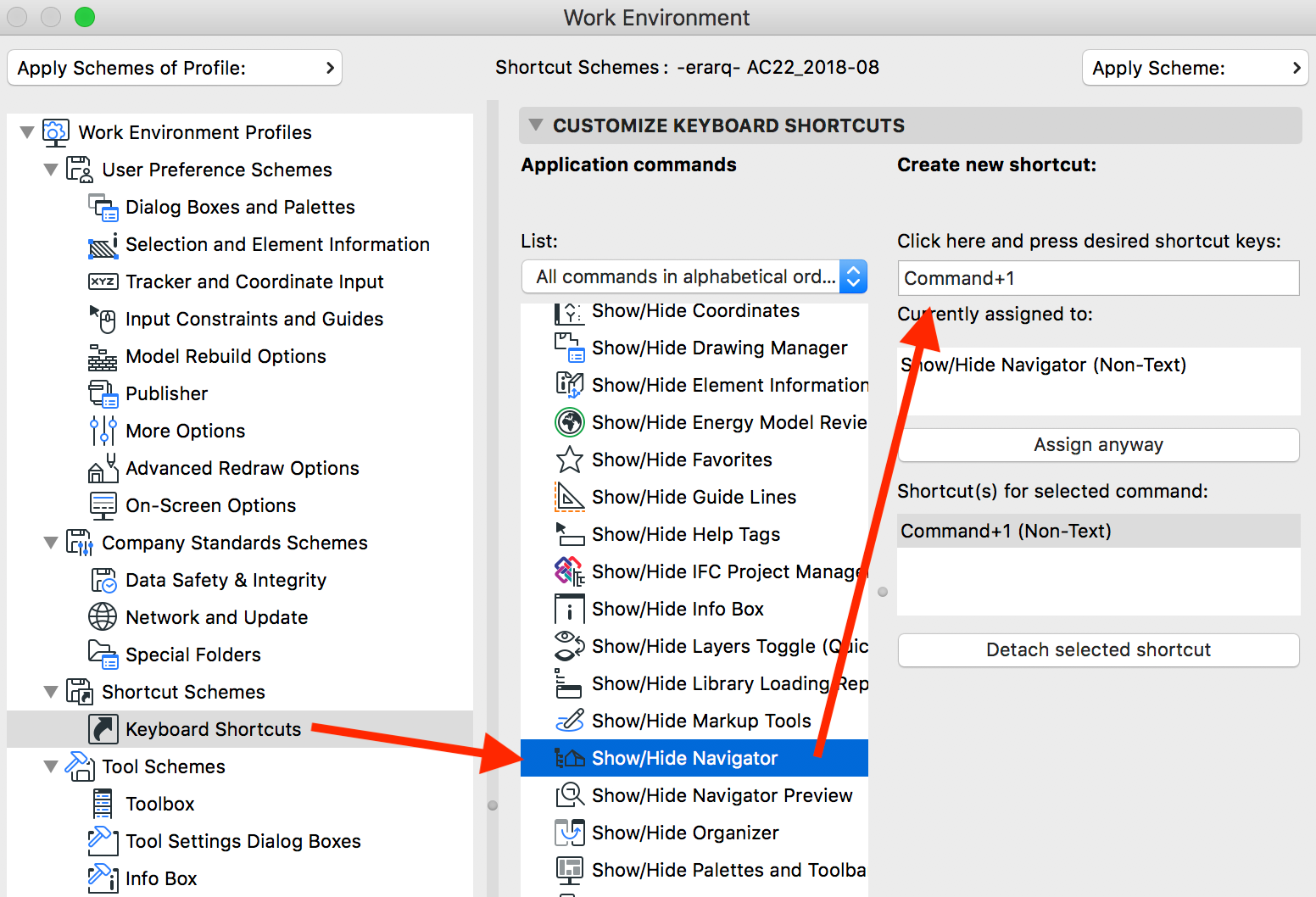
Solution
3 Replies 3
Eduardo Rolon
Moderator
Options
- Mark as New
- Bookmark
- Subscribe
- Mute
- Subscribe to RSS Feed
- Permalink
- Report Inappropriate Content
2018-09-13 05:23 PM
Solution
dhnguyen
Contributor
Options
- Mark as New
- Bookmark
- Subscribe
- Mute
- Subscribe to RSS Feed
- Permalink
- Report Inappropriate Content
2018-09-13 05:49 PM
2018-09-13
05:49 PM
awesome, thank you!
DNguyen
ArchiCAD 18- 25
(expert in AutoCAD, novice in ArchiCAD)
ArchiCAD 18- 25
(expert in AutoCAD, novice in ArchiCAD)

Barry Kelly
Moderator
Options
- Mark as New
- Bookmark
- Subscribe
- Mute
- Subscribe to RSS Feed
- Permalink
- Report Inappropriate Content
2018-09-14 02:56 AM
2018-09-14
02:56 AM
If/when you upgrade to version 20+, there is a pop-out navigator in the TAB bar.
This automatically hides itself when you carry on working.
No need then for the full navigator (in most cases or until you want to publish).
In older versions (i.e. 18) there is a 'pin' if you right click on the top of the Navigator.
When active the navigator will close itself when you carry on working.
You have to un-dock the navigator though - if it is docked then it will not auto-hide.
Barry.
This automatically hides itself when you carry on working.
No need then for the full navigator (in most cases or until you want to publish).
In older versions (i.e. 18) there is a 'pin' if you right click on the top of the Navigator.
When active the navigator will close itself when you carry on working.
You have to un-dock the navigator though - if it is docked then it will not auto-hide.
Barry.
One of the forum moderators.
Versions 6.5 to 27
i7-10700 @ 2.9Ghz, 32GB ram, GeForce RTX 2060 (6GB), Windows 10
Lenovo Thinkpad - i7-1270P 2.20 GHz, 32GB RAM, Nvidia T550, Windows 11
Versions 6.5 to 27
i7-10700 @ 2.9Ghz, 32GB ram, GeForce RTX 2060 (6GB), Windows 10
Lenovo Thinkpad - i7-1270P 2.20 GHz, 32GB RAM, Nvidia T550, Windows 11

Still looking?
Suggested topics
- Archicad becomes completely unresponsive when using "Expand all below" in Layout Book in Documentation
- Archicad 29 crashes when updating drawings linked to another Teamwork project in Teamwork & BIMcloud
- Publisher reports "Saved" but no DWG or PDF files are created (Archicad 29) in Documentation
- template for version 29 view references problems in Project data & BIM
- Revision ID "00" showing "01" on Layouts & Publisher instead in Documentation
